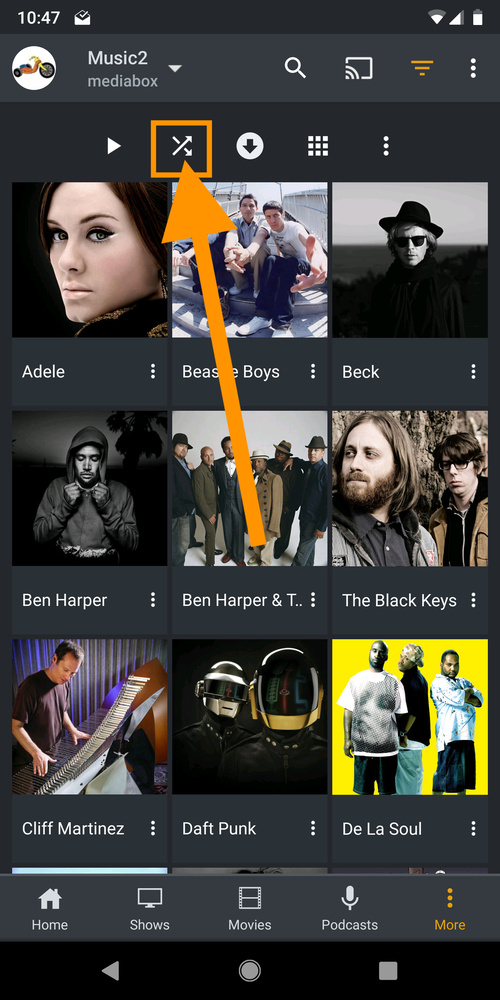
I recently bought a car that has Android Auto and I like the fact that I can play my Plex library right through the unit, but one “issue” I’ve noticed is that the “Shuffle” feature only works within an album or playlist. I prefer to shuffle all the songs in my library, is that something that can be added?
Seconding this. Without a “shuffle all” feature, the Android Auto feature is useless. Most of the time, you’re going to use “Shuffle all” as a quick and easy alternative to FM radio - it’s simply more common to shuffle all in the car than to pick specific songs / artists / tracks. Plus, when you’re driving, you need fast functions that you can use while briefly stopped at a red light. The current flow of:
Open Plex
Open Menu sidebar, choose to only use locally synced content
Click “All Artists”
Hmm…which artist do I want to listen to…
Click the Artist
Hmm…which album do I want to listen to…
Pick the album
Play it
Is way, way slower and more annoying and less useful and less handy to the driver than:
Open Plex
Open Menu sidebar, click “shuffle all”, done
Plex is the only Android Auto music app I’ve ever used which does not have a shuffle all function, and it’s preventing me from fully switching to Plex as the music app for my phone.
I agree the default view when you launch Plex using Android Auto is fairly useless. I got used to how Google Play worked.
Google Play usually remembered which playlist and song I was on when I last disconnected from Android Auto, and it let’s me start right back from where I left off. I’m only interested in playing sync’d content from my phone, as I don’t want to pay for a ton of data.
My preferred experience would be to have my most recently played and synced playlists (on device only) on the main screen with a shuffle all button for that playlist.
Yeah, seems like a pretty basic feature. So for now I’ve just been opening Plex on my phone (by bypassing the AndroidAuto warning while driving), and tell it to shuffle all music.
And using voice commands rarely work for me. Saying, “Play Music” will get a response of , “OK. Telling Plex to play some music.” Which then just crashes Plex, or an error, “Plex doesn’t appear to be responding right now.” Or say, “Play country music.” and get the correct, “OK. Telling Plex to play country music.” And then Daughtry starts playing! No where within Plex (or within meta data) is Daughtry listed as ‘country’. And I think last time I got a different album started playing, again, not country.
I just want to add that this is a more general Android App issue than just Android Auto. The app needs an option to shuffle an entire library in general, not just for Android Auto.
Thanks for pointing that out, but now I have to change my point to: That’s a completely unintuitive implementation.
Also, there is no obvious way to access a Track listing on the Android app, unless I’m also missing that somewhere. As you can see, my options are: Artists, Albums, Playlists.
I’m curious why would it not be on the music home screen? There’s no logic to the path: “I want to shuffle all of my Tracks, so I’ll click on the Artist listing to see all of my (Album) Artists so that I can shuffle all of my Tracks.”
After a bit of fooling around I found a solution. not optimal, but it works well enough for me.
Create a Smart playlist of all the tracks in a library, then sync that playlist to your device. Whenever you add/remove tracks from your library, those changes will then be then synced to your device playlist.
When you are in AA, open PLEX and it remembers the playlist option if you were previously there. Open your playlist and start playing a tune. Then hit the up arrow, and you will see the Shuffle button.
Although Note to Developers there is a bug here. You actually have to go to the next track to see the shuffle button. Works great for me. I found it by mistake, and would not be using plex for audio if not for this shuffle all feature.
It would be great if we either had shuffle as a default, or I could click a shuffle button off to the side as I’m selecting the playlist, though. Clicking a song, next track, dots, shuffle, and then next track is 5 extra buttons I’ve got to hit just to get this started, Everytime I start it up. No problem when I’m just starting my trip or at a red light, but it would be really nice to have this at a more convenient location, or just generally making shuffle a permanent option for playlists with Android in general. I’d like this functionality on all my Android devices.
I mean, isn’t the whole point of Android Auto to keep it simple? Not everyone wants shuffle and not everyone wants straight playthough. Making it a default player option just makes overall sense.