Good morning @panni. Beta13.1 wouldn’t run for me - I got an “error see log” message. I need to confess now to being a bit slapdash. I deleted the settings.xml file from profile/add-on data/script.plexmod and ran the addon again. After signing in again, amending my settings choices and reordering my libraries all is well.
With dubious logic, I figured that I had the error because I’d manually amended my settings for H265 etc. I must have struck lucky. Sorry there’s no log.
I meant sorry I haven’t got a log to send you as I fixed it by deleting settings.xml etc etc. I knew that ideally you would want a log in order to see the error.
Looking back I’ve put quotes around “error see log”. Punctuated properly you might have understood me.
Seems like its missing an XML file - how did you install that beta? If you’ve deleted something, it might not recreate its XMLs. You can force it to by setting the addonSetting “Always compile templates” once.
Edit: I might add a sanity check for this particular issue
Edit 2: Oh yeah. I need to check that. It won’t be an issue when installing from the repository, but if you delete the old folder before updating the beta and the THEME_VERSION hasn’t changed, it won’t create its XMLs.
I didn’t touch any files. I just installed over the existing install which caused it to error out but after enabling “Always compile templates” in the addon settings like you suggested it worked again
When you uninstalled it did you make sure to delete the user settings/data as well when it asks? This was an alternate method I have come across to get it working besides enabling the “always compile templates” option.
Just gave 0.7.9 beta 13.3 a quick test everything I tested seems to be working fine, I did come across 1 small bug.
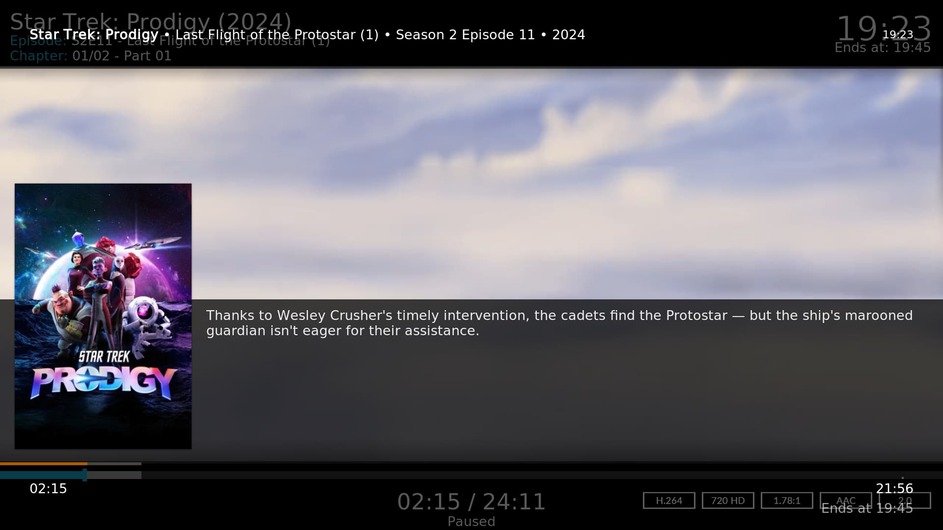
When bringing up the info screen while playing an episode shown in the image below there are 2 seek bars the original kodi one and the pm4k one. The kodi one seems to be behind the pm4k dialog but above the video. I’ve done this using a keyboard (i button) and using a remote control using it’s info button in case it matters how the dialog is opened. I have a pm4k debug log as well if you need it.
This will happen when using a custom skin as I’ve had the same issue with the Zephyr 2 skin. It’s advised that you use the Plextuary skin from the Don’t Panic repo along side this mod.
P.S. I’m also glad I’ve watched Prodigy Season 2 already as Wesley’s appearance would have been a major spoiler
On the subject of skinning. @panni I know the issue has been raised on your GitHub about things being stretched vertically on 16:10 screens and you couldn’t do much at the time but will this new theming engine make things easier for different aspect ratios or will it be the same issue as before where you would need to duplicate the templates?
For instance on my android tablet which unfortunately is 16:10 it’s mostly affecting the posters being cut off on the left and right slightly and the background art being stretched otherwise generally speaking the UI works fine still so maybe we could either…
Potentially duplicate the templates and only edit the code that controls the background and posters to better fit a 16:10 AR somehow?
To save time mucking around with template for a certain AR could we somehow maybe force the Mods UI to stay in a 16:9 aspect ratio with black bars to appear on the top/bottom so it would only affect the GUI and not the video playback which video calibration would do. I’ve seen code like the following below in skinning to force AR sometimes so would this work at all somehow for the mod?
I’m obviously no coding expert so I am probably throwing out potentially stupid ideas/code right now but thought I’d suggest it as I tried this code on Zephyr 2 skin and it did work at keeping a 16:9 AR but it pushed the UI to the top with 120 pixels of space at the bottom instead of it being centred on the screen so not quite sure what to do there but maybe the same code could be adapted here?
As for video calibration I did try removing 60 pixels either side and it didn’t work very well. While the background art and posters honoured the video calibration the rest of the UI ignored it and continued on to the bottom of the screen. Plus video calibration caused issues with 4:3 videos not filling the screen properly resulting in me resetting it back to the full resolution.
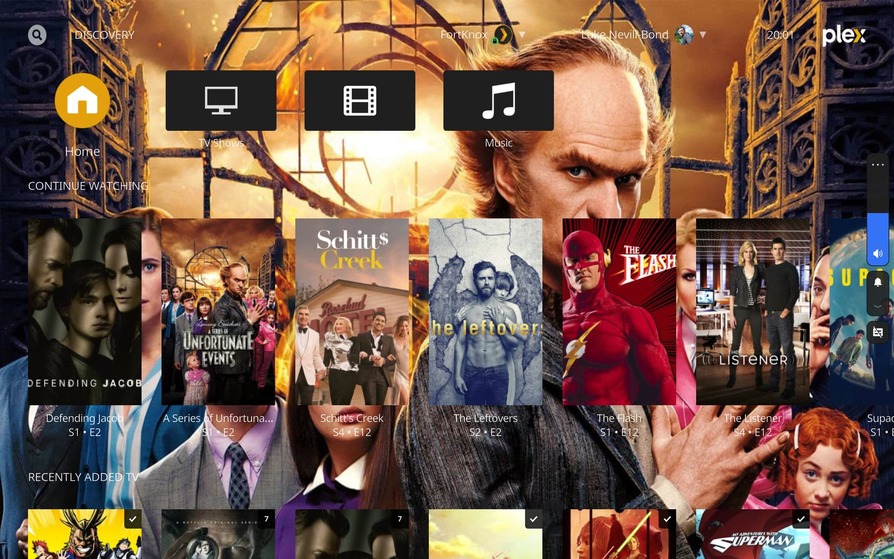
Here’s an example of me using video calibration to limit my screen to 16:9. I’ve bumped the opacity of the background poster to 100% so you can see the rest of the UI elements bypassing it.
Well, the templating engine definitely makes this more feasible. I don’t know how practical that would be (and I don’t really know how to support 16:10), as all positions, sizes and offsets in PM4K are on an absolute, not relative basis.
In that case we have to try and set a solid background, otherwise the non-covered parts will flicker like crazy (that’s the mouse cursors you see on that screenshot).
Edit 2: If you want to test around, just use the new template loading mechanism - place any known .xml.tpl file, in this case base.xml.tpl in addon_data/script.plexmod/templates and PM4K will pick that up when recompiling the templates.