PM4K / PlexMod for Kodi (18, 19, 20, 21, 22+)

2025-07-27 14:54:17.503 T:14716 debug : requested setting (use_watchlist.24352936) was not found.

2025-07-27 14:54:24.306 T:14716 debug : requested setting (viewtype.plexdiscover.watchlist) was not found.
2025-07-27 14:54:24.306 T:14716 debug : requested setting (library.settings.plexdiscover) was not found.
2025-07-27 14:54:24.307 T:14716 debug : requested setting (viewtype.plexdiscover.watchlist) was not found.

This should fix these issues.

0.8.0-beta13.3: script.plexmod.zip (3.0 MB)

Changelog:

  • Library/Collections: Fix broken display due to missing default sort attributes
  • Library/Watchlist: Clamp chunk size to 240 regardless of addonSettings in case of Watchlist (it breaks otherwise, investigating)

Edit: Yep, discover.plex.tv doesn’t like X-Plex-Container-Size > 300. The fix is valid.

8 Likes

yep, mine was 540, now fixed with 240.
awesome new feature!
cheers

Great new release @panni! I was never really a big watchlist user, but I might start using it now.

Not necessary, you can set it to 540 again. 0.8.0-beta13.3 circumvents the issue for watchlist specifically.

I wasn’t sure what all the talk about Watchlist was leading to. Now it’s here and I see for myself what it is, I’m impressed and will definitely be using it. Thanks again panni.

that’s okay, it was only set higher for the roundrobin testing, then I didn’t know what the default was to set back to.

I have tested more thoroughly with the latest build. With chunk size at default 240, a collection with more than 240 items will not display correctly (see my post from yesterday on this issue). But once I went to the add-on settings and switched to 360, it worked fine (same workaround).
The watchlist showed correctly its items and worked fine (I have made one with 32 items), I tested 7-8 movies and all started to play without any problems. Just one niggle, though: just as I was exiting the last movie, intending to leave PM4K, I’ve got one of those old errors where I was shown the 3 dots indefinitely and in order to get to Kodi’s Home i had to press the Home button that I’ve mapped on the remote. Otherwise I would have been staring at that screen for a long time, with PM4K running in the background.
It’s been quite a while since I havent’ seen that bug, but then it was not an usual use scenario (starting/leaving 7-8 movies one after another).

Still shouldn’t happen. If you could capture some logs, that’d be great. This one is quite elusive and could also just be a network hang.

Sent you a PM, managed to reproduce it. It happened again as I was trying to leave PM4K. NVM the 2 movies that failed to play, that was a cloud network share problem. All the rest started/played flawlessly. The problem was trying to leave the add-on.
Thanks a lot for your great work and debugging efforts, Watchlist (and PM4K as a whole) is awesome!

I got that too twice since the last update, randomly. I only use local content. Both times there were updates pending for coreelec though and I know that locks it up sometimes.

Thanks @Panni for the Watchlist feature. :heart:
All is working fine for me.:ok_hand:

Thanks for the great Watchlist feature, but the movies inside be English cover, can I switch it to German?

Thanks so much for the watchlist function, seems to work really well.

I have come across one bug. If I actually watch a movie to the end it successfully removes it from my watchlist. If I start a movie but don’t finish it and then select mark as played from Continue Watching, it does not get removed from watchlist. It instead swaps the play button with an egg timer and I can’t back out of the movie page.

The egg timer turns to the play button after about 10 seconds.

Will be fixed in next beta.

Yeah, oversight on my part, will fix that as well.

That should be unrelated. The button always swaps to the egg timer icon while we’re still waiting for servers to answer for the watchlist state check. If a server is taking long to answer, the icon will be shown for a while (until it times out).

Had a good amount of back and forth with @Korbus47 with test builds. Should be fixed in next beta as well.

5 Likes

0.8.0-beta13.4: script.plexmod.zip (3.0 MB)

Changelog:

  • Watchlist/Mixins: Make watchlist check tasks leaner by not passing around related objects (server)
  • Home: Try avoiding race conditions on tick/section stale while checking for exit/shutting down
  • Home: Don’t try fetching hubs for watchlist section
  • Home/Kodigui: Add more debug-logging for shutdown/close procedures
  • Core/Watchlist: Correctly supply language code to requests so watchlist returns translated items
  • Home/Library: (blindly) remove item from watchlist if manually marked watched via Home or Library context menus
10 Likes

On first load up of PM4K, the focus of the update prompt is briefly stolen by the hubs when they load and then moves back to the update prompt.

Maybe something to look at? Either way it’s a very small issue.

Hmm, I don’t think so. The focus isn’t stolen but it might look like that, as I briefly disable the buttons of the dialog, so nobody accidentally presses update after booting up PM4K.

Edit: thanks for reporting, though! If you think that’s not it, please tell

That is what I meant yeah, I guess it looks like focus is stolen but it’s actually not.

Regardless, I think it would look better if Home fully loaded before the update prompt appeared. Don’t know if you want to rework that though…

Thinking about it more, a ā€œcheck for updatesā€ button would be cool!

1 Like

Hello panni!

Thanks for the new update. (-;

I have a idea for your plex client:

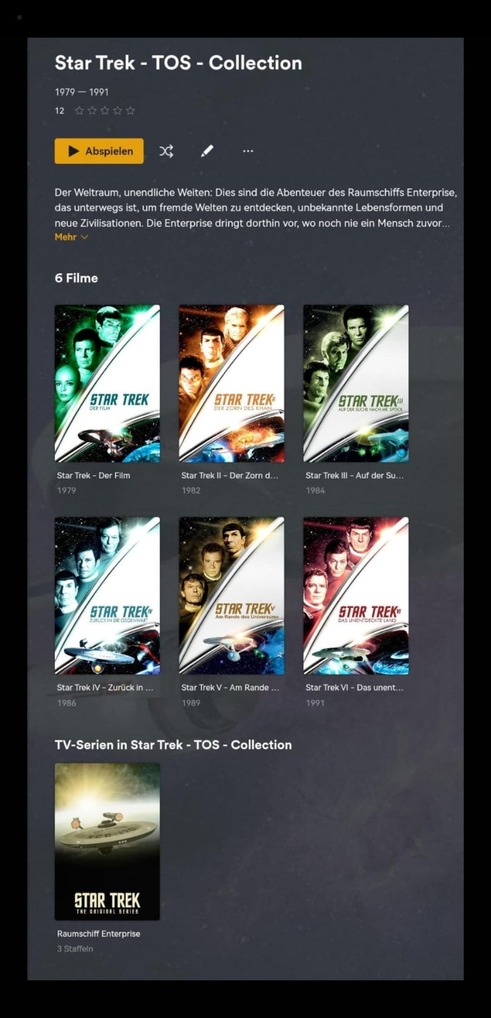
The original plex client combines collections in movies and series.

Here is an example:

When i have a movie collection called ā€œStar Trek - TOS - Collection,ā€ and a series collection with the exact same name (Star Trek - TOS - Collection).

These are displayed together when I click on the respective collection (see my photos).

Movie Collection of Star Trek:

Series Collection of Star Trek:

Would it be possible to implement something like that?

Best regards
legendos