Server# PMS-1.18.1.1966 on QNAP TS-451+ x64 Intel Celeron J1900, QTS-4.3.6-1070
Player# PMP-2.44.0.1018 on Core-i5 iMac 10.13 High Sierra x64
The NAS compatibility list shows that the TS-451+ can hardware decode 8bit HEVC at 4K resolution, but when I test that, it doesn’t hardware decode any HEVC Jellyfish at all.
I tested by transcoding 1080p HEVC videos on the fly to a lower resolution and bitrate. It worked fine for the h264 Jellyfish. I also tested with a combination of TV Shows, Films, and KODI demos.
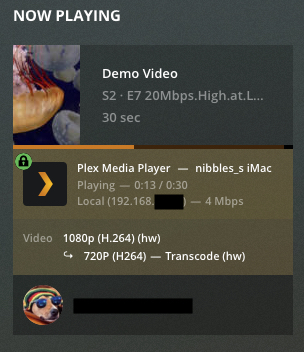
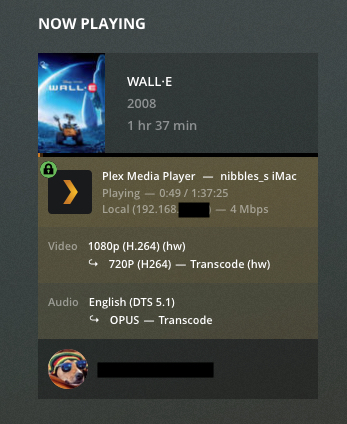
H264-H264 transcodes work great, hw decode => hw encode, full pipeline.
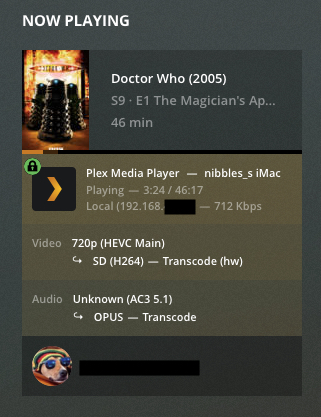
HEVC-H264 transcodes do not, sw decode => hw encode
I rebooted today and played one h264 and three HEVCs.
What I saw in the logs for the HEVCs:
No support for codec hevc profile 1 or 2.
in "Plex Media Server.log"

Oct 16, 2019 11:10:10.354 [0x7fa273a23700] DEBUG - Starting a transcode session xaahaumr55pu5dih2ajj1yvi at offset -1.0 (state=3)
Oct 16, 2019 11:10:10.355 [0x7fa273a23700] DEBUG - TPU: hardware transcoding: using hardware decode accelerator vaapi
Oct 16, 2019 11:10:10.355 [0x7fa273a23700] DEBUG - [Universal] Using local file path instead of URL: /share/Video/TV/Demo Video/Season 02/Demo Video - s02e03 - Jellyfish.2K.15Mbps.8bit.SDR.29.97.NoAudio.HEVC.mkv
Oct 16, 2019 11:10:10.355 [0x7fa273a23700] DEBUG - TPU: hardware transcoding: zero-copy support present
Oct 16, 2019 11:10:10.355 [0x7fa273a23700] DEBUG - TPU: hardware transcoding: using zero-copy transcoding
Oct 16, 2019 11:10:10.355 [0x7fa273a23700] DEBUG - Codecs: hardware transcoding: testing API vaapi
Oct 16, 2019 11:10:10.356 [0x7fa273a23700] ERROR - [FFMPEG] - libva: /share/CACHEDEV1_DATA/.qpkg/PlexMediaServer/lib/dri/iHD_drv_video.so init failed
Oct 16, 2019 11:10:10.356 [0x7fa273a23700] ERROR - [FFMPEG] - Failed to initialise VAAPI connection: 1 (operation failed).
Oct 16, 2019 11:10:10.357 [0x7fa273a23700] DEBUG - [FFMPEG] - Format 0x32315659 -> yuv420p.
Oct 16, 2019 11:10:10.357 [0x7fa273a23700] DEBUG - [FFMPEG] - Format 0x30323449 -> yuv420p.
Oct 16, 2019 11:10:10.357 [0x7fa273a23700] DEBUG - [FFMPEG] - Format 0x3231564e -> nv12.
Oct 16, 2019 11:10:10.357 [0x7fa273a23700] DEBUG - [FFMPEG] - Format 0x32595559 -> yuyv422.
Oct 16, 2019 11:10:10.357 [0x7fa273a23700] DEBUG - [FFMPEG] - Format 0x59565955 -> uyvy422.
Oct 16, 2019 11:10:10.357 [0x7fa273a23700] DEBUG - [FFMPEG] - Format 0x48323234 -> yuv422p.
Oct 16, 2019 11:10:10.357 [0x7fa273a23700] DEBUG - [FFMPEG] - Format 0x58424752 -> rgb0.
Oct 16, 2019 11:10:10.357 [0x7fa273a23700] DEBUG - [FFMPEG] - Format 0x58524742 -> bgr0.
Oct 16, 2019 11:10:10.357 [0x7fa273a23700] DEBUG - [FFMPEG] - Format 0x30313050 -> p010le.
Oct 16, 2019 11:10:10.357 [0x7fa273a23700] DEBUG - [FFMPEG] - Created surface 0x4000000.
Oct 16, 2019 11:10:10.357 [0x7fa273a23700] DEBUG - [FFMPEG] - Direct mapping possible.
Oct 16, 2019 11:10:10.358 [0x7fa273a23700] DEBUG - TPU: hardware transcoding: final decoder: vaapi, final encoder: vaapi
Oct 16, 2019 11:10:10.358 [0x7fa273a23700] DEBUG - Job running: EAE_ROOT='/share/CACHEDEV1_DATA/.qpkg/PlexMediaServer/Library/tmp/pms-7c7f5bbd-2abe-4f86-8d2a-acc2062e795c/EasyAudioEncoder' FFMPEG_EXTERNAL_LIBS='/share/CACHEDEV1_DATA/.qpkg/PlexMediaServer/Library/Plex\ Media\ Server/Codecs/395e79c-2728-linux-x86_64/' XDG_CACHE_HOME='/share/CACHEDEV1_DATA/.qpkg/PlexMediaServer/Library/Plex Media Server/Cache' XDG_DATA_HOME='/share/CACHEDEV1_DATA/.qpkg/PlexMediaServer/Resources' X_PLEX_TOKEN='xxxxxxxxxxxxxxxxxxxx' '/share/CACHEDEV1_DATA/.qpkg/PlexMediaServer/Plex Transcoder' '-codec:0' 'hevc' '-hwaccel:0' 'vaapi' '-hwaccel_fallback_threshold:0' '10' '-hwaccel_output_format:0' 'vaapi' '-ss' '1' '-analyzeduration' '20000000' '-probesize' '20000000' '-i' '/share/Video/TV/Demo Video/Season 02/Demo Video - s02e03 - Jellyfish.2K.15Mbps.8bit.SDR.29.97.NoAudio.HEVC.mkv' '-filter_complex' '[0:0]hwupload[0];[0]scale_vaapi=w=1280:h=720:format=nv12[1];[1]hwupload[2]' '-map' '[2]' '-codec:0' 'h264_vaapi' '-b:0' '2855k' '-maxrate:0' '3807k' '-bufsize:0' '7614k' '-r:0' '29.969999999999999' '-f' 'segment' '-segment_format' 'matroska' '-segment_format_options' 'live=1' '-segment_time' '1' '-segment_header_filename' 'header' '-segment_start_number' '0' '-segment_list' 'http://127.0.0.1:32400/video/:/transcode/session/xaahaumr55pu5dih2ajj1yvi/0aa3547d-98e8-42b4-af15-e02dbfae1509/seglist' '-segment_list_type' 'csv' '-segment_list_unfinished' '1' '-segment_list_size' '5' '-segment_list_separate_stream_times' '1' '-avoid_negative_ts' 'disabled' '-map_metadata:g' '-1' '-map_metadata:c' '-1' '-map_chapters' '-1' 'chunk-%05d' '-start_at_zero' '-copyts' '-y' '-init_hw_device' 'vaapi=vaapi:,driver=i965,kernel_driver=i915' '-hwaccel_device' 'vaapi' '-filter_hw_device' 'vaapi' '-nostats' '-loglevel' 'quiet' '-loglevel_plex' 'error' '-progressurl' 'http://127.0.0.1:32400/video/:/transcode/session/xaahaumr55pu5dih2ajj1yvi/0aa3547d-98e8-42b4-af15-e02dbfae1509/progress'
…
Oct 16, 2019 11:10:10.387 [0x7fa273a23700] DEBUG - Started session successfully: xaahaumr55pu5dih2ajj1yvi
Oct 16, 2019 11:10:10.387 [0x7fa280992700] DEBUG - Completed: [127.0.0.1:36934] 204 PUT /video/:/transcode/session/xaahaumr55pu5dih2ajj1yvi/0aa3547d-98e8-42b4-af15-e02dbfae1509/progress?duration=30.097000 (9 live) 0ms 203 bytes (pipelined: 7) (range: bytes=0-)
Oct 16, 2019 11:10:10.389 [0x7fa272b7d700] ERROR - [Transcoder] [hevc @ 0xd49c00] No support for codec hevc profile 1.
Oct 16, 2019 11:10:10.391 [0x7fa273447700] ERROR - [Transcoder] [hevc @ 0xd49c00] Failed setup for format vaapi_vld: hwaccel initialisation returned error.
What I expected to see:
Now Playing on the J1900

Steps to reproduce:
- Install PMS on an older QNAP.
- use any 8-bit HEVC Jellyfish. I tested ones 20 Mbps and lower.
- Play one and pause it. Choose Playback Settings while paused.
- Select a lower quality, like Convert to 720p(High) 4 Mbps
- Observe the lack of HW decode, but the smooth fallback to SW.
Here are the logs:
Plex Media Server Logs_2019-10-16_11-13-34.zip (95.3 KB)
Plex Media Player.log.zip (25.7 KB)
And a timeline of my tests
11:00:00 am restarted PMS
11:06:00 am analyzed the HEVCs
11:08:00 am start playing 1080p h264 in Direct Play.
11:08:30 am start playing 1080p h264 Convert to 720p h264
11:10:00 am start playing 15 Mbps 8bit HEVC in DP.
11:10:30 am start playing 15 Mbps 8bit HEVC Convert to 720p h264.
11:11:00 am start playing 20 Mbps 8bit HEVC in DP.
11:11:30 am start playing 20 Mbps 8bit HEVC Convert to 720p h264.
11:12:00 pm start playing 20 Mbps 10bit HEVC in DP.
11:12:30 am start playing 20 Mbps 10bit HEVC Convert to 720p h264.
Mea culpa:
- I shouldn’t be transcoding I know, but I’m just testing the beta.
- Experimenting on grandpa’s NAS isn’t the best idea, but I trusted the Compatibility list.
- If it says “No support for hevc profile 1” that’s the CPU saying it’s not Plex’s fault.

- I noticed this months ago but thought that Main10 was the culprit.
Okay, thanks for reading!
