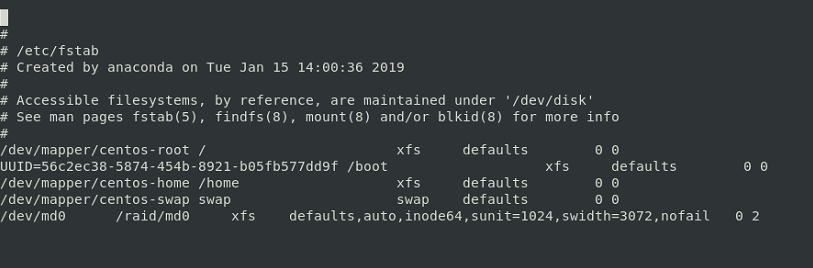
Here’s a thought. This is get it to show itself;
- Comment out the line in /etc/fstab
- Restart
- Let the raid mount itself again under /run
- type mount and look at the mount for /dev/md0
- Copy and use what you need from it. There must be an option missing.
Here’s a thought. This is get it to show itself;
ok ill comment out the line and restart
something weird had happened until i fixed the line, have no idea if it was related, but when i used my arrows or ‘/’ an ‘s’ would appear so i had to num lock my numeric keyboard to use my arrows there. once the file was save and exited, it went back to normal no more ‘s’ instead of arrows. it was quite weird frankly
this is what mount gave me. well it gave me a long list of stuff but i just copied /dev/md0
/dev/md0 on /run/media/aurelie/c959b441-08ff-4a80-adcf-6ee256c01ce9 type xfs (rw,nosuid,nodev,relatime,seclabel,attr2,inode64,sunit=1024,swidth=3072,noquota,uhelper=udisks2)
you have a 64 bit inode filesystem. I should have realized.
add the inode64 and the stripe info to the command line mount
mount -o defaults,inode64,sunit=1024,swidth=3072 -t xfs /dev/md0 /raid/md0
You should get further. Do you see what I’m bringing forward? That raid volume might require all of them.
This is the reference I’m using:
http://xfs.org/index.php/XFS_FAQ#Q:_What_is_the_inode64_mount_option_for.
I’m sorry for being confusing. The hour is late here
I don’t know where you are but I’m in east Canada and it’s 3am here.
So I’ll just write this “mount -o defaults,inode64,sunit=1024,swidth=3072 -t xfs /dev/md0 /raid/md0” in the terminal command line and see what it does
and… i believe that worked
sh-4.2# mount -o defaults,inode64,sunit=1024,swidth=3072 -t xfs /dev/md0 /raid/md0
sh-4.2# df
Filesystem               1K-blocks       Used  Available Use% Mounted on
/dev/mapper/centos-root   52403200    6427904   45975296  13% /
devtmpfs                  16340896          0   16340896   0% /dev
tmpfs                     16357660         12   16357648   1% /dev/shm
tmpfs                     16357660      10168   16347492   1% /run
tmpfs                     16357660          0   16357660   0% /sys/fs/cgroup
/dev/sda1                  1038336     327448     710888  32% /boot
/dev/mapper/centos-home 1882658652   82587288 1800071364   5% /home
tmpfs                      3271532         36    3271496   1% /run/user/1000
/dev/md0                5858060288 2451017812 3407042476  42% /raid/md0
tmpfs                      3271532          0    3271532   0% /run/user/0
and i checked the permissions just for fun
sh-4.2# ls -la /raid/md0
total 0
drwxr-xr-x. 4  987  981 52 Feb 17 15:15 .
drwxr-xr-x. 3 root root 17 Apr 28 20:13 ..
drwxrwxrwx. 5  987  981 70 Feb 17 15:15 Plex-Media
drwx------. 5 root root 63 Feb 20 12:40 .Trash-0
it most certainly did work 
There you have it… Those are the mount options to put in /etc/fstab.
All you need add is the nofail option.
so i just write the line like this?
/dev/md0 /raid/md0 xfs defaults,inode64,sunit=1024,swidth=3072,nofail 0 2
I like to add auto as well but YES, that’s it
NOW it’s close 
so modified the file like so. and this is where i am at now
[aurelie@localhost ~]$ sudo sh
[sudo] password for aurelie:
sh-4.2# nano /etc/fstab
sh-4.2# df
Filesystem               1K-blocks       Used  Available Use% Mounted on
/dev/mapper/centos-root   52403200    6430988   45972212  13% /
devtmpfs                  16340896          0   16340896   0% /dev
tmpfs                     16357660         12   16357648   1% /dev/shm
tmpfs                     16357660      10116   16347544   1% /run
tmpfs                     16357660          0   16357660   0% /sys/fs/cgroup
/dev/sda1                  1038336     327448     710888  32% /boot
/dev/mapper/centos-home 1882658652   82591784 1800066868   5% /home
tmpfs                      3271532         48    3271484   1% /run/user/1000
/dev/md0                5858060288 2451017812 3407042476  42% /raid/md0
sh-4.2# nano /etc/fstab
sh-4.2# ls  /raid/*
Plex-Media
sh-4.2#
now do i restart and recheck ls /raid/* and df?
And then it’ll be time to make and set the correct permissions for /raid?
Yep… that will do it. Click the button
Perfect I’ll do it once I get home after work.
As I’m sure you’ll probably be asleep by the time I get home, the steps I’ll do will be:
find /raid/md0 -type f -exec chmod 644 {} ;
Am I right that we’re finally a few feet away of the end of the tunnel?
Yes, you can see the light, you’re just about to emerge.
find /raid -type d -exec chmod 755 {} \;
find /raid -type f -exec chmod 644 {} \
That gives you (the owner I presume) full RWX to directories and files.
Read permission for everyone else.
Adjust as you see fit. One for directories and one for files.
I see the correction you made from the code I took from your guide.
When you say “the owner I presume” all I want to know is does that mean Plex will have the permissions to access them?
If your username is the owner (from the chown command), that user will have full permissions.
I recommend, your username (owner) have full permissions. This makes adding/deleting/restructuring very easy.
Other users (Plex) only need read permission
Ahhh now that makes great sense.
I’ll do all that between 3 and 4am and I hope my next message will be my last
so update
restarted and rechecked done an i think it came back normal
[aurelie@localhost ~]$ ls /raid/*
Plex-Media
[aurelie@localhost ~]$ df
Filesystem               1K-blocks       Used  Available Use% Mounted on
/dev/mapper/centos-root   52403200    6431576   45971624  13% /
devtmpfs                  16340896          0   16340896   0% /dev
tmpfs                     16357660         12   16357648   1% /dev/shm
tmpfs                     16357660      10120   16347540   1% /run
tmpfs                     16357660          0   16357660   0% /sys/fs/cgroup
/dev/md0                5858060288 2451017812 3407042476  42% /raid/md0
/dev/sda1                  1038336     327448     710888  32% /boot
/dev/mapper/centos-home 1882658652   82590476 1800068176   5% /home
tmpfs                      3271532         36    3271496   1% /run/user/1000
then for the permissions, i am not sure it worked as it looks the same as yesterday. Shouldn’t it say in ls -la 755 and 644?
sh-4.2# find /raid -type d -exec chmod 755 {} \;
sh-4.2# find /raid -type f -exec chmod 644 {} \;
sh-4.2# ls -la /raid/
total 0
drwxr-xr-x.  3 root root  17 Apr 28 20:13 .
dr-xr-xr-x. 19 root root 267 Apr 30 01:52 ..
drwxr-xr-x.  4  987  981  52 Feb 17 15:15 md0
sh-4.2# ls -la /raid/md0/
total 0
drwxr-xr-x. 4  987  981 52 Feb 17 15:15 .
drwxr-xr-x. 3 root root 17 Apr 28 20:13 ..
drwxr-xr-x. 5  987  981 70 Feb 17 15:15 Plex-Media
drwxr-xr-x. 5 root root 63 Feb 20 12:40 .Trash-0
but decided to go with step 4

edit: should i copy my registry from windows (HKEY_CURRENT_USERSoftwarePlex, Inc.Plex Media Server) to the preferences.xml on my centos?
at this point i’m kind of ready to do anything not to start from scratch and loose my 6 years old data. i might consider doing a sacrifice of a virgin on a full moon if that’s what it takes 
find -type d sets permissions for directories, -type f for files.
You will end up with something similar to this (look at the permissions of the episode files)
philippe@carp:~$ ls -lR /mnt/DVR/enregistrements/Ces\ gars-la\ (2014)/
‘/mnt/DVR/enregistrements/Ces gars-la (2014)/’:
total 4
drwxr-xr-x 2 plex plex 4096 Jan 2 23:31 ‘Season 02’
‘/mnt/DVR/enregistrements/Ces gars-la (2014)/Season 02’:
total 37279596
-rw-r–r-- 1 plex plex 4774865924 Dec 24 23:31 ‘Ces gars-la (2014) - S02E01 - Episode 1.ts’
-rw-r–r-- 1 plex plex 4768604960 Dec 25 23:31 ‘Ces gars-la (2014) - S02E02 - Episode 2.ts’
-rw-r–r-- 1 plex plex 4772792096 Dec 26 23:31 ‘Ces gars-la (2014) - S02E03 - Episode 3.ts’
-rw-r–r-- 1 plex plex 4771972040 Dec 27 23:31 ‘Ces gars-la (2014) - S02E04 - Episode 4.ts’
-rw-r–r-- 1 plex plex 4771708840 Dec 28 23:31 ‘Ces gars-la (2014) - S02E05 - Episode 5.ts’
-rw-r–r-- 1 plex plex 4773109064 Dec 31 23:31 ‘Ces gars-la (2014) - S02E06 - Episode 6.ts’
-rw-r–r-- 1 plex plex 4769188700 Jan 1 23:31 ‘Ces gars-la (2014) - S02E07 - Episode 7.ts’
-rw-r–r-- 1 plex plex 4772017912 Jan 2 23:31 ‘Ces gars-la (2014) - S02E08 - Episode 8.ts’
philippe@carp:~$
Phil
if you type ls -la, you will see the parent and current directory permissions as well which confirms how directories are set.
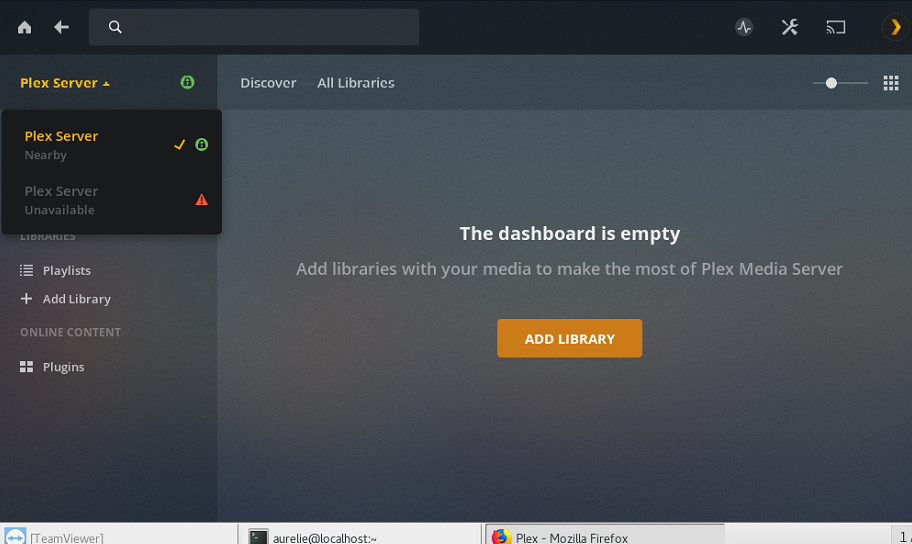
So if I understand correctly, seeing 2 servers (the windows and the centos) instead of 1, is a problem with my permissions?
The windows server is no more. Correct?
If it is gone: Settings - Device - Servers - Delete the Windows one. (longer time since seen)’
This isn’t a permissions problem… It is a simple Naming problem. Deconflict the naming and all will be good