PMS Unable to Transcode 4k

Server Version#: 1.28.2.6151
Player Version#: 4.91.1

As the title says, I am having trouble with transcoding 4k content. I’ve never had issue when the starting file is 1080p, 720p, etc but once I get up to 4k nothing but direct play seems to work. If I try to stream it at a lower quality, the stream stops a couple of minutes in. If I try to use the Download feature at any other resolution, it fails. If I try to use Plex’s Optimize feature, it fails.

I know the hardware is capable enough to transcode 4k, since if I use ffmpeg to convert to 1080p it works fine - in fact that is my current solution, to manually create a 1080p version and put it in an Optimized Versions folder. This is eating at my storage keeping both versions, but I also don’t want to delete 4k versions and just never go above 1080p as I do have a 4k TV - I want to be able to use 4k for my TV and lower resolution for my phone.

Any debugging I have attempted to do has failed. I have tried looking through Plex’s console and the logs under Troubleshooting, but I do not see anything of use - no errors relating to transcoding, nothing appears to be crashing. I am happy to provide additional information but do not know what would be most helpful so please let me know what to provide, or ideas to try that might fix it.

Thank you all in advance!

You didn’t specify your hardware, but hardware transcoding was not functioning for me on 10th Gen Intel with 1.28.1 and 1.28.2 (see also Anyone have been able to HW transcode on an Intel NUC 11 (Iris Xe)? - #533 by ChuckPa). It does work for me on 1.29.0, and hardware accelerated HDR tone mapping is reported to be fixed in the next release.

If you have a semi-modern Intel CPU with Quick Sync your server should easily be capable of transcoding at least one 4k stream.

Like @iscaela said there are issues in the current builds preventing this, so you may just have to be patient.

If you don’t have an Intel CPU/GPU I would consider changing server hardware, it is pretty awesome.

Please provide DEBUG logs ZIP file which captures the start of a playback attempt.

Ok so I started replies to all of the above below, but as I was nearing ready to post I gave 1.29.0 beta a try and now have slightly different behavior - I’ll still include the replies below as they have not changed. With 1.29.0, it appears I am now able to use the Optimized Versions feature in Plex to transcode 4k content which I was not able to do before, so yay progress. I am still unable to use the Download feature with 4k, though it looks to be making more of an effort now - instead of just giving an error it says its downloading for a while in the app and in the browser it tells me it’s transcoding the file, but after a while it stops and tells me there was an error downloading the file. The live transcoding while streaming 4k is also not working, and is behaving the same as before.

hardware transcoding was not functioning for me on 10th Gen Intel with 1.28.1 and 1.28.2

I assume when you say hardware transcoding you mean hardware acceleration and/or hardware-accelerated video encoding. I have both disabled currently, though I have in the past tried enabling them and gotten the same issues. If I understand correctly though, the issue you are referencing is a relatively recent one and I have had this issue for a while now, I just waited to post it because I was hoping I could resolve it myself once I got around to it and finally now gave up

If you have a semi-modern Intel CPU with Quick Sync your server should easily be capable of transcoding at least one 4k stream.

I don’t know much about Quick Sync, but from what I can find online it appears my CPU does not support it. Like I said above though, it’s definitely capable of transcoding a 4k stream as I can do so with ffmpeg, just not through Plex.

Please provide DEBUG logs ZIP file which captures the start of a playback attempt.

By that do you mean the result of the Download Logs button under troubleshooting? If so that zip appears to be rather large and houses a lot of data. Can you narrow down the scope of what you’re asking for please?

@npmw10533

Quick Sync:

Almost all Intel “Core” CPUs since the -2000 series have Quick Sync Video capability.
There are some which don’t. There are additional attribute letters assigned to the CPU SKU for them.

The Intel CPU information archive https://ark.intel.com

If you search there, providing your CPU info (e.g. i7-7700), it will list all the technical capabilities of the chip.

To determine if it has Quick Sync Video capability is to search for it listed on the page.

As example: Search for i7-7700 (no suffix character)

Scroll down and you will find this:

In the Plex context of transcoding 4K, there is a generation dependency added.
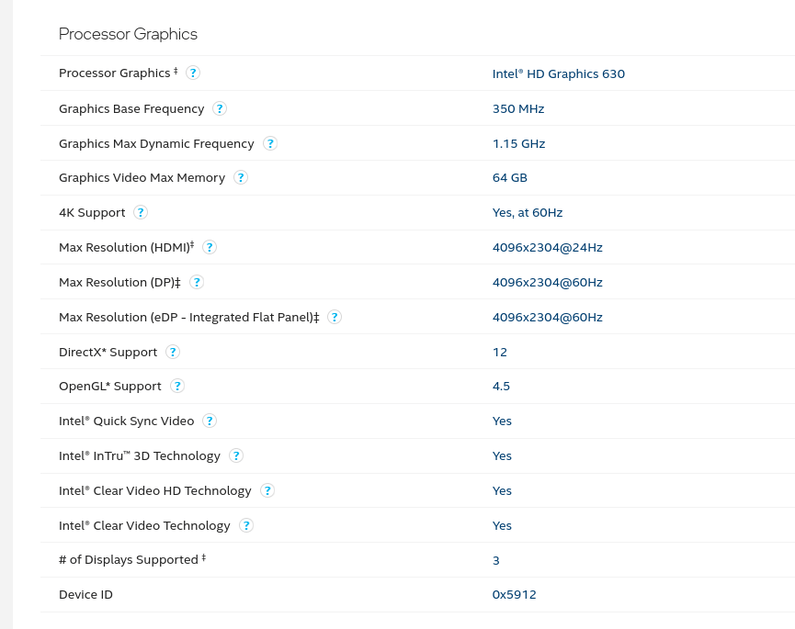
The QSV version which first gave us this capability is the Intel UHD 630 graphics as it can transcode 2160p UHD HEVC → 1080p SDR H.264.

“Intel Quick Sync Video: Yes”

As additional confirmation of its capabilities, notice

“Processor Graphics: Intel HD Graphics 630” (commonly known as ‘UHD 630’)

The most common, and first, CPU SKU which gave us hardware decoding of 2160p UHD HEVC is the -7xxx CPU. (e.g i3-7300, i5-75000, and i7-7700)

The CPUs can, in hardware convert HEVC HDR → HEVC SDR. At the moment, Plex is not licensed for writing HEVC output. This is why H.264 is used as Plex does hold that license.

My request:

You stated you can’t transcode 4K.

The Plex logs will show us :

  1. If the CPU can do it
  2. If it was attempted
  3. whether it succeeded or failed and why.

These are the logs you get from Settings - Server - Troubleshooting (lower left corner of Plex/web panel) - Download Logs.

It will give you a ZIP file.

After you attempt the playback again, Please download the server logs and attach them here.

Thank you for the helpful information - I am using an older xeon processor which on that intel page does not say anything about quick sync, so I assume that means it does not support it. Is Quick Sync required for 4k transcoding or does it just improve performance?

The Plex logs will show us …

Sorry I wasn’t clear, but when I asked you to narrow down the scope of the ask I meant more along the lines of a file within the zip or a keyword I could search for as it appears to me that the zip file contains a ton of information over a larger time period than is needed and than I would prefer to post online. I did some poking around in the logs and tried my best to answer what you’re looking for:

  1. If the CPU can do it

Sep 23, 2022 02:20:18.847 [0x7fa3b4604b00] DEBUG - [Req#c1e99/Transcode] Streaming Resource: Reached Decision id=89426 codes=(General=1001,Direct play not available; Conversion OK. Direct Play=3000,App cannot direct play this item. Direct play is disabled. Transcode=1001,Direct play not available; Conversion OK.) media=(id=148247 part=(id=148982 decision=transcode container=mkv protocol=http streams=(Video=(id=418648 decision=transcode bitrate=1290 encoder=libx264 width=640 height=480) Audio=(id=418649 decision=transcode bitrate=123 encoder=libopus channels=2 rate=48000))))

  1. If it was attempted

Sep 23, 2022 02:20:18.486 [0x7fa3b4604b00] DEBUG - [Req#c1e99/Transcode] Starting a transcode session 4e98777769e3e039b3ae9e85102d7a630b5ba0f9 at offset -1.0 (state=3)

Sep 23, 2022 02:20:18.486 [0x7fa3b4604b00] DEBUG - [Req#c1e99/Transcode/JobRunner] Job running: FFMPEG_EXTERNAL_LIBS=‘//Library/Application\ Support/Plex\ Media\ Server/Codecs/c4efa15-4369-linux-x86_64/’ X_PLEX_TOKEN=xxxxxxxxxxxxxxxxxxxx “//Library/Plex/plexmediaserver-1.29.0.6219-b1b4d4871.x86_64/usr/lib/plexmediaserver/Plex Transcoder” -codec:0 h264 -codec:1 aac -analyzeduration 20000000 -probesize 20000000 -i “//Plex Versions/Optimized for TV/.mkv” -filter_complex “[0:0]scale=w=640:h=480:force_divisible_by=4[0];[0]format=p010,tonemap=mobius[1];[1]format=pix_fmts=yuv420p|nv12[2]” -map “[2]” -codec:0 libx264 -crf:0 23 -maxrate:0 1290k -bufsize:0 2580k -r:0 23.975999999999999 -preset:0 fast -x264opts:0 subme=2:me_range=4:rc_lookahead=20:me=hex -filter_complex “[0:1] aresample=async=1:ocl=‘stereo’:rematrix_maxval=0.000000dB:osr=48000[3]” -map “[3]” -metadata:s:1 language=eng -codec:1 libopus -b:1 123k -f matroska -map_metadata -1 -map_chapters -1 Output.mkv -y -nostats -loglevel quiet -loglevel_plex error -progressurl http://127.0.0.1:32400/video/:/transcode/session/4e98777769e3e039b3ae9e85102d7a630b5ba0f9/21204174-8856-4291-9afc-c278a16f2eef/progress

Sep 23, 2022 02:20:18.846 [0x7fa3b4604b00] DEBUG - [Req#c1e99/Transcode] Using default transcode duration of 120 minutes

Sep 23, 2022 02:20:18.846 [0x7fa3b4604b00] DEBUG - [Req#c1e99/Transcode] Started session successfully: 4e98777769e3e039b3ae9e85102d7a630b5ba0f9

Sep 23, 2022 02:20:18.847 [0x7fa3b4604b00] DEBUG - [Req#c1e99/Transcode] Activity: updated activity 324214f5-3353-4146-b563-3f596416315f - completed -1.0% - Transcoding Media for npmw10533

Sep 23, 2022 02:20:18.965 [0x7fa3b5d11b00] DEBUG - [Req#c1ea9/Transcode/4e98777769e3e039b3ae9e85102d7a630b5ba0f9/21204174-8856-4291-9afc-c278a16f2eef] Streaming Resource: Unthrottling session 0x7fa3bcd8d488:34626d2c-51bc-47c7-9bd9-228358e05b0a which is using static transcoder slot. Used slots is now 18

Sep 23, 2022 02:20:18.965 [0x7fa3b5d11b00] DEBUG - [Req#c1ea9/Transcode/4e98777769e3e039b3ae9e85102d7a630b5ba0f9/21204174-8856-4291-9afc-c278a16f2eef] Transcoder: session 4e98777769e3e039b3ae9e85102d7a630b5ba0f9 indicated fallback to software decoding

Sep 23, 2022 02:20:23.952 [0x7fa3b5d11b00] DEBUG - [Req#c1ed0/Transcode/4e98777769e3e039b3ae9e85102d7a630b5ba0f9/21204174-8856-4291-9afc-c278a16f2eef] Activity: updated activity 324214f5-3353-4146-b563-3f596416315f - completed 0.0% - Transcoding Media for npmw10533

  1. whether it succeeded or failed and why.

This part I cannot seem to find - After the above my phone shows an error, the web ui dashboard window at the top shows nothing (previously it said it was transcoding for my phone), and there appears to be nothing further in the logs with an ID matching above (assuming I’m searching for the correct fields). I don’t see any related crashes or stacktraces, errors, etc. Far as I can tell, the transcoding just…stopped.

If there is any additional information I can provide short of dumping dozens of MB of data, please let me know. I hope I’m not being too unhelpful in doing it this way
THanks for sharing you have a Xeon. I have an E5-2690v4. Great CPU, ZERO hardware transcoding capability which, because of its raw power, can software transcode a lot of 4K HEVC titles :slight_smile:

To find what PMS is doing from the DEBUG logs (Plex Media Server.log – the current active log)

  1. MDE: is the Media Decision Engine where the player and PMS determine how to handle the requested playback of the selected video.

  2. Beneath that (several pages), you’ll find TPU: before the FFMPEG invocation line. There are 3 values here:

a. blank == software codec
b. vaapi == quick sync video
c. nvdec/nvenc == nvidia decoder & nvidia encoder.

This line shows software decode and encode (aka … software transcoding)

Sep 22, 2022 15:04:03.708 [0x7f7c33e20b00] DEBUG - [Req#19b/Transcode] TPU: hardware transcoding: final decoder: , final encoder: 

Is this more what you’re hoping to understand?

I have an E5-2690v4.

Coincidentally I’m on an E5-2697 v4! It looks to be very similar to what you have, so if yours works then hardware-wise at least mine should too

Is this more what you’re hoping to understand?

This is exactly what I was hoping for - thank you!! MDE:'s logs appear to imply to me that it is going to attempt to transcode. TPU: does not appear in the log though - I gave it ~25 minutes after I had it start transcoding which is a while longer than it took to appear to fail in the UI. I assume that’s enough that I should’ve seen TPU: somewhere? I do see an FFMPEG invocation line, or at least what I think is that line, but no TPU before it.

Sep 22, 2022 15:04:03.708 [0x7f7c33e20b00] DEBUG - [Req#19b/Transcode] TPU: hardware transcoding: final decoder: , final encoder: 

Not sure if it helps but I also see no combinations of final encoder, final decoder, hardware transcoding. Maybe something crashes before it gets to that part?

This is the TPU: line I referred to

Sep 22, 2022 15:04:03.708 [0x7f7c33e20b00] DEBUG - [Req#19b/Transcode] TPU: hardware transcoding: final decoder: , final encoder: 

What you’re not seeing is the actual FFMPEG invocation command line due to how Engineering changed the logging.

I’ve not experimented with it yet but I do have an easy way to:

[chuck@lizum ~.2004]$ cat bin/set-transcoder-debug 
#!/bin/sh
Token="$(tail -1 "/var/lib/plexmediaserver/Library/Application Support/Plex Media Server/Preferences.xml"  | sed -e 's/.*PlexOnlineToken="//' | sed -e 's/".*//')"
curl -X PUT http://127.0.0.1:32400/:/prefs/set\?TranscoderLogLevel=debug\&X-Plex-Token=$Token
echo Token=$Token

In this line , the logging levels are:

error - the default
debug - what I show here
verbose - next level up

I don’t recommend using verbose. you’ll never catch what you’re looking for unless you have a 10 second clip of video.

This is the TPU: line I referred to

Without debug logging on for the transcoder at least, I do not see that

I’ve not experimented with it yet but I do have an easy way to:

Hmm, that seems like it would be helpful but it is not working. I grabbed my token fine and fixed the port because I have mine custom, but I get a 404 from Plex:

~ curl -X PUT http://127.0.0.1:<PORT>/:/prefs/set\?TranscoderLogLevel\=debug\&X-Plex-Token\=<TOKEN>
<html><head><title>Not Found</title></head><body><h1>404 Not Found</h1></body></html>%                                                                                                                                                                  

@npmw10533

I’m sorry? You changed internal port 32400 ??

PMS port on the local loopback adapter is hard coded to 32400. This is the internal port. You can’t change it.

under Settings > Server > Remote Access > Manually specify public port - is that not the same port?

In any case, if I curl to 32400 I get this:

curl: (7) Failed to connect to 127.0.0.1 port 32400 after 0 ms: Connection refused

I stand corrected here. (Just confirmed with Engineering)

curl -X PUT http://127.0.0.1:32400/:/prefs\?TranscoderLogLevel=debug\&X-Plex-Token=$Token

How did you remap the pre-programmed port 32400 ? That’s set in the C++ code itself.

Ok so I think that new URL did it - at least I got a 200 so it did something

How did you remap the pre-programmed port 32400 ? That’s set in the C++ code itself.

Like I said that’s in the settings for me: Settings > Server > Remote Access > Manually specify public port :man_shrugging:

I just re-did an instance of failed transcoding and re-checked the logs, I still don’t see any instance of TPU: in my logs. I do see this though:

Sep 23, 2022 18:25:06.472 [0x7fa3af03db00] WARN - [Req#16a8f3/Transcode] Got a request to stop a transcode session without a valid session GUID.

Not sure if that’s expected but it looks suspect. Not sure where that request came from

That is the external port used for remote access. Your router remaps it to 32400.

If you are on the same network as the server, or on the server itself, always use port 32400.

Ah, I had multiple terminal windows open and I was running it from outside the machine via ssh - my bad. In any case, I got a 200 with the tweaked URL above and still don’t see TPU: or anything that appears helpful in the logs. I also don’t see a ton of new logs relating to transcoding - how much logging is tweaking this flag supposed to add?

You can up it to verbose as well.

good point…I set it to verbose and see a little more - still no TPU: so I’m guessing that was removed from the logs by the devs or something.

In this instance, I can see that the transcode definitely starts and looks to have gotten to 13.6% before it looks to have been killed:

Sep 24, 2022 00:38:25.507 [0x7fa3b0796b00] DEBUG - [Req#26cdb0/Transcode] Activity: registered new activity 437ed6eb-48ac-4312-8116-26aaee77ca05 - ""
Sep 24, 2022 00:38:25.508 [0x7fa3b0796b00] DEBUG - [Req#26cdb0/Transcode] Activity: updated activity 437ed6eb-48ac-4312-8116-26aaee77ca05 - completed -1.0% - Transcoding Media for npmw10533
...
Sep 24, 2022 00:40:00.877 [0x7fa3b2b20b00] DEBUG - [Req#26d2f0/Transcode/f78761e31c6700bf32483920f663000b828387d5/41a4d1a7-576c-4ac9-bdd8-147b7c28c2d8] Activity: updated activity 437ed6eb-48ac-4312-8116-26aaee77ca05 - completed 13.6% - Transcoding Media for npmw10533
Sep 24, 2022 00:40:02.576 [0x7fa3b0e7bb00] DEBUG - [Req#26d107] [Now] Adding 0 sessions.
Sep 24, 2022 00:40:02.697 [0x7fa3c8f2cb00] DEBUG - Jobs: '/mnt/mpatho/npmw10533/Library/Plex/plexmediaserver-1.29.0.6219-b1b4d4871.x86_64/usr/lib/plexmediaserver/Plex Transcoder' exit code for process 69325 is -9 (signal: Killed)
Sep 24, 2022 00:40:02.697 [0x7fa3b0258b00] DEBUG - Activity: Ended activity 437ed6eb-48ac-4312-8116-26aaee77ca05.

Correct me if I’m wrong but it looks like the transcoder is being killed by something externally rather than crashing? Or is it possible plex might kill a service using a signal like that?

The only additional info I see in the logs that might be connected - it looks like it’s trying to start a second transcoding session for the exact same file shortly before the first one was killed - almost exactly a minute before. Maybe that’s connected?
