Store the List or Grid view mode into each Playlist and Collection (smart or normal)

Goodmorning everyone,

I’m a newbie to Plex but there is one thing I think Plex don’t can do: define the List or Grid sort order for Collections and Playlists based on the user’s choice.

As far as I know:

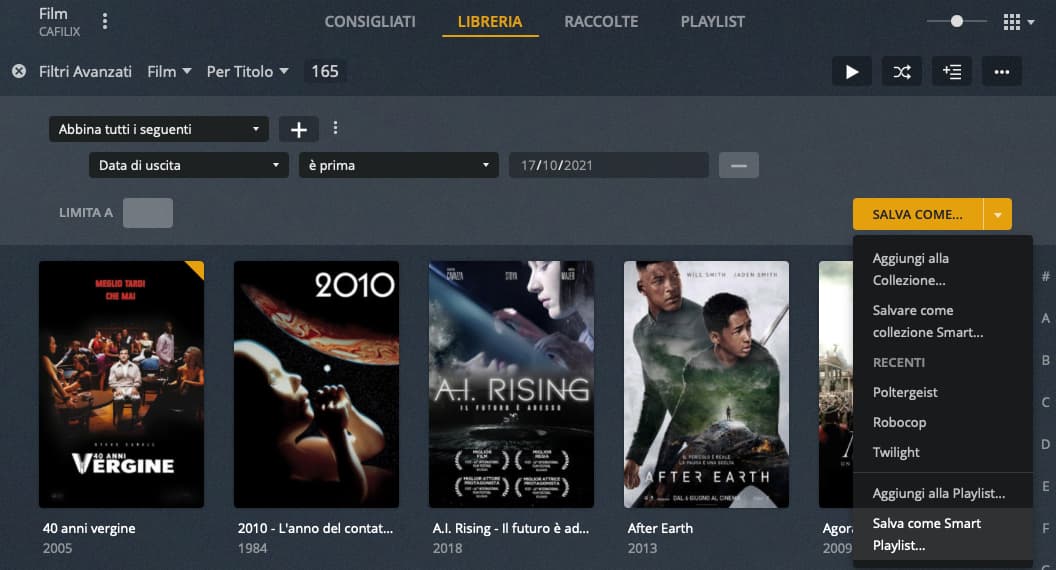
  1. the Smart Playlists have the “List” sort order by default;

  2. while, on the other hand, the Collections of defaults have a Grid ordering.

Plex creates, of course, two areas, see image:

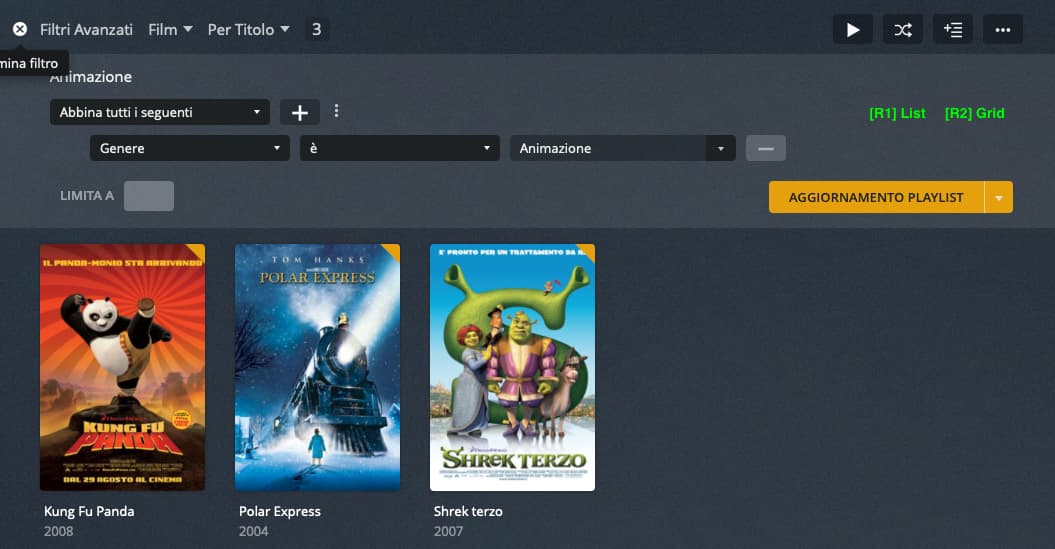
The following image shows how it would be enough to insert two radio buttons (R1 and R2) to allow the user to choose the preferred sort order for each type of archive: Playlist, Collections or …

I am a disabled person and, also for this reason, it would be convenient for me to define the Grid order at my Smart Playlists.

Since this innovation does not affect the data of each average item, I think it does not present major implementation difficulties.

I hope Plex can introduce it in the next update.

Thanks to all for your attention!

This is 100% necessary, thank you for suggesting this. I’ve starting adding my own home videos to Plex and using Collection for capturing people and places. Each of my two kids has loads of videos, and Grid view makes viewing them cumbersome. I hope this simple feature gets implemented soon.

Dear Jeremy, :+1::crossed_fingers:

All you need to do is to set your preferred sorting order before you save the playlist or collection.

This applies to smart playlists and smart collections.

A ‘dumb’ playlist cannot be sorted, unfortunately.
But there is already a feature request for that. So please vote on this, instead of creating a new feature request: Playlist sorting and searching feature request

Regular collections can already be sorted title and release date, as well as be sorted completely manually. https://support.plex.tv/articles/201273953-collections#toc-5

Simply filter your library by that collection and use all the facilities of the regular library view (e.g. sorting or changing how the library is displayed → list, summary, grid)

Step #1 – Parameter definition

Step #2 – I choose: Smart Playlist

Step #3 – I am asked to create the Smart Playlist

Step #4 – It is created

Step #5 – As shown in the list

5

Dear OttoKerner,

these steps show the creation of a new Smart Playlist.

Where should I set the Grid view?

In the menus that I encounter, the Grid sorting does not exist, or I don’t see it.

Can you take one or more screen shots to show us this possibility?

Thank you so much, see you soon!

P.S .: I voted for the link you sent me, I don’t know English well and I’m not so sure it’s the same request …

I’ve encircled it in yellow on your screenshot above.

Hello OttoKerner,

the menu indicated by you is the following:

Schermata 2021-10-18 alle 11.15.44

You can indicate the items: “Sort by List” and “Sort by as Grid” (or as Plex defines them …).

I just DON’T see them …

Thank you so much, see you soon!

I’m afraid I don’t understand what you mean by “sort as grid or list” then.
Do you actually mean to store the “view mode” per playlist or collection?

Hello OttoKerner,

obvious!

Example of “List sorting”:

Example of “Grid sorting”:

Schermata 2021-10-18 alle 12.07.44

Of course I want to memorize the type of list. If I create a Playlist or Collection I want to be able to tell how it should show me – by default – the contents.

Now can you understand the meaning of my suggestion which is a serious flaw in Plex ?!

If you haven’t already, rate it !!!

Thank you so much, see you soon

There might be a language barrier here.
This is not a “sorting”. It is a “view mode”.

You might wanna edit the topic title and your initial post to prevent any misunderstandings.
This is to help other users to understand what you are asking for, and thus might want to add their votes to this thread

Dear OttoKerner,

Good idea !!!

What would you put as a title?
My English is a GooglEnglish …

«Define the default “view mode” for Playlists and Collections: List or Grid»

Thank you so much, see you soon

I’d go with:
“Store the list or grid view mode into each playlist and smart collection”

Hello OttoKerner,

I madifycate it «Store the List or Grid view mode into each Playlist and Collection (smart or normal)» because Collections, for example, may not be smart.

Thank you so much, see you soon