Server Version#: 1.19.5.3112
Player Version#:4.34.3
Is not entirely true that anything in brackets is being ignore, isn’t it?
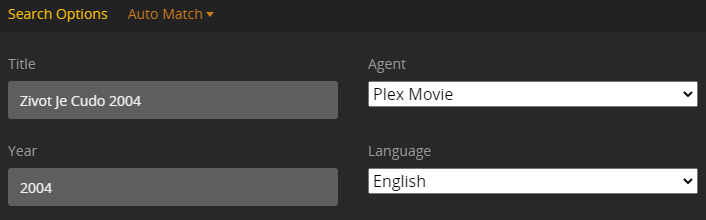
I have most of my movies very well sorted and Plex does not recognize them because it thinks that the year is part of the title. The convention used is the following: [YEAR] Movie Title (YEAR) [DIRECTOR]
And in the Fix Match it shows something like this:
In many cases Plex will still successfully match if the file is named “Movie (YEAR) [other whatever] more whatever (stuff).mp4”. As long as it starts with “Movie (YEAR) …” you can get away with a lot, unofficially.
Unexpected stuff at the beginning of a filename is almost certain to cause matching problems.
Ok, but then I cannot sort my movies as I like. I use sub folders for “Directors”, and I want to have each directed movie sorted by year (as it should be). I don’t see any other way to achieve this organization if not using the year at the beginning.
Isn’t the point of Plex (and other media center apps) to separate the management of your media from the actual directory structure and file naming? If you have your library displaying by release date and then filter by director it should give the view you’re looking for.
Agreed, I don’t see a perfect way to do what you describe, without making some other changes or compromises.
I also wouldn’t recommend putting movies into subfolders by “Directors”. While it will probably usually work OK, it’s not what Plex recommends. Additional levels of subdirectories have caused problems in the past.
Once imported into Plex, Plex can display movies filtered by Director and Date nicely in the Library.
The path of least resistance might be to change your mindset. Don’t try to use the filesystem as your database for this metadata. Don’t try to force it to sort things for you. Instead let Plex - or another media management tool! - keep that info and allow you to sort and filter however you want.
How do you handle movies with multiple directors today?
I understand. But, as much as I love Plex (and today bought the Pass btw), it is not perfect by a looong shot, and about 40% of the time I need to use SMB shares to reach my library because Plex would fail. So, that is why I need order in my files structure. Also because I don’t know you, but when I am acquiring new movies I have a quick look browsing my files to see what I’m lacking, not filtering with Plex that would be much more tedious and time consuming.
I use the folder of the director I like the most, hahaha.
I get your point, but I’ve being using Plex for about 6 years now, previously Kodi and before XBMC, and you cannot deny that none of them are flawless, there is always imperfections, and the only way to control them is to check manually. Another strong point for me is that it took me years to nicely sort 3000+ movies like this, it would take me long time to rename everything again.
Plex doesn’t really offer to be the “manager” for your files, it just expects them to be named and ordered in a certain way on disk.
One thing that might actually work for you is the newer ability to use IMDB/TMBD IDs in file and directory names. That might take precedence for matching in Plex, and allow you to keep more of the naming structure that you want.
I’ll find the forum posts describing it, just a minute.
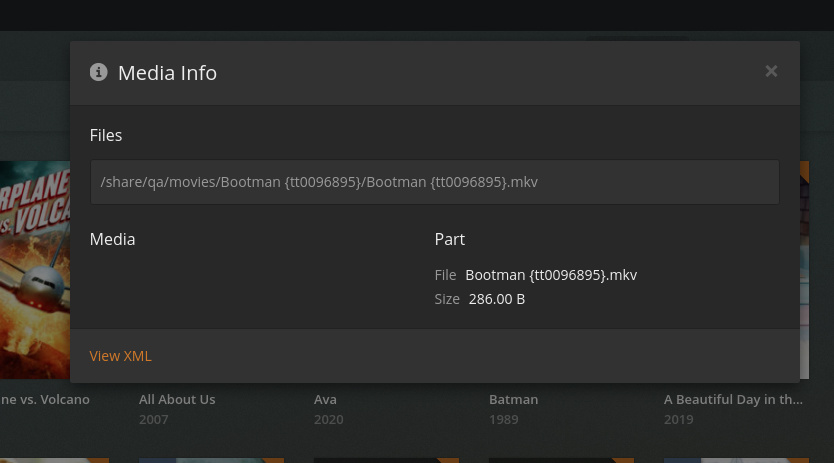
If using the new Plex Movie agent available in Plex Media Server version 1.20.1 and newer you can also enter the IMDB id number in curly brackets to help match the movie.
/Batman Begins (2005) {tt0372784}
Batman Begins (2005) {tt0372784}.mp4
It seems to work pretty well if it’s added to the directory OR the file, but I haven’t used it extensively.
There was discussion about other metadata provider IDs on the “Preview” thread, but it’s probably a good idea to stick with what’s in the support doc.
I’m wondering if those IDs are “strong” enough to get your movies to match, even if they’re named “wrong”. Might be worth testing.
If that works well for you, then something like TMM (tinyMediaManager) or FileBot would probably help you match/identify/rename.
When we were discussing how to differentiate the information,
Established is:
(year)
[optional info]
We wanted to add a clean mechanism. {tmdb: ID} and {imdb: ID}
were obvious initial choices for movies.
Because of the number of folks who already have [tt.......] naming in use, Engineering saw an easy way to include that.
It turns out that FileBot and Radarr support this.
While I’m not 100% certain, when the new TV scanner comes on line, it will also capitalize on this naming structure and linkage into FileBot and Sonarr.
So … would you say you’re reluctant to rename thousands of files and directories by hand?
It’s really common for people to have a large collection of media, organized in a way that makes sense to them.
But there’s a kind of “lowest common denominator” that some of the most common tools - like Plex, FileBot, Radarr (as @ChuckPA says) and some of the other library management tools support.
In the long run it’s usually easiest to just go with the flow and do what the tools support. In the short term that usually frustrates and annoys people.