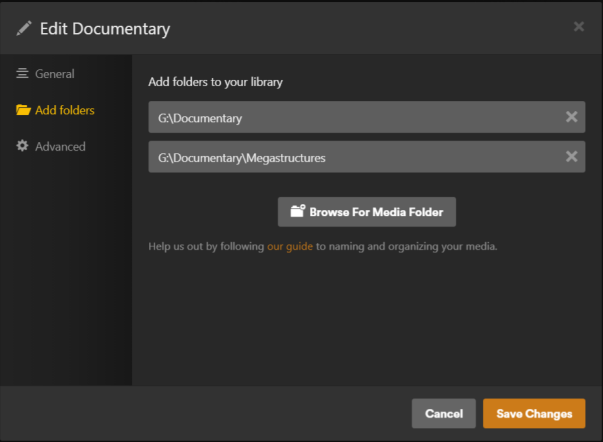
Hi Guys, I run Plex server on Windows 10 and have been having trouble moving video files from one drive to another while keeping custom metadata.
I have followed instructions Here: Lost metadata when moving files into subdirectories and here: https://support.plex.tv/articles/201154537-move-media-content-to-a-new-location/ Without success.
Whenever I move files from one drive letter to another, the metadata does not transfer.
Strangely If I move the files from one directory into another ON THE SAME DRIVE the metadata is kept intact
When I make a copy on the same drive, Plex shows both file locations as it should. When a copy is made on another drive Plex treats them as seperate. although the metadata is not transfered It DOES show how much of a video file has been played.
Sorry about my poor explanations, any help would be appreciated. Plex is a great platform but at times I think the creators of this software are trying to drive us a little crazy.
Thanks in advance… Brad
Do you have the different drive letters setup as different libraries or mapped to the same library? Usually as long as things stay in the same library - and you don’t have the “automatically delete on changes” enabled - it keeps data connected even if you move instead of copy (always safer to copy though). At which point it should just see it as a duplicate of the same thing - at least that’s been my experience but that wasn’t on Windows setup.
You might share a screenshot of your library folders screen maybe to clarify how you have it setup. Like this is mine showing the folders linked on my QNAP server for my Movies library:
Every once in a while I create new “letter” folders and as long as both the old and new folders are in there when I’m moving\copying files around it keeps the metadata together (unless I’ve borked a naming thing and it misreads it at which point I have to fix it).
Merge info to fix it: https://support.plex.tv/articles/201018248-merge-or-split-items/ - be sure when you merge items in that situation you select them in the right order otherwise you will lose that metadata:
Note: The first item you select is what all selected items will be merged into.
Hi Insomnic_1, thanks for the reply.
I have different drive letters setup as different libraries. automatically delete on changes is Disabled.
As you can see, I have the simplest of directory structures. (maybe too simple). Under each main directory I have tv shows/documentaries in their own folders.
The video files I am trying to move are going between the the tv shows and documentaries libraries which are on different drive letters.
Could that be the reason for the problems I am having?
Regards Brad
That answers the situation then… when you move between libraries then items are treated as completely separate. It’s seeing it as a new thing because one library doesn’t know anything about the other library even if they are the same type of library.
Using different libraries used to be more common - like to separate SD and HD content - but over the last few years the features in Plex have made that less necessary to manage those types of situations anymore and aren’t expected uses as much.
Unfortunately I don’t think there is a way to “merge” libraries easily. You can add the Documentary drive to your TV Programmes library but I don’t think it’ll merge the info you setup in the Documentary library together. Others have dealt with this so might be good to wait for one of them or a Plex rep to chime in on it.
It might just be a “bite the bullet” thing where you’ll just have to go ahead with merging them and fix things up after the fact initially. I’ve had to do that occasionally when I messed up moving files around or decided I wanted something in a different library; I have two different TV Shows libraries - one has anime and sometimes I chnage my mind about it being in the Anime or Regular library. In that case I just live with it. 
In your case, one thing that might work if you like having documentaries separate, after you merge the two, you could create a Collection in your TV Programmes library to make it easier to get to just those - things like that work well if you like to parse things out. There’s also ways to limit sharing via tags to replace sharing via library too.
Thanks very much for your help. I’m happy to at least have an explanation to why it has happened.
I wish plex just used .NFO files like almost all the other media servers use, it seems a simpler and more bulletproof way of handling metadata.
As you mentioned, others might have suggestions as well. Fingers crossed someone can come up with a solution.
I will try the suggestions you have mentioned.
Thanks and Regards
Brad
I think it comes down to providing a consumer service business model… the way Plex handles things is very user friendly because the user doesn’t have to do much themselves even as an admin to get things working; you don’t even need your own media anymore. The tie-ins to metadata sources and Discover features “just work” for the most part and reduces that adoption and management of media for Plex. NFO files and such are more fiddly so are less consumer level friendly and would be an additional overhead for Plex to manage … and the more local management the less data Plex gets outta it for their business model stuff too. Just a perspective anyways.
I think that’s one reason some folks have been switching to Jellyfin since much of that setup is still very local media focused and closer to the XBMC framework most of the current media management services were forked from initially. They support NFO files I believe.
It’s nice having these options these days … I feel like there are more now (including things like Infuse and Kody which work different but provide similar experience) than there used to be a few years ago and competition and options are good things.
You make some good points. NFO files are a bit of a messy way to do it.
Maybe it’s just me being hopeful but maybe plex can one day enable the moving of files between libraries and on different drives. I did some experimenting with copies of the same video file in each of the TVprogram libraries and the Documentary libraries, of course the metadata was not there but if I played the file from one library and then looked in the other library, it does keep track of how much had been played. Support for moving between libraries is partway supported already.
Regards Brad