Server Version#: 1.15.0.659-9311f93fd
I cast the first 3 episodes of my show to chromecast and everything was working fine, then i cast the 4th episode and skip a little a head to avoid the intro and I get a weird messy looking picture, but playing the audio correctly. I try just playing it on my phone, same problem.

I go to the activity dashboard and see that the video is being transcoded
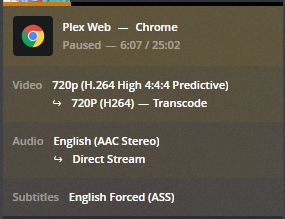
I got to plex.tv/web, same problem. So then I launch the plex client on my PC and play the same episode without problem, but notice that this stream is not being transcoded. I play it in VLC just to make sure the file is okay and it plays fine. So the problem has to be something going on with the transcoder.
Thinking this is some weird bug I restart the Plex server, nothing. I restart the PC, nothing. I start playing back some other shows to find another file that needs transcoding and I get this error popping up on some of the titles I select

So now I’m thinking there has to be some sort of corrupting in the files/database causing both these issues because now it’s not just the transcoding that is having issues.
I run a repair of the software through windows control panel, nothing. I run a repair of the database as per plex article, nothing. I update to the last 1.15 version (from 1.14), nothing. I rollback the database 2 weeks ago and re-run the repairs, nothing. I uninstall plex server and re-install, nothing.
I check the plex logs, nothing. I check the Windows logs and find that power outage we had on 2/1/2019, but my image backups only go back to 2/2/2019.
So now I’m thinking there has to be some corruption that happens with Windows during the power outage. Possibly a file that’s a dependency for Plex and is causing these transcoding/playback errors.
I run chkdsk and sfc scannow, nothing.
Now I’m thinking maybe the corruption occurred with a video driver explaining the poor transcoding.
I re-install Windows, re-install Plex server, copy over the database and metadata and run Plex again. Same problem, nothing changed.
So now I’m thinking maybe there’s something hardware wise that’s causing poor transcoding and maybe the playback error is a separate issue.
I install Plex on a different PC restore the database and play the same episode, nothing.
I exit PMS delete the Plex Media Server folder in the Appdata, re-launch PMS and let it create a clean database. I create a new library add only that show to it and let it grab all the info.
I play the same episode, same problem.
So now I’m sitting there thinking why did the first 3 episodes play just fine on chromecast, but now when I playback those same episodes on a different PC with a clean install of PMS and database the problem still occurs. Why did those first 3 episodes play fine?
And as I sit there pondering, giving up not paying attention and the video is just playing out with no problems. I skip a little a head and it’s still working and I keep skipping little by little a head, past the intro on the timestamp I know the transcoding problem occurs, but yet now it shows just fine.
I realize that if I skip ahead anywhere to the parts where the transcoder has already loaded, it works fine. As long as I don’t skip too far ahead it plays great.

So it hits me… that’s why I wasn’t able to run into the problem the first 3 episodes. It was because I let the intro play out because the show was still fresh and I wasn’t tired of seeing the intro every episode. It wasn’t until I got to the 4th and skipped ahead and every time I re-installed, repaired or started out with a clean DB and tried playing it again I would always skip ahead to the part of the video where I knew the problem occurred not realizing the transcoder hasn’t gotten there yet. The second message about “playback error” was irrelevant and a totally separate issue that threw me off from the start making me think that this was more than just a transcoding issue.
TLDR: Plex has problems transcoding H.264 (High 4:4:4 Profile).
Solution: Don’t skip past where the transcoder has transcoded and wait for Plex to fix this type of codec transcoding.
