If you allready have the Quadro you wont benefit from having a Quick sync capable CPU …you’ll actually have to disable your CPU’s IGPU in BIOS to utilize the Quadro’s encoding capabilities.
So on the Plex status screen do you see hw in front of both decode and encode? I’m just thinking on if this GPU is better than a new Kaby lake i7 or not if I rebuild. I can still return the P2000.
performance/hardware wise, I believe the p2k is functionally equivalent to a 1060gtx (aside from the unlimited encoder)
how it compares directly with an intel igpu for transcoding purposes, I don’t think I have seen any comprehensive comparisons.
the p2k does have a few advantages over the gtx series cards, in that is a single slot solution and doesn’t require additional power connection, so will fit in smaller cases.
going with a new intel/igpu would save you the cost of the p2k, the pcie slot it uses, and whatever energy savings from not having to power it.
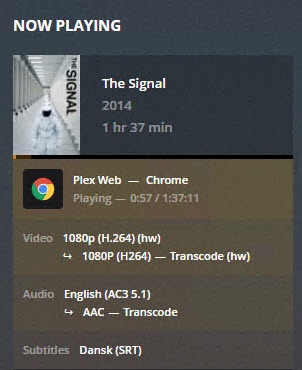
@herngaard So after lots of testing while being snowed in I am happy to report that I have hardware decode and hardware encode working on Windows Server 2019 inside VMware using PCIe passthrough. I ended up having to use the Plex Pass 1.15.1.707 version of PMS. I couldn’t get it working with the public version of 1.14. Screenshots below. First screenshot is of me playing back one video and transcoding down to 720p, you can see all the CPU cores get hit really hard for about 20 seconds. The other screenshots are showing off the hardware transcoding.
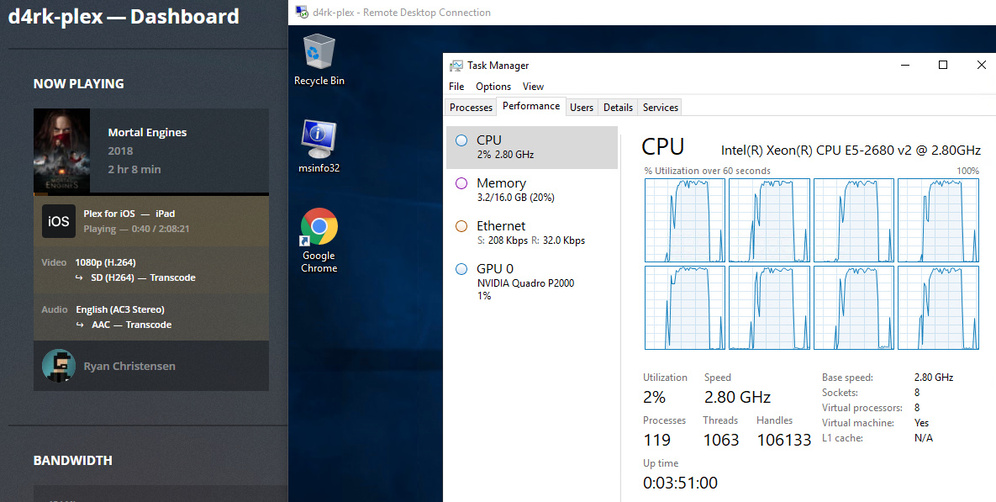

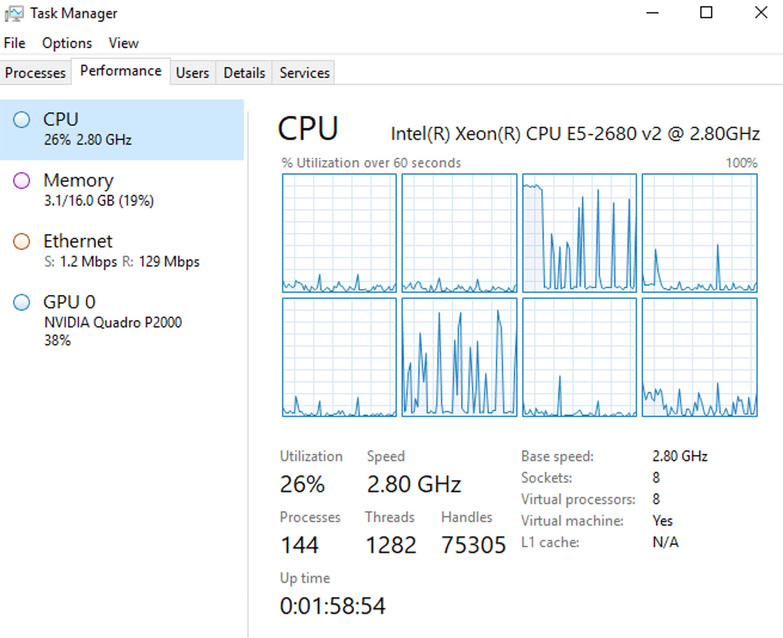

Slight update on this. I spent the weekend adding my libraries in and something must’ve changed because now I can’t get hardware decode working. Hardware encode works but decode is slamming that CPU again.

Figured it out. For whatever reason hardware decoding only works with mapped drives not UNC paths. I will file a bug with Plex.

EDIT: So it’s broken again. Nothing has changed besides rebooting my server and now I can’t get hardware decode working any longer. Looks like it might just be kind of buggy still.
EDIT 2: I have this working reliably. I have no idea how I had it working in the first place but it’s now working persistently through reboots, etc. I plugged this dongle into my P2000. Without the dongle I only get hardware encode. With the dongle plugged in I get both hardware encode and decode. That’s a wrap for me. Sorry about all the replies!
1 Like
When does the server need to decode?
I gave up on using my P2000 in vmware due to the added fan noice of the server and built a new system dedicated for the purpose instead:
i5 8400 CPU (6 cores)
ASRock B360M Pro4 motherboard
16GB RAM (2x8GB G.Skill Aegis DDR4 3000 C16 @2666MHz)
HPe Nvidia Quadro P2000
240GB OCZ Vertex 3 SSD
2x Seagate Ironwolf 8TB SATA HDs
Corsair CX650M PSU (semi modular)
Corsair Carbide 100R Silent, miditower
I’m running the system completely headless, only power and NIC, and playing from a client via chrome works with hardware transcoding withour dongles, what do i need to test to find out if I need one as welll?
“Optimizing” a file from 1080p 36Mbps 26GB down to 1080p 10Mbps 11GB takes only 7 minutes at x11 speed, my old vm does it in about an hour @ x1.6 speed. 
1 Like
Have you rebooted yet? I assume you RDP into the system to configure and monitor it? For my situation after I had rebooted a few times it all of the sudden stopped doing hw decodes. If you reboot it without a monitor plugged in does it still work? So does your new rig stay pretty much completely silent now under load? That looks like a nice build.
Yeah, I have rebootet many times, it seems to work just fine. I even let the machine use the autodetected nvidia drivers windows update installed automatically.
When using PCI-E passthrough it was only using 25% of the GPU doing “Optimization” versions of media, now it’s not virtualized it’s using 60% and is much faster. Which I find a bit strange to be honest, since the only difference is a massive bump from 2.1 > 4 Ghz on the CPU cores, of which it seems to utilize one core heavily, and the virtualization layer itself, I would expect the performance to be comparable since the passthrough shouldnt tax the card too much i think.
The new “server” is very silent, even with the stock Intel boxed fan/heatsink and the Quadro doing it’s thing at 60% load. But I’ll still be doing some tweaking and probably swapping the Corsair fans for some 120mm Noctuas. I have a boatload of nice 140mm fans but i dont think I can fit them in the case…right now i just made a quick fan curve in bios for the included ones to get it up and running.
This topic was automatically closed 90 days after the last reply. New replies are no longer allowed.
