Question about how Plex buffers on Chrome

Yes, I would definitely recommend NOT forcing transcoding but instead find a client that buffers a lot more than the web browsers.

After going through this journey of testing, I also believe the “automatic adjust quality” option isn’t the best either. I mean, I can see it being the right choice in specific situations, but for most variable connections I think a larger buffer is better and then finding the sweet spot for the constant stream quality to allow the buffer to fill up most often. However, I don’t claim to fully understand the workings of the auto adjust.

If a connection is variable, you can set the constant stream quality to something lower than the usual mean value of the bandwidth over time,. With that in place, the connection should then be able to fill the buffer when the connection is running faster than the given stream setting. If the buffer is large enough, it will hopefully get you through the poor connection phases.

1 Like

I didn’t realise about Roku and AUS. The Roku I mentioned is with my father-in-law, who’s only 60miles away. My friend out in AUS generally just uses their laptop/computer as they don’t have a smart TV. I think they did tinker with the idea of plugging the computer into the TV, but I don’t think they did anything more on it.

I did take a quick look at AUS Amazon, and even the Amazon Fire Stick is all out of stock! Crazy! There must be a away of buying a Fire Stick or a ‘Google Chromecast with Google TV’ out there? Or just bite the bullet (and cost) and post out a Roku?

The VPN test you did does seem to give you a strong idea of what’s going on (in general) with internet traffic over there. And, at the very least, using something like the Plex Windows client means you got to test out how the caching/buffering can help smooth out some of the problems.

The transcode buffer setting: I actually changed mine up to 600. You might not notice any change in general client performance, but you at least know your PMS has everything ready for the client. The transcoder is only hitting hard for a short while, then it just calms down and trickles out the data. As long as someone isn’t constantly seeking/searching fowards and backwards, the PMS transcoder will be fine. All of that said, I also use ramdisk as the transcode location. My PMS is on Ubuntu so it’s really easy to setup and I just have 16gb of RAM for my PMS.

Just on my “idea” for having both PMS and Client on the same PC… I thought about this some more today and it’s a bad idea! The client app will be happy enough to download the files, but, I have no idea how it will respond/react when the comms link goes down? Will it just auto-restart and carry-on indefinatly, or will it just give up needing a human to say “retry”. Also, and this is the main issue with my idea, is that PMS will then be keeping it’s own record of what someone has watched. So the client will never really know to download more TV? I know I’m not explaining myself very well, but the whole idea needs some testing first!!! Mainly (a) how will it retry a download, (b) does “Sync Your Watch State and Ratings” fix the issue of the Plex Client (downloader) never knowing something has already been watched! … If I get some time free, I’ll try and test both of these out.

@leelynds you’re 100% correct, I forgot all about that!!! So yeh, not really a way to know how the caching is working on the Roku! Darn it! That said, I’m pretty sure it sure it buffers a few minutes, as I know I can reboot my PMS and mess with it, before the remote user notices. That’s not the same with Chrome, that pretty much stops in a matter of seconds (usually).

:rofl::rofl::rofl: I spent all that time writing out my last/previous post, to finally scroll down to where you’ve hit the jackpot!!! Wow!!

All of this because of how cr@ppy Chrome (probably any browser, but lets pick on Chrome) is! This is all something to log in the old memory bank for the next time this sort of thing comes up. And I’ll defiantly be having a conversation with my friend in AUS about this (since they mainly use a browser), as they really need to switch to a different client!

I think you could still leave on the auto adjust and see how it gets on? Also, you really should install Tautulli (if you haven’t already) as it’ll log stats on a per episode/film basis. This means you can go back and look at the history and see the speeds of transfer over time :wink::+1:

So really the last question is… What to do about some form of plug-in box for you mother-in-laws tv? :astonished:

You’ll have to let your mother-in-law know that we’re all really happy no that you’ve got Plex working. It took one guy from the US and one rogue-UK-guy (who comes up with crazy ideas) to talk about it in a forum :astonished::rofl::rofl::rofl::rofl::rofl:… She better get you a good birthday/xmas present this year :rofl:

Like I said before, I don’t spend a lot of time watching the Dashboard. But I think it depends on the device, I’ve seen the Roku and Android TV play for several minutes on a remote connection toward the end of a video (and looking at the Bandwidth section) without the slightest bump in usage (in fact, the local web app not playing anything at all has a higher bitrate just monitoring the connection)

1 Like

If you want to do that to your friends and family…
:wink:
These have usually the crappiest hardware. In my humble opinion, all devices with “fire” in their name should burn in a fire.

Even though they all use Android TV as their operating system, they (and the user experience on them) cannot be compared to a high-end device, like the Nvidia Shield Pro.

1 Like

Yeh, exactly, you don’t get to see the true buffered amount. You can only make an educated guess when the stream first starts. E.g. how much data does it try and transfer all at once (at the start) before it decides to drop.

It would be interesting if the Plex client had a way to display this info? Like a technical overlay, or just something in the playback menu?

This is more about cost and availability in AUS (for the original posters). Personally I use Shield, but my father-in-law has a simple Roku Express. The Express works flawlessly for him, though I should have gotten the 4k for HVEC decoding.

First of all, thank you Otto for pointing me in the direction of the Plex for Windows Desktop.

Yes, I agree about “Fire-anything.” The hardware, the UI, the ads. Not worth it. I’m not a huge Roku, the company, fan but their hardware is decent for the price and the UI is grandma simple. Not happy about the ads, but I’ve got that covered.

Otto, do you happen to know if the buffer limit in Plex on the browsers is browser forced? Is it a size limit?

It would be great if in the Dashboard, we could see the client’s buffer usage as well. That will provide very helpful diagnostic information when we are troubleshooting for our users (who we do end up supporting).

1 Like

Sorry, no idea. But as anything browser-based, I expect severe restrictions to be in place to minimize impact and performance. In the browser itself, not in the Plex web app.

Maybe FireFox would be a better browser to test with?:

I did also find this on a Github page, that’s talking about Chromium (ish), but then goes into detail about Firefox:

No idea if this is something to think about, or look at? Though I understand it’s all a pain since there is no simple way to know how much data is buffered/cached on clients (as we’ve all noted :+1::wink::grin:)

This is an excellent find!

To add to this…
I’ve been using Edge as my main browser with Firefox as the backup. In Plex I have several “hubs” (rows) being displayed on my Plex home page and Movie Recommendation page. In Edge these pages have a fit loading and you struggle to scroll. I know it is the loading of the posters because once all the hubs are loaded the page scrolls smoothly. Firefox doesn’t have this problem. It’s butter smooth the whole time.

I’ve been already pondering moving to Firefox as my primary, and this might push me over.

However, I still think Plex for Desktop is the better solution for Plex streaming. I’ll do some more testing with Firefox and see how it goes though.

2 Likes

Otto, one other question…

Can you confirm that the Plex client (player) shows the client’s buffered amount on the Progress Bar (the dark yellow bar after the birght yellow)?

I’m trying to determine if my understanding of the dark yellow bar displaying different information between the Plex client and the Plex server (dashboard). I’ve just learning that the dashboard shows the server’s transcoding process.

Thanks

Sorry, I can’t.

You’re letting me down Otto. :stuck_out_tongue_winking_eye:

Nah, I’ve always respected your presence and knowledge on these forums. Thanks.

Appears this might not work any longer in Firefox:

Buffer full video in 2021? : firefox (reddit.com)

My testing to come…

Just got word that

In the player, it’s the player cache. On dashboard, it’s the transcode cache for server.

1 Like

Awesome, thank you! Huge help to me. I was starting to believe that was the case since Direct Play shows no transcoding (dark yellow) in Dashboard but the client was showing a dark yellow bar, so I assumed it had to be the buffer.

If you happen to have someone’s ear, if we could see both the client’s buffered as well as the server’s transcoding in the dashboard, that would be extremely helpful in troubleshooting connection issues.

Testing didn’t take long.

In Firefox:

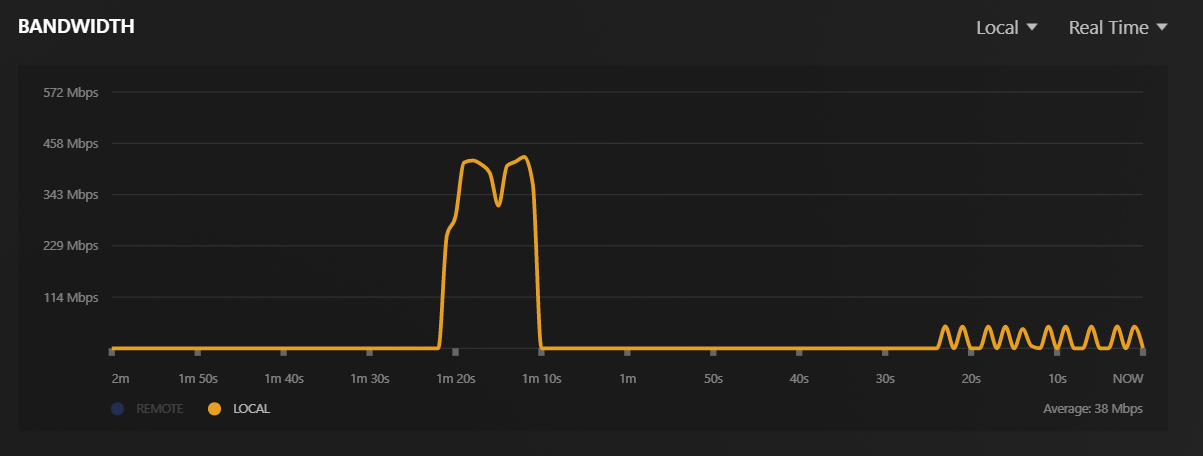
I went from about 60 seconds of buffer to about 3 minutes. I tried 9000/9000 and then 90,000/9,000. It didn’t appear to make a difference between that two values so I think I hit a cap. Still, 3 minutes vs 1 minute is a bit.

This is the bandwidth usage at default 60/30:

This is the bandwidth usage at 90,000/90,000:

The mystery deepens…

I decided to compare to Plex for Windows Desktop:

My buffer never grew by more than 1 minute. I wondered if this is because I am “local” and Direct Play.

I decided to try “local” connection but with 4 Mbps stream on same movie. This time the buffer grew to about 10 minutes:

I ran it again but at 2 Mbps. The buffer went up to 17 minutes.

So, it appears the buffer in Plex for Windows is based on data size, not seconds. Not sure how that might impact 4K movies with a ton of data. I don’t have any to test with. The movie I did test with is:

I then tested with a movie that is “1.8 Mbps original.” The buffer went to close to 10 minutes and is showing as a Direct Play. So, it isn’t the Direct Play that is deciding the buffer size.

Finally, I tested with a “27.6 Mbps original” movie. The buffer went to 1 minute.

So, my guess is that there is a minimum buffer size of 60 seconds and then a maximum data size for the buffer too in Plex for Windows Desktop.