Server Version#: 1.32.5.7349-8f4248874
Player Version#: 9.29.1.3463
I have a PC turned into a Promox VE (Ryzen 5 2600, 16GB of RAM). I allocated four cores and 10GB of RAM to the Plex server (running Ubuntu).
I was playing a blu ray rip (Original quality - 1080p, no compression), direct play on my android TV and everything was amazing. However, near the end of the movie I was experiencing loading lag on and off. Eventually I got the “this server is not strong enough…” Error. This happened near the beginning of another blu ray movie (original quality-1080p, no compression). Ended up watching something else.
In both cases, the Plex dashboard said direct play (so I wasn’t transcoding), subtitles were off, my VE only had this Plex server running and nothing else, and only my android TV was accessing Plex.
Any ideas?
Edit: I just tried watching the same spot of the blu-ray where I got the error above and I got this new error: “Connection to the server is not fast enough”.
When I look at the playback settings in the app on the android TV it says: “Play Original Quality 28.7 Mbps (about 12GB per hour)”. Then when it buffers, it says “Play Original Quality Detected as 27.9 Mbps”. (Sometimes lower). So maybe it’s an internet issue?
I just updated my original post as you posted, so in case you didn’t see it:
I just tried watching the same spot of the blu-ray where I got the error above and I got this new error: “Connection to the server is not fast enough”. So maybe it’s an internet issue?
Is it transcoding ? Is the server able to keep up ?
Is there bandwidth / throughput limiting (as happens with remote streaming a lot)
Could it be something as simple as DirectPlay, where the stream bitrate exceeds the TV adapter or the Wifi speed?
– TVs only have 100 Mbps ethernet adapters but much faster WiFi
– ( example: Playing Gemini Man @ 187 Mbps DirectPlay over a wired connection will fail every time)
– WiFi “g” is only 56 mbps.
Are there any numbers to share?
Media bitrate shown?
Streaming limits ?
Any playing with “Jumbo Frames” ?
Maybe even DEBUG logs ZIP file?
I am asking and jumping in here because I have some insane bitrate test videos (250,
300, 350 and 400 Mbps).
PMS never complains about “chunk size” or anything else.
Absolutely may interject To answer your questions:
No. It is direct play and says so according to the plex dashboard.
Not sure how to test this?
Good point and it’s what I think. I will have to try it with the TV plugged into internet instead of wifi (even though the wifi router is right beside the TV). Though as I said above, the max transfer rate I see in the play back settings are 28.7 Mbps.
The rest) Not even sure what “Jumbo Frames” is - I am simply playing it back in original quality with Plex default settings (to my knowledge). How do I check streaming limits? (or is there a limit on free accounts?)
The chunk size idea was from the other poster that linked to another thread that seemed to have issues with it for 4K videos. But my videos are 1080p in original quality.
If you’ll forgive, I’ll walk through the whole process, writing as I go. Hopefully, I’ll communicate my thought process / testing methods so you can apply to your scenario and pinpoint the issue.
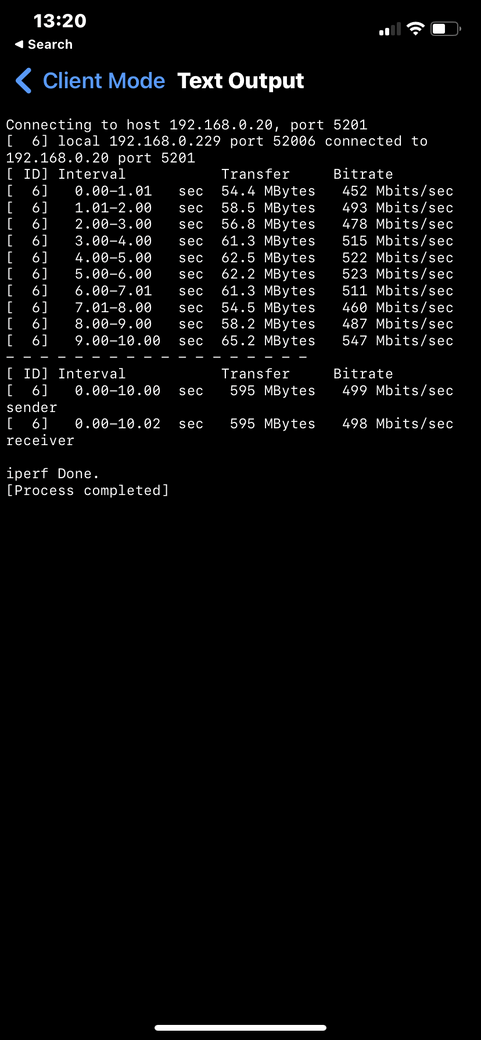
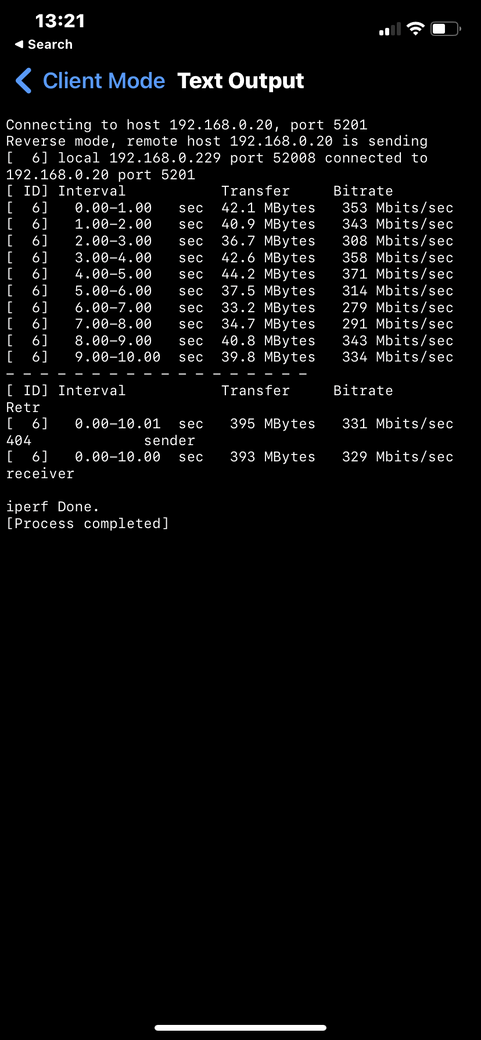
Lan / device-device network speed testing. iperf3
You want one ‘iperf3 server’ (iperf3 -s) on your PMS machine
Bandwidth isn’t an issue with regards to the chunk size that my thread is referring to, though this thread does appear to be related to wifi connectivity (perhaps a signal interruption or just generally low quality? or if user is using a “powerline adapter” I’d wager noise or latency introduced by the filter circuit causing the issue)
Though I see you attempted to comment about my thread and implied it was bandwidth related also, which it is not. It’s a limitation on the size of chunks that plex sends the client when “no buffer” is calculated - to explain; when plex makes a negotiation between server and client there’s a little calculation that determines whether the client should require a buffer or they can sustain playback without a buffer, and whether or not the server can also sustain that rate of playback without sending excess data to the client. This is fundamentally a problem as that initial negotiation is not infallable and it’s not all-encompassing and there are scenarios where “no buffer” is negotiated but playback with the default chunk size requested by any of the clients (MPV/exoplayer etc) exceeds the round-trip time of the response from the client requesting the next chunk. Which this isn’t entirely unusual and happens a lot in single piped HTTP/1 transactions, especially where latency is either high or varied.
However this DOES pose a fundamental issue with plex’s interactions from server > client and I came up with a solution to this issue by forcing the client to request a buffer ALWAYS and ignore the plex “no buffer” entirely, so that the client can receive more data than just standard playback where each chunk would require a response from the client to essentailly say “I’m ready for the next chunk!”, as again, that response time can exceed the playback time on clients.
The larger a file, the smaller time to playback each ‘chunk’ can be, for example, non-accurate numbers for illustration only; a ‘chunk’ at 720p@2000 may be 20 seconds of playback, however 4k@20000 would only be 2 seconds of playback and if the response exceeds 2 seconds even by a fraction of a second, plex will show a momentary buffering icon and the playback will stop whilst receiving the next ‘chunk’.
I have noticed anybody even remotely affiliated with plex is avoiding this entirely as an issue and I have no idea why, I could only speculate it would either be because of the multiple clients making it difficult to enact a change ‘globally’ across clients or a larger scale change would be needed to cover more scenarios, maybe there’s just too much work involved? Though Plex’s competition (emby, jellyfin etc) all experience similar issues as they are utilizing the same clients in the same ways. MPV player is very powerful and I thank the stars it’s user-configurable to allow users to configure it as needed and fix issues, but to deny the issue exists or to not respond about it when it’s even even discussed on the github of the client plex is utilizing (MPV in the case for windows) is actually jawdroppingly bad.
This is an issue that can be replicated over LAN and is already affecting a large number of plex users who are just being told “your internet just sucks” when the reality is; plex is just missing an option
Closing:
Confirmed the problem and solution are trivial
Plex can and should do better to recognize issues that may initially appear as though they’re related to a less than perfect network configuration.
Thank you for taking the time to write this up as you have. That’s a lot of effort.
You’ve helped me understand this from a different perspective
I’ve highlighted this passage because I think this is where I need to focus first.
Please correct me if wrong.
One additional problem I have is the lack of hard data (logs) which show the failures.
Those logs are what I need to take to the engineers. Without them, or without me recreating the problem (extremely difficult/impossible for me on my LAN), I need a “how to” .
That “how to” will allow me to actually walk through the source code of the “MDE:” (media decision engine) which is what negotiates the playback environment between server and players.
“MDE” is a complex piece of code and YES there easily could be a problem where it’s falling through and not calculating correctly – resulting in the problem everyone is seeing.
If we can take the scientific approach, I would appreciate knowing the following so we can
Do the math as we walk through the logic in code
Create a test environment (if needed) to replicate a live case AND a solution test case.
I’d like to know:
Server DEBUG and Player logs which CAPTURE the error happening from “click” until failure.
Media XML (from top through the end of the </media> marker)
The actual network playback environment:
– Server network connection
– LAN network configuration
– WAN configuration if appropriate
– Wifi AP make & model if appropriate
– Player make & model
– Player connection mode (wired / wifi / local / remote )
If I may speak to how things were in the past – That’s the past.
There have been a lot of changes
We’re still doing a huge amount of “cleanup”.
Previous institutional knowledge has been lost but we’re moving forward and there are some previously ignored problems are already fixed and will be released with the next release.
We are working at a slower pace now (fewer hands) but hopefully it is more productive and a lot less placating
If you all can help me bring this to a focus with definitive data
THEN I can champion it through Engineering and the player product teams to get fixed.
Oh jesus I didn’t actually expect a response!
Thanks for the eloquent response and apologies for the abruptness, I’d been fairly fed up and apologise for taking out on you a little bit -
I can however give a fairly simplistic method for reproducing this over from a lan test
Download and launch clumsy + plex
Set source+destination ip to plex LAN server in clumsy (e.g mine is 192.168.1.9 and thus my filtering was; ip.DstAddr == 192.168.1.9 or ip.SrcAddr == 192.168.1.9)
Set “lag” on clumsy to 110ms+
Play a file with a bitrate of over around 10,000~ (both latency and this can be lower but these are just real world numbers I ended up recycling during testing previously when trying to rule out bandwidth/networking as an issue with my scenario)
This test purely simulates network latency and is the near-equivalent to the WAN connection issue I encountered based entirely on rough estimated numbers, but triggers the issue without fail.
If you believe you require logs or anything further do let me know and I’ll be happy to be all hands on deck and provide as much information as possible.
The test case is so incredibly easy to reproduce with a simple introduction of latency I figured it wouldn’t have been overlooked in the “MDE” at all, but the same solution I came up with for forcing MPV into requesting more and making it forcibly create a buffer also alleviates the issue in the LAN test
Anyway! Hope this helps and is enough to begin an investigation, but if not again, happy to help provide more solid details opposed to a quick and dirty test case (which does indeed only take minutes to setup and should realistically work between two VMs spun up to act as either party)
Now , to further the discussion, I’ve already chatted with the app devs.
I’ll get a reply from the Apple team when they are awake.
The reply from the Android team
If you mean the Android team, then it’s a dynamic amount based on the free memory of the device and the stream bitrate
Do you have logs after seeing the issue? We shouldn’t ever allocate a 0 byte buffer
While I didn’t get the question entirely correct, One thing is going to be clear -
The Dev team is going to need to see the player logs which capture this. (unmodified configs)
I know you can tweak MPV and force allocate a large amount of memory but that should not be necessary. It should do the right thing from the start. true?
Also, to avoid any confusion, Free memory is RAM, not Storage.
I should apologise as it’s not a 0 byte buffer in any measurable scenario I’d encountered, saying so was an oversimplification and exaggeration, and the buffer is just exceptionally small in some scenarios where the requested buffer simply doesn’t factor in the latency during playback of said buffer and the time it takes to receive the next packet can exceed the buffer, stalling playback.
I should note that latency is only a factor once the bitrate exceeds a threshold as bitrate does not equate to a linear amount of playback in seconds, higher bitrates obviously mean shorter playback available in the buffer, it does make this a fairly unique issue to high bitrate and less than perfect networking, subsequently not usually affecting LAN (unless of course latency is forcibly introduced) due to the ultrafast responses from the clients.
Generally I don’t tend to see this as problematic on android or iOS due to those usually being “on-the-go” platforms where I’d usually be transcoding down to 720p - so I’ve not readily tested those as platforms extensively, though I have had a friend in the US attempt to use a TV running Tizen OS and using the plex app (linux?) and they were able to observe the same issue with a similar latency and high bitrates not setting the buffer correctly.
If you have a specific test case you’d like me to cover and provide logs for I’m happy enough to spend the time on getting it setup as this does seem to affect multiple platforms, I’ve been able to replicate it so far on LAN using my Windows PC via the web app, desktop app and on an Xbox one console over ethernet and doing nothing above simulating the increased latency, though I was unable to utilize the MPV config settings to resolve the issue on the web app nor xbox one as I either couldn’t locate the config, or it wasn’t exposed.
But yes I’d like to think it would allocate and even dynamically change the length/size of buffer, and yep we’re on the same page with buffer being utilized in RAM, and memory is not storage
and there are scenarios where “no buffer” is negotiated but playback with the default chunk size requested by any of the clients (MPV/exoplayer etc) exceeds the round-trip time of the response from the client requesting the next chunk.
— VERSUS ----
I have everyone energized.
They are wanting details; Test settings and Logs so the problem can be corrected.
Test settings were everything as default and the only factor being an induced latency (150ms in this instance). I can record this happening too if that’d be helpful
I’m sure there must’ve been a big discovery stemming from this with lots of people working hard, I can only take the silence as dedication to getting the issue resolved can’t wait to put the fix to the test
“150ms lag” ?? Is this something you’ve created or measured?
Is this server running in a VM environment and. if so, which hypervisor on which host OS ?
Apologies for being slow due to health. A “major heart attack” (Drs are dramatic, lol) really does ruin any and all plans you might have for the next 6 months!
Future Ref: “com.plexapp.system.log” is not useful in isolation. The full ZIP file is because we can see PMS and anything else which is active.

 To answer your questions: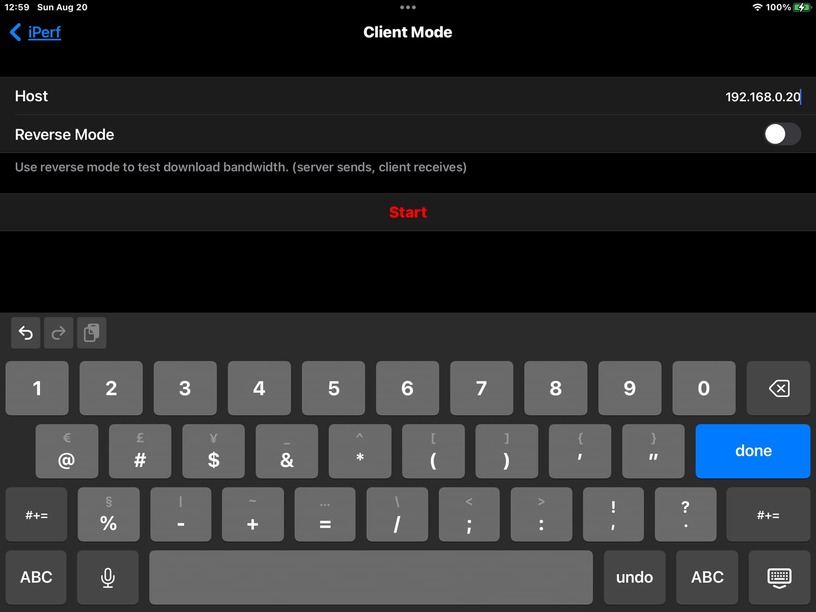





 can’t wait to put the fix to the test
