Hi all.
I have a RP3 running plex media server. Connected to it is a external hdd with all my media.
I mainly use the plex server locally (within my domain) on my TV running WebOS 3.0. Everything runs flawlessly, even .x265 4K movies until(!) I try add subtitles through the plex client.
Why is that? Does it have to do with transcoding? How do I get around this?
Yes, it has to do with transcoding. Not many devices allow for SRT or embedded (as in MKV) text subtitles, so Plex has to transcode the text into the video stream.
There’s likely not a way around it other than to pre-encode any video for which you need subtitles into the video using a 3rd party application on an extra PC.
Thank you for your answer!
I now used MKVToolNix to add the .srt to the .mkv. Works fine using vlc on my extra PC, meaning I can choose the sub to play within vlc.
However, I do not seem to be able to configure it from the plex client. The only option I have is “English (PGA)”.
Do I have to enable something on the server or client?
Perhaps I wasn’t clear enough - you may still require transcoding.
Not all devices understand text streams, whether you have them inside the mkv, or external such as SRT.
PGA is a type of subtitle separate from the main video. If whatever you are watching on still doesn’t understand it and is transcoding, you’ll still need to convert the text into a video stream combined with the video, just like Plex would do.
@“wastebymattias@gmail.com” it’s a plex fault that you can’t direct play subtitles on your webos tv…
I can play movies with subtitles without transcoding:
- with attached hdd
- trough dlna service
- with emby server
- and with xplay (custom webos plex app)
Only official plex app can’t stream movie with subtitles correctly which is insane…
Hi,
I have the almost same setup. Raspi 3, and lg webos 3.5 tv. If I set opensubtitle or sub-zero plugin to download srt external subtitle for my tv shows, it stops at buffering if I try to play.
In web browser or mac client or the third party webos plex app (xplay) also work. It’s clear, this is not server-side fault, this is the WebOS app fault. I already read it, the pi3 not enough powerful to transcode video files (someone has the same problem with i7 and nvidia 1070 setup…), but why need it to transcode? Why not transcode it, if I watch with xplay?
It seems it has way around it, other than pre-encode movies on pc or mac.
The official plex player looks and works better than the third party client, except the subtitle problem.
Is there any hope to fix the official plex app, I don’t want to buy a third party app? The early access also have this problem…
@bttd As you have correctly deduced that’s a shortcoming of the WebOS Client and complete unrelated to the issue of this thread. Please read the posts in the Client forum, there are plenty discussing your problem :s
I have similar setup to yours:
- Raspberry Pi 2 (plex media server installed)
- LG TV WebOS 3.0 (plex client app installed, year 2016 version)
- 1080p movie (.avi/.mp4, 1-2GB each) & subtitle files (.srt) stored at fast USB, plugged direct into PI’s USB port)
- Plex client video playback was at default settings (stream original movie file)
*Both device connected via local LAN router (wired)
Here is my findings:
- Plex app in WebOS kept buffering when subtitles ON
 ← transcoding
 - Plex app in WebOS works fine when subtitles is OFF ← no transcoding
- Xplay app (unofficial plex client) in WebOS WORKS FINE with subtitle ON (a big slap at the Plex developer’s face)
 ← no need transcoding
 - Stream movies (WITH subtitles ON) to my laptop via WiFi through plex web client WORKS FINE ← no need transcoding
I went on some digging by checking out my raspberry CPU loading (using htop) while playing movie using Plex webOS app (subtitle on):
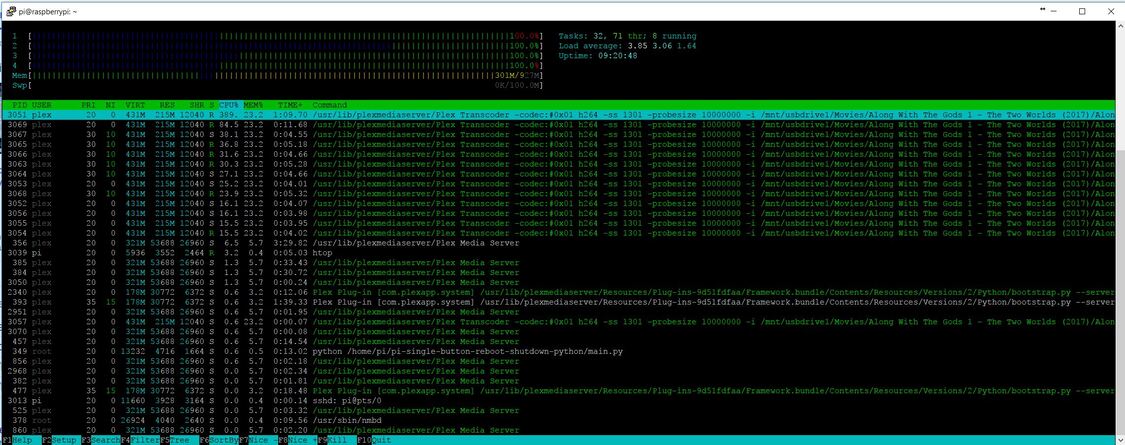
CPU loading is at 100% because transcoding video file with subtitle
Conclusion:
-
Plex app in WebOS unable to direct play movies when subtitles is on, instead it required transcoding to get the subtitle printed on the screen. As a result, RPI CPU is at 100% performing transcoding task (RPI2 or RPI3 are not capable of doing real-time transcoding, hence we kept on seeing the constant buffering on TV)
-
Xplay app on the other hand able to direct play original movie files with subtitle and not require transcoding process at all (pi CPU loading was very low, less than 10%).
I supposed is about time for Plex webOS developer to refresh their code and fix this. Raspberry Pi is gaining so much popularity now, is a perfect low power media streaming server. Unable to play movie smoothly with subtitles actually very disappointing
I second this. If you search the internet, you will find tons of people saying the same thing: Plex app forces transcoding of 4K HDR movies with subtitles, while other third apps (like XPlay) allow direct play.
So if you wanna use a Raspberry Pi as your plex media server and wanna play 4k HDR subtitled content, you are forced to use third party apps instead the official Plex app.
It’s really a shame.
