Just a question - if i played the files from a USB Stick and all worked fine? The TV processing problem would it be ruled out?
I don’t know a way to share other than screen shots… I can try to remember to do it tomorrow, i’m heading to bed now
No problem thanks!
I have been trying to change a few TCP settings to no avail - with the test files however - I am getting a warning message that my connection is not fast enough for the server?
Looking at speed test I average around 450 to 600 each test I do where my Plex server is.
I am going try to upgrade my Ethernet cables maybe ?? they are old and maybe with better connection I may need some Cat 6 cables… could this be the interference?

I mean, I doubt it honestly… look at the screenshot you sent of the 1080p file playing above… It’s only 18Mbit, and your TV can pull 80Mbit without a problem… Plus it happens both wired and wireless, and the tv gets 80Mbits no matter which connection it’s on… So I really don’t think it’s the internet connection… it COULD be the router it’s connected to, but that seems unlikely… So that leaves the TV itself… if I had to choose between an NVidia Shield TV or some device I’d never heard of, I’d choose the Shield…
Also, I did just look through my server settings, and can see nothing that would explain the issue you’re having… Do things play fine on the chromecast? Or do you have the same issue?
Chromecast plays fine but tanscodes all the files chromecast does not accept.
It is only on Direct Play if files are bigger than normal.
Thanks for the advice on the Shield or Vero and all help thus far - much appreciated.
If it is a TV problem processing the Direct Play that is a shame really…
Playing video now via the app - but its a normal 1.4gig file and plays easy.
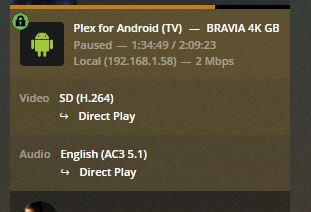
Update on this
Tried some cat 6 cables and no change.
Going to check my HDMI cable from TV to AMP ARC see if this may be the problem before i purchase a new device - still debating the shield or Vero 4k+ after reading many reviews and videos on Vero.
I just cannot see how or why the TV cannot process a less than 100Mbit file does not make sense to me… lol
More to come with tests here…
1 Like
Update -
So i did a few changes in wiring - all new cat 6 Ethernet throughout - had to be done anyway and I also bought newer HDMI cable that were also very old - so everything wired is more up to date.
Had time to cable manage too 
I was hoping this would help my “bandwith” problem and it did not and does the same as before - once files have sound file DTS MA it struggles and when I try a video file above 1080p so 4k it struggles.
Not sure if it will help anyone if i add my log file here to identify the problem - i tried to eliminate on my side all but still no luck.
I added my log here - you may notice many files played as downloaded a few demos to test, maybe somewhere there there is a problem someone can help me with.
One difference - DTS MA files for example just skips when playing and has a delay to reach my AV amp to show DTS.
If I play 4k files regardless of sound file - it skips and I also get a message not enough network to server to play this file - BUT at 600megs going to my server I cannot see this to be a problem.
I checked CPU - RAM usage and both do not struggle.
Please let me know which Log file you need - thank you instead of sending the whole zip file.
edit actually found the recent changes in the log when trying a few files this AM at 9.40am in the logs
com.plexapp.system.log (14.0 KB) Plex Media Server.log (5.7 MB) Plex Transcoder Statistics.log (5.8 KB)
another edit maybe -
My current server set is:
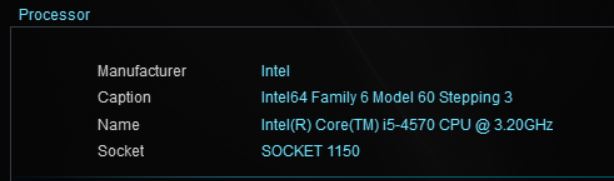
Thanks.
Correct me if U am wrong - however the more i read about m CPU it may be the problem I am having - many say it struggles with higher but files and maybe this is why.
Can anyone confirm this could be the problem, it is quite old CPU now.
If it is CPU then i need to make judgement call - new CPU/M/board or the Shield to bypass Server CPU as many say the Shield is Badass and plays everything people throw at it?
If it were transcoding, I’d absolutely say that the CPU is the issue, however, DirectPlay of the video file is very minimal processor usage, and even a low grade NAS can DirectPlay a 4K file. I am telling you, if your TV is struggling with 4K that’s because the interface is only 100Mbit, and when we last spoke you couldn’t get it to do more than 80Mbit over Wired or Wireless… 4K Files commonly go over 100Mbit… a 1080p file however, peaks at around 40Mbit, so you should have no problem with 1080p files. However, last we spoke, those weren’t playing correctly either. Has that problem been fixed? Or still have issues with 1080p files?
It is transcoding and not detecting any GPU causing all (audio+video+subtitles) to be done by the CPU, even for one stream it is underpowered.
The Sony doesn’t have an E-ARC hdmi and probably wouldn’t pass lossless audio if it did, the combination of audio + non text subtitles will cause it to transcode.
Oct 19, 2019 09:39:52.423 [10408] DEBUG - TPU: hardware transcoding: enabled, but no hardware decode accelerator found
Oct 19, 2019 09:39:52.423 [10408] DEBUG - [Universal] Using local file path instead of URL: E:\4kUHD Demo\Samsung  Introducing Quantum Dot Display Demo.ts
Oct 19, 2019 09:39:52.423 [10408] DEBUG - TPU: hardware transcoding: final decoder: , final encoder:
1 Like
Hi,
1080p works well, however if i add an DTS MA sound file it does not.
1080p DTS 5.1 is hit and miss
1080p AC3 5.1 no problems
any 4k - with stereo to DTS MA - stuggles.
Still not found solution - with the set up i have at the moment - regarding Direct Play yes i did think that if direct play CPU wont be the issue… making it more likely to be the TV.
@pl_5309 thanks for joining and replying.
Not to sure what this means - and a little confused as only have problems with “Direct Play” from the Sony TV app.
If i use Chromecast for example - all 1080p any sound file will play ok as it transcodes down audio file as Chromecast cannot do it. But even with Chromecast all 4k ones seem to struggle too…
The main issue you are experiencing is the behaviour of Plex streaming brain when it deals with a client that can’t process/pass through the audio.
In order to pass DTS-HD MA or Dolby Truehd audio, the TV would need an E-Arc port (HDMI2.0B or HDMI2.1) that didn’t arrive till this year. If the manufacturer allows DTS or DD to pass out the ARC port the lossy core of DTS-HD MA should work, Dolby True HD will be transcoded.
If the audio is being transcoded and you add on subtitles then Plex starts transcoding the video to keep everything in sync. With the new transcoder in 1.17+ I am unsure but prior Plex would not do 4K to 4K. The combination of audio + video being transcoded is too much for your processor. Your Haswell processor if the GPU was working could handle 4k in h.264 Main, High, SHP, MHP up to profile level 4.1 leaving the CPU to deal with the audio. You would have to check the xml info on the file to know if it fall within this range.
The Chromecast + Plex have their own current issues and most audio would start out transcoding.
1 Like
Thanks - would my option to add a Plex Client like the Shield help?
Yes, this what pushes most people into getting an AppleTV 4k or Shield.
Guess i need to be patient for a week or so with the new models coming out next week according to leaks the last few days.
thanks to all…
Will let know how it goes when i purchased the new shield as I think two models are coming out - so will have to see which one to get as not into gaming so hopefully the rumoured small one will be exactly what i need.
Time to check which one is best for me with the new Shield TV 2019 & Pro out today… and will revert more when i can
Update on this
I recently received the new Nvidia Shield Pro 2019
Connected it all - very easy set up - HDMi direct to the TV
Ethernet connected to modem
Installed Plex as Plex Client only
Changed Plex pass-through settings and max settings
All video files so far played flawlessly full audio and video quality.
The Shield TV solved my problems!
I will add my set-up here for anyone who has similar problems…
PLEX MEDIA SERVER:
Intel i5-4570 CPU @ 3.20GHz
8.0GB RAM
Windows 10 Pro 64-bit
ASUS B85M-G
Intel® HD Graphics 4600
ST2000DX002-2DV164 Main Drive
WDC WD4003FZEX-00Z4S Storage
WDC WD30EFRX-68EUZN0 Storage
TV/AV:
Sony TV 55" XE9005.
Onkyo - TX-NR609
All HDMIs connected to TV and A/V via ARC connection to the Amp.
Nvidia Shield Pro 2019 - hard wired to modem and connected to TV for Plex Client as Player.
Thank you to all who have helped me!!
1 Like
This topic was automatically closed 90 days after the last reply. New replies are no longer allowed.
