Server Version#: 4.108.0
Player Version#:
<If providing server logs please do NOT turn on verbose logging, only debug logging should be enabled>
Hi all
I currently have my library split across 4 Hard Drive:
- BR Movies
- BR Movies
- BR Movies and BR TV (sub folder for each type)
- 4K Movies and 4K TV (sub folder for each type)
I’m going to consolidate this and cut down on a single drive to:
- BR Movies
- 4K TV and BR TV (sub folder for each type)
- 4K TV
Of course this means I have to shift things around (removing the sub folders) and changing drive letters.
Can I just do one drive at a time? I would like Plex to honour my artwork/backgrounds if possible, rather than having to re-do everything.
thanks!
thanks, I saw that. I was wondering more if Plex will basically start from scratch and create new artwork etc when picking up the titles that have moved. Especially since I will still have the “old” location according to that guide. Like will it just create duplicates or start again? I don’t want to have to re-do 1500 titles.
Plex should keep custom artwork, collections, etc.
That is the reason for copying the files and having Plex pick them up as duplicates.
Be sure to disable Empty Trash Automatically.
You can test the process before moving all your media.
Create the new location for BR Movies, copy over just two or three movies, etc. and see how Plex handles things. For the last step, Remove Old Content Location, remove the files from the original location instead of removing the path from the library. Scan the library to pick up changes and empty trash.
Do the same for TV shows.
If you do not have a specific reason to separate 4k media, like choosing not to share those libraries with people … It might be nice to have all movies in one place and all TV in one place.
Plex just transcodes as needed for lesser screens, right? That’s why Plex is cool.
Yeah it would be great. I’m working within hard drive constraints right now though. There’s 46TB in there currently but I need a bit more, and also want to cut down on the amount of drives.
Got it.
It isn’t totally obvious from the form so in case you don’t know… You can add more than one folder to a Plex library. So if you wanted one library for all TV and another for all movies, just add all the relevant folders in the library Edit form.
As long as the Plex naming rules are followed inside each folder it should work fine.
/Some/Place/TV BR
   /Doctor Who (1963)
      /Season 01
         Doctor Who (1963) - s01e01 - An Unearthly Child (1).mp4
         Doctor Who (1963) - s01e02 - The Cave of Skulls (2).mp4
/Some/Other/Place/TV 4k
   /From the Earth to the Moon (1998)
      /Season 01
         From the Earth to the Moon (1998) - s01e01.mp4
         From the Earth to the Moon (1998) - s01e02.mp4
/Some/Totally/Different/Place/TV 4k
   /Grey's Anatomy (2005)
      /Season 00
         Grey's Anatomy (2005) - s00e01 - Straight to the Heart.mkv
thanks! The new drive should turn up in a couple of weeks, so I’ll test it all out then.
So this sort of works. I copied one of the folders across to the new hard drive and told Plex to look there. It did, and it’s indeed made copies under many titles. But not all. There’s still a lot it’s ignored and now I have title duplications… and have to manually go and match them. Yuck. This was the small drive as well. Not looking forward to doing this on the bigger drives.
A drag and drop feature would be really really nice, Plex (where I can just drag the new title on top of the existing correct one). Saves me having to manually match the title again.
edit: and it’s matched a couple (so far) wrong as well. I’ll have to go through them all to check. This is what I wanted to avoid.
What version of Plex Media Server are you running? 1.32.8, 1.40.x?
See Settings → Server_Name → General.
For one or two of the titles that did not match, please show how you have the files named and organized. Include the full path to the file, showing which folder is added to the library, both old and new locations. Also show the file extension (mkv/mp4/etc).
Also, you should be using the “new” scanners/agents. Movies: Plex Movie / Plex Movie. TV Shows: Plex TV Series / Plex Series.
If you’re using the new scanners/agents and following Plex naming & organization requirements there should be very few mismatches.
However, there is a bug in PMS 1.32.8 where the scanners occasionally do not initialize correctly. The workaround is to restart PMS. The bug is fixed in 1.40 (current Plex Pass / beta release).
The above will help figure out why things are not working.
I’ll do so, thanks! I’ve just sorted out the UHD folder, which had about 380 titles. Now merging the first of 3 BR drives, which each have another 200-400 titles. I’ll look for the mis-matches and post back.
Version is Version 1.32.8.7639. I do think I’m running the older library scanner though… happy to switch, but will I lose all my custom posters and backgrounds?
Also, sorry for the last question… when all of this is done, can I just change the Drive letters of my hard drives and Plex will pick that up?
I use to have E, F G, and H… I’d like to have E, F and G when done, but because I’m adding new drives and copying things around, “I” has been introduced and E/F will be deprecated… slightly triggering me 
Plex should keep any custom selections that are locked in place. However, I’ve seen posts where that does not always happen.
See:
See Move Media Content to New Location (previously linked by @tom80H).
Basically (read document for details):
- Copy media to new location.
- Add new location to library.
- Scan to pick up new location. PMS will show duplicates.
- Remove old location from library.
- Scan to pick up changes.
- Empty trash and clean bundles.
Basically (read document for details):
Yep, this is the method I’m using now… I was hoping a simple Drive letter change could be picked up without me having to go through this all again, but alas it’s not so. That’s fine. It’s a small issue for now, thanks for your assistance.
Here’s an example of where the items failed to merge correctly. (there are others that are similar or slightly different as well)
There are two cuts here. Theatrical and extended. The merge correctly placed the “Argo” files together. But the “extended” cuts didn’t merge (almost anything that is a “cut” doesn’t merge)
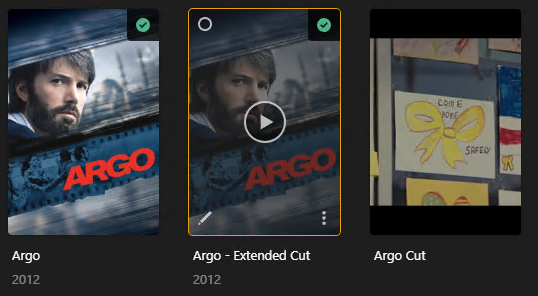
Folders are shown below

Similar is Battle Royale, though here there’s only a Director’s Cut

Folder:


Now I know the above file/folder should probably be named “Battle Royale” instead of the file name it’s given, but I was hoping that Plex would be able to duplicate what I already have rather than create an unknown entry that I have to manually merge.
Is there something to say that new additions should be treated as copies of existing movies so it knows to match based off file name?
edit: another example (which I’ve already fixed but if I come across another example today I’ll post) was where Beverly Hills Cop was copied across but Plex added an entry for Beverly Hills Copy III. That was much more clear cut where the folder was the correct movie name and the file was named perfectly as well. Yet I had an entry for a movie I don’t own (as you can see below, in the bottom row)
File structure for the and new location was basic and followed this path:

And here’s an example that’s in principle identical to Argo but it had a different outcome.
Apocalypse Now is saved as the standard movie and the Redux.
But instead of creating an empty entry like it did for Argo, Plex merged the copied Redux into the standard movie.

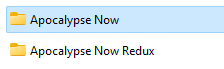
Same issue, different outcome
Another different example
Blinky Bill (for the kids, haha)
new entry on the left (H drive). Old location is G.
Plex created a new entry instead of merging the current one.

I guess this is because the folder structure changed, but that was the point of this exercise - folder structures were always going to change with new drives coming on board and my need to be more efficient with the structures.
Maybe to fix all of this, a simple flag to say a user is doing a data migration (and therefore Plex will rather merge similar titles instead of creating new ones?). Unless something like that already exists.
Plex Documentation → Your Media
You need to follow Plex naming & organization requirements.
First, do not add the root of a drive to a library (ex: F:\ or H:\). That can cause problems, as sometimes Windows or other apps may write temporary files to those locations. When that happens, Plex will try to scan them.
You want to have a top level folder that holds the movies. For example, F:\Movies or H:\Movies.
Second, you need to add the year to each movie folder and file name. This helps Plex correctly match the movie.
Third, for separate movie cuts, use Editions (see documentation linked above). Each edition will be listed separately and watched status & progress will be tracked separately.
H:\Movies  <-- folder added to library
..\Apocalypse Now (1979) <-- Movie Name (year)
....\Apocalypse Now (1979).mkv
..\Apocalypse Now (1979) {Edition-Redux} <-- use curly braces for Edition support.
....\Apocalypse Now (1979) {Edition-Redux}.mkv
If you’ve many movies/shows to name, there are tools that can help. Filebot is popular. The free version of Tiny Media Manager works quite well. There are many others as well.
TMM Renamer Patterns:
- Show Name:
${showTitle} (${showYear})
- Season:
Season ${seasonNr2}
- Episode Name:
${showTitle} (${showYear}) s${seasonNr2}e${episodeNr2} ${episode.title}
- Movie Name:
${movie.originalTitle} (${year}) {tmdb-${movie.tmdbId}}
PowerRenamer in Microsoft Power Tools is helpful for simple renaming with pattern matches or regular expressions. It makes quick work of tasks such as adding a year to file names, removing undesirable text from multiple files, etc.
Whatever you do: never switch agents and swap drives or drive letters at the same time.
If you want to switch to the new metadata agents, do it separately from moving your media files around.
If you switch agents, it is sometimes not guaranteed that your poster selections will remain. Simply because the new agent might provide different posters than the old one (or provide them in a different order).
And even the new agent will sometimes swap out posters after you do Refresh Metadata. Because it’s using TheMovieDB.org as its main poster source. And on TMDB there is a user-voting on poster motives. New posters get uploaded and voted up/down by the user base, so that the order of posters can change.
If you want truly stable posters, store them as jpg files beside your video files. The syntax is explained in the above hyperlinks.
thank you everyone for your help. After working on this every day for nearly a week, I’m done!
Everything is now sorted into the right drive. I’ve removed an extra drive from the PC as a bonus. I manually matched (literally got an ipad/pencil and manually marked off an exported list vs plex! and even did vlookups the other way around… and tried many tools to automate like WebTools NG which never worked) everything and now the library is done. I found lots and lots of errors!
Definitely won’t be updating the Agent at all after that mission. Don’t want to go through this again.
Thanks again to those who helped, much appreciated.



