I have recorded a 26 min TV Show and the file size is 3.69GB.
Is there any way I can record a smaller size or would I need to manually do this?
Also, can Shows record in another format other than .ts ?
That seems… excessive. Even for an MPEG2VIDEO encoded video in a transport stream (.ts) container. I’ve got 30 minute, 720p, 60 fps videos recorded from an HDHomeRun OTA tuner (Flex 4K) that are around 30% that size. (FOX in the States broadcasts in 720p/60, MPEG2VIDEO.)
Can you post the XML info from the recording so that we can see how it’s encoded?
But to answer your question, you can have the DVR transcode the video to H.264 or H.265 while recording to potentially decrease the final size. In your Live TV & DVR settings, click the gear icon next to your listings:

Then, enable the “Convert Video While Recording” option. This will cause the video to be transcoded to H.264 in realtime while recording. Optionally, if you’d like to use H.265, and your hardware supports it, enable the “Enable HEVC video encoding (experimental)” option in your Server → [Server Name] → Transcoder (Show Advanced) settings.
I have the XML info in .xml format file, how do I post it?
You can just post it in your comment using the preformatted text tool </> from the toolbar.
<MediaContainer size="1" allowSync="1" identifier="com.plexapp.plugins.library" librarySectionID="9" librarySectionTitle="TV Recordings" librarySectionUUID="a92d6c95-cb64-4a8d-a708-d99bf215f418" mediaTagPrefix="/system/bundle/media/flags/" mediaTagVersion="1737517094">
<Video ratingKey="136748" key="/library/metadata/136748" parentRatingKey="136747" grandparentRatingKey="136746" guid="local://136748" parentGuid="local://136747" grandparentGuid="plex://show/667b83e539baf404a779d733" grandparentSlug="toku-reo" type="episode" title="Episode 07-24" grandparentKey="/library/metadata/136746" parentKey="/library/metadata/136747" librarySectionTitle="TV Recordings" librarySectionID="9" librarySectionKey="/library/sections/9" grandparentTitle="Toku Reo" parentTitle="Season 2024" summary="" parentIndex="2024" viewOffset="69000" lastViewedAt="1738111502" lastRatedAt="0" thumb="/library/metadata/136748/thumb/1738026493" parentThumb="/library/metadata/136747/thumb/1738026493" grandparentThumb="/library/metadata/136746/thumb/1738026494" duration="1569600" originallyAvailableAt="2024-07-23" addedAt="1738026487" updatedAt="1738026493" oneShot="1">
<Media id="161812" duration="1569600" bitrate="19740" width="1920" height="1080" aspectRatio="1.78" audioChannels="2" audioCodec="aac_latm" videoCodec="h264" videoResolution="1080" container="mpegts" videoFrameRate="PAL" audioProfile="he-aac" channelIdentifier="5" mediaGrabBeginsAt="1738024200" mediaGrabDevice="device://tv.plex.grabbers.tunerservice/dvb%23bda%23usb%23vid_2040%26pid_8265%230014346229%23" mediaGrabOriginalDuration="1788760" mediaGrabPostProcessed="1" mediaGrabStatus="complete" origin="dvr" videoProfile="main" hasVoiceActivity="0">
<Part accessible="1" exists="1" id="166303" key="/library/parts/166303/1738026485/file.ts" duration="1569600" file="F:\TV Recordings\Toku Reo\Season 2024\Toku Reo - 2024-07-23 13 30 00 - Toku Reo.ts" size="3967842460" audioProfile="he-aac" container="mpegts" deepAnalysisVersion="6" packetLength="188" requiredBandwidths="32498,29180,25621,23270,21458,20094,20089,20089" videoProfile="main">
<Stream id="366571" streamType="1" codec="h264" index="0" bitrate="19645" bitDepth="8" chromaLocation="left" chromaSubsampling="4:2:0" codedHeight="1088" codedWidth="1920" colorPrimaries="bt709" colorRange="tv" colorSpace="bt709" colorTrc="bt709" frameRate="25.000" hasScalingMatrix="0" height="1080" level="41" profile="main" refFrames="2" requiredBandwidths="32403,29084,25525,23174,21362,19998,19993,19993" scanType="progressive" streamIdentifier="256" width="1920" displayTitle="1080p" extendedDisplayTitle="1080p (H.264)"> </Stream>
<Stream id="366572" streamType="2" selected="1" codec="aac_latm" index="1" channels="2" bitrate="95" language="English" languageTag="en" languageCode="eng" audioChannelLayout="stereo" profile="he-aac" requiredBandwidths="96,96,96,96,96,96,96,96" samplingRate="48000" streamIdentifier="257" displayTitle="English (AAC_LATM Stereo)" extendedDisplayTitle="English (AAC_LATM Stereo)"> </Stream>
</Part>
</Media>
<Image alt="Episode 07-24" type="coverPoster" url="/library/metadata/136747/thumb/1738026493"/>
<Image alt="Episode 07-24" type="snapshot" url="/library/metadata/136748/thumb/1738026493"/>
<UltraBlurColors topLeft="471d16" topRight="463274" bottomRight="673023" bottomLeft="562320"/>
<Channel id="487048" filter="channel=487048" tag="5 Whakaata Māori"/>
<Marker id="183186" type="credits" startTimeOffset="1410160" endTimeOffset="1536160">
<Attributes id="183186" version="4"/>
</Marker>
<Extras size="0"> </Extras>
<Related> </Related>
</Video>
</MediaContainer>
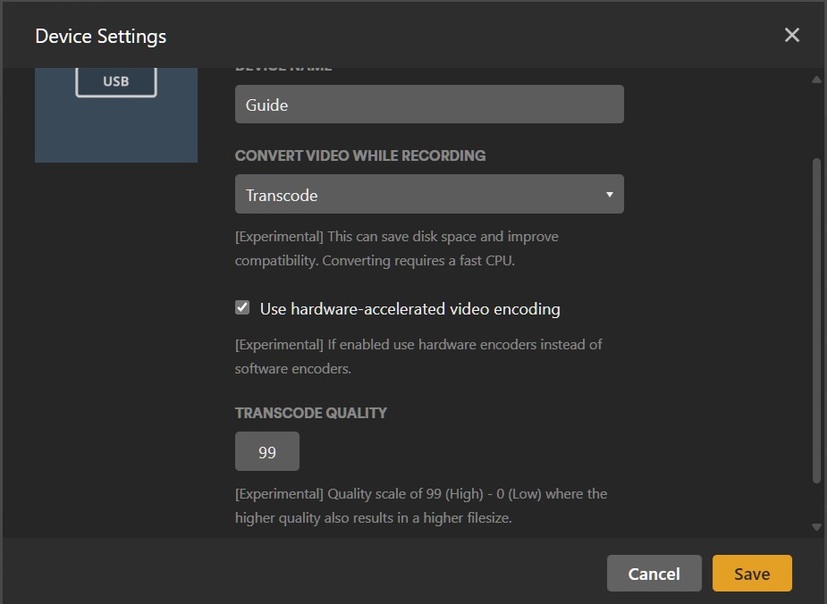
Wow, that’s already ~20 Mbps H.264. You could try lowering the transcode quality to lower the file size. If your system supports it, you could also try enabling HEVC encoding in your Transcoder settings.
Do you have any reference as to what it would be without converting while recording? I only ask because that seems really high even for MPEG2VIDEO codec.
I have recorded again with transcode quality set to 15 from 99 and the file size is now 2GB
Not too sure on how to enable the “Convert Video While Recording” option. This will cause the video to be transcoded to H.264 in real-time while recording. Optionally, if you’d like to use H.265,
