Hi, I’ve been trying to get this working properly since about last night. I’m pretty sure I’ve installed ASS properly and I just finished a re-install of HAMA.
But I’m still at a point where I can’t get it to pull any metadata from anidb. If someone could let me know what I might be doing wrong it would be a great help.HAMA Troubleshoot.zip (57.4 KB)
Hi again,
Am I doing something wrong?
For some anime movies, the scan finds the match and inserting [anidb-4151], but not download information.
XML: C: \ Users \ Gustavo \ AppData \ Local \ Plex Media Server \ Metadata \ Movies \ a \ d0bbaa3316a8da8462c21d00ad0a3c8af55fd16.bundle \ Contents \ _combined
Info.xml is empty,
Thank you
	<anime aid="13498">
		<title type="main" xml:lang="x-jat">Ulysses: Jeanne d`Arc to Renkin no Kishi</title>
		<title type="official" xml:lang="en">Ulysses: Jeanne d`Arc and the Alchemist Knight</title>
		<title type="official" xml:lang="ja">ユリシーズ ジャンヌ・ダルクと錬金の騎士</title>
	</anime>
In this case remove the hyphen in “Ulysses- Jeanne d’Arc and the Alchemist Knight”, or at least put a space before as it is part of ulysses word then and throw all calculation off
Hi,
So I have a weird issue with movie titles with some Detective Conan movies.
As an example, I’ve created a separate library with just a single movie inside.
The folder:
Detective Conan Movie 04 - Captured in Her Eyes (Sub)
The files inside:
Detective Conan Movie 04 - Captured in Her Eyes (Sub).mkv
anidb.id (this contains 2647).
The movie itself gets matched correctly to “Case Closed Movie: Captured in Her Eyes”.
However, the “Season 1 Episode 1” gets all the metadata from the first Detective Conan movie.
It’s kind of hard to explain so I hope the screenshot explains it better:
Looking at the HAMA log, everything seems to be matching fine, until suddenly:
2019-01-06 20:10:43,082 (7fd8a9107700) : INFO (TheTVDBv2:253) - s0e1 s01e001 anidbid: 2647 air_date: abs_number: 0, title: Movie 01: The Time-Bombed Skyscraper com.plexapp.agents.hama.log (201.1 KB)
I updated ASS and Hama before creating the separate test library just to rule that out as an issue.
Am I doing something wrong?
So my hama agent is not pulling new info for episodes - new boruto episodes have the hd080p at the end of the episode name that tells me that it isn’t pulling metadata. When i try to do a fix the search spins forever
My question is what is the quickest way back to fixing hama?
Okay put new zip into plugins folder - before that you fix match dissapeared from anime library which was absolute and hama - readding hama has made it dissapear from agents - this isn’t going well
Hi
I guess this is still operational. I have some newly downloaded anime that isn’t getting the right episodes nor correct descriptions. I am looking at the README to try and determine how to troubleshoot.
Should I be updating from git periodically? I installed in 2017 I think. You mention using powershell. Are you referring to “git pull”? Is there a way to update automatically? Is it okay to just manually copy and paste? And is the .py file all that is required for updating?
By the way in your OP, you link to “the original” you forked from, but that link is now broken.
Hi ZeroQI Few weeks ago, I finished installing a Plex Server in a docker container. Last week I add another library to the server but when I scanned it a lot of series dont show any poster or metadata. My other window server with the exame library show some problems (even when I restore it) a few days later. I think this is a aniDB banning issue. I tried using the latest version of the agent and rolling back the version of plex server before realize the problem is from anidb.
@Ninelpienel It crashes: “AttributeError: ‘str’ object has no attribute ‘xpath’” due to MAL. Pretty sure there was a fix recently to handle that 22 days ago:
@mcrommert recent agent doesn’t need folders manually created anymore. Latest release fix issue as you noticed
@ataribaby i wrote a troubleshooting section. You update if you have issues. so you do not ask to resolved something already resolved in latest code. Yes you can copy and paste. PowerShell was written to be easier though. You need to update all files. OP?
@EvilVet exame = contraction of exact same? banning last 24h. Logs indicate if banned, please go through them
Update: Oh wait! I think I know what it is… I’ll post an update after I try something!
Hello @ZeroQI ! First, I’d like to thank you so much for all your great work, I’ve been testing for a while and it saves me a lot of time :]
Now, I’m trying to create my final library here, with the new version of HAMA, and I’m facing an issue where some anime that I have are being duplicated as “X Seasons” and “1 show”. When I click on the show, it points to the seasons anyway. Am I missing something?
I’m happy with any of those, just don’t like having both in my library.
Disabled : Don’t display collections inline at all.
Hide items which are in collections : If an item belongs to a collection, do not show the item in the main library when browsing. Entries for collections are shown inline.
You are currently showing everything
I would “Hide items in collections” to group them but in that case remove the collection since only one series is in it, or you can not show collections…
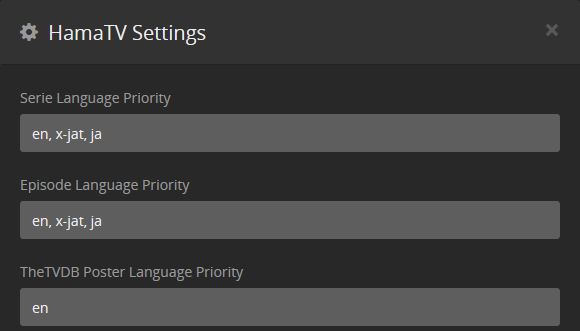
HAMA is giving me issues with Panty & Stocking with Garterbelt whenever I set the primary language of the agent to “en.”
When the primary language is x-jat, I get the appropriate episode names for the AniDB agent. However, when I set it to “en,” every episode follows the tvdb agent instead of the AniDB agent save for episode 11.
I’ll provide screenshots to show what I’m talking about, and include all of the logs I have available (oddly enough, I don’t have any episode specific logs for whatever reason).
I know this is a lot of info to sift through, so I don’t expect an immediate response. Thanks in advance!