I’m sorry, but I find the practice of closing threads downright stupid. It totally loses continuity, disrupts conversation flow, and obscures the topic at hand. Nonetheless, the gawds here have determined that this thread must be split in two. So here goes.
Would you say the following is an accurate summary of where your issue currently stands?
The remote access settings page for your server always shows “Not available outside your network” except in the brief period after you enable remote access.
The public IP address displayed by Plex is different from the one shown as the WAN IP address on your router, or from canyouseeme.org.
You employ a VPN client on your NAS running Plex Media Server; all outbound traffic from the NAS currently egresses via the VPN tunnel.
You have not yet determined whether or not you can configure split tunneling using your VPN client such that Plex traffic bypasses the VPN tunnel.
You are able to (always?) connect to and play media from your server remotely from your cell phone using its cellular network.
Your shared users intermittently have issues connecting to and playing media from your server remotely and they don’t often notify you of this in a timely manner.
Assuming that’s all correct, my first troubleshooting suggestions would be to:
Disable Wi-Fi on your phone and begin playback of a media item on your server.
On your server’s web client, navigate to Dashboard (Activity icon -> Dashboard) and show details.
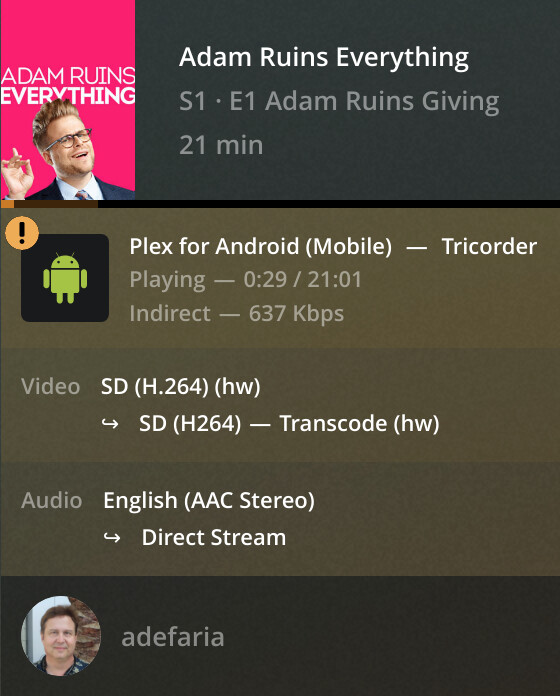
Note the location shown for the playback; it should be one of: Local, Remote, or Indirect. You can post a screenshot of it here if you like, or just report that value.
Also, navigate to Settings -> Network in the web client and see what the value of “Enable Relay” is and report that.
The remote access settings page for my server always shows that remote access is ok for about 1/2 second every time I display that page. Then it quickly toggles back to remote access not working. Additionally, if I disable then attempt to re-enable remote access, it will again briefly flash that remote access is available, then quickly flash back to remote access not working.
The public IP address displayed by Plex is different from the one shown by canyouseeme.org. Sometimes the port for that IP address is 0. Other times, like right now, I see 84.17.45.11 : 18187. Why it’s chosen port 18187 is beyond me.
I have not confirmed that all outbound traffic from the NAS currently egresses via the VPN tunnel. I even asked Synology early on via a support ticket but never received a definitive "Yeah all outbound traffic egresses through the VPN. I suspect it does.
I am able to sometimes connect to and play media from my server remotely from my cell phone using its cellular network. Realize that where I am at in Phoenix Sprint has crappy coverage. It is not a frequent mode of operation for me.
Currently, I have 3 users streaming from my PMS (busy night!). All say direct play but I find that confusing. One’s here in Scottsdale (I’m in Phoenix) and the other is in Florida. The 3rd is me streaming something for myself. All appear to be streaming fine (Florida may have hit pause).
Disconnecting my phone from the wifi yields me a very weak signal. Sprint doesn’t have good coverage at my house which is why I usually just use wifi. As such connecting to my PMS just spins round and round… Ah got a connection! OK, streaming something. 4 users! Here ya go:
This means that remote access to your server is being provided via Plex Relay. That is because when Plex tests its ability to reach your server, it is unable to do so. Because of this, and the fact that you have relay enabled, Plex proxies the connections through its own servers. So what appears to be intermittent failure of remote access to your server is (likely?) an intermittent failure of the relay.
Based on the information provided, it is almost certainly the case that the VPN is a contributing factor in the remote access failure. Since Plex sees your public IP address as being that of the exit node for the VPN server to which you’re connecting, that is where it attempts to reach your server. Presumably, that connection attempt is going nowhere since the VPN provider isn’t forwarding the request to your server.
You can get true remote access (non-relay) in one of several ways, depending on what your VPN provider and ISP can and cannot do:
Set up a port forward with your VPN provider. PIA supports this, but I think it must be requested via their app. Since you’re not using their client on the NAS, this may not be possible. Specify that port as the manual port in Plex’s remote access settings.
Configure split tunneling on your VPN client such that Plex traffic does not egress via the tunnel. Have your ISP configure a port forwarding rule for Plex and then manually configure that port in Plex’s remote access settings.
Have your ISP configure a port forwarding rule for Plex and then manually configure that port in Plex’s remote access settings. In Plex’s Settings → Network configuration, specify a custom server access URL. Something like the following (replace “32400” with the port you work out with your ISP, if not 32400):
The point is, traffic has to be able to ingress from Plex’s servers to your server at a known IP address and port. Right now that isn’t happening, so relay is being used.
This is interesting and thanks for the detailed explanation. However, I am still confused. First, however, a question. Is this relay thing happening when remote users see Plex complaining that the connection is “indirect”?
You say “Plex tests its ability to reach your server, it is unable to do so”. Who or what is ‘Plex’ in that statement? I assume you mean Plex, the organization behind Plex.tv, or perhaps you mean the remote users Plex client.
Next, you say “Plex proxies the connection through its own servers”. Again, does the phrase ‘Plex’ also mean the organization behind Plex.tv? If so then I don’t understand how it can, on the one hand, not be able to reach my server and then in the same breath proxy stuff from my server! If it can’t reach my server, how can it proxy it?
Of the solutions you propose, I like #2 best which is to just configure split tunneling so that Plex traffic does not egress via the tunnel. At that point is calling up my ISP to have them do a port forward still required? I’m really trying to avoid that. I mean are we sure that UPnP is unable to port forward if it is given a channel that is not tunneled?
I have a friend of mine that is also on Cox but in a different state - California and I don’t believe he’s doing any port forwarding, manual, or by calling up Cox (I’ve asked him to confirm - waiting for a reply). I think he just uses port 32400 and lets UPnP do the port forwarding and it works for him.
Relay is likely always happening. When they are complaining, some other issue has occurred and the relay isn’t working as expected.
“Plex” in my statement was referring to Plex, Inc.
Yes. The support article I linked describes the process in greater detail.
It works because Plex’s relay servers are not initiating the connection. By enabling relay, your Plex Media Server establishes the connection to them (Plex’s relay servers). When a request is made by a remote user to connect to your server and play media, it is tunneled over that existing connection, from your server to Plex’s relay servers to the remote client.
With true remote access, your server publishes its connection information to Plex, Inc.'s servers. It publishes both a private connection URL (for local access) and a public connection URL (for remote access). It also publishes any custom server access URLs you’ve configured. When this information is published, a connectivity test is performed to the public URL(s). What you see on the remote access settings page is the result of that connectivity test.
When the connectivity test passes, and a remote client attempts wants to access your server, it requests the public connection URL from Plex’s servers and they provide the published URL. The client then attempts to connect directly to your server using that URL. If all goes well, the remote client can then stream media directly from your server, subject to any bandwidth limitations you have defined for remote access.
If the connectivity test fails, and a remote client wants to access your server, it still requests the public connection URL from Plex’s server’s. However, in this case instead of providing the published URL (which it was unable to contact), Plex, Inc.'s servers provide the URL to reach your server through their relay servers, a connection to which your Plex Media Server has already established. Media played over this connection is subject to bandwidth limitations imposed by Plex, Inc.
This is just a high-level overview and some of the details may not be exactly correct on a technical level, but this is generally how it is supposed to work. Specifically, there’s a lot of detail missing about how this model works with local clients since it’s not strictly relevant here. Also, some of the order of operations may be a little off.
I don’t think we can be sure of that at all, actually. Maybe your ISP has UPnP enabled and it will work automatically, if you can bypass the VPN tunnel. It’s certainly worth testing, if you can get split tunneling working.
I’m going to make the assumption that you’re using the VPN for privacy when downloading.
There are Docker containers that include VPN, media management, and download tools. If you used one of those, you could disable the whole-NAS VPN, nicely avoiding Plex.
OR, there’s a Docker container for Plex. Using macvlan networking would bypass the Synology VPN. But I’m not familiar with Docker on Syno - it might take extra steps to enable hardware transcoding.
Great stuff there @pshanew! I was trying to understand “indirect” access and thought maybe that was just another term for relaying. Sorry, I didn’t click your link. Good stuff there. I’ll have to read up on that later. I’m still preferring the split tunneling approach but I have yet to hear back from Synology and PIA about that. I’m hoping split tunneling will work and UPnP will work on my ISP’s router. Another option I’ve heard of is supplanting Cox’s cable modem/router/wireless access point with my own hardware and do the port forwarding myself. That’s a little more effort and $$$ but you gain control.
@Volts, yes VPN for download. And yes to Docker containers. All my tools, save the PMS itself, are Docker containers. I wanted to use them if for no other reason than to get better familiar with Docker. And I think I saw some of them that included the VPN but I was not able to get them to work, gave up, and when for the non-VPN stuff, relying instead on using PIA at the Synology level.
So if I understand your “half-ideas” you’re saying that I can either go with changing all of my current Dockerized tools for download to use Docker containers that have VPNs with them, then take off the PIA VPN on the Synology and I will have those tools VPNed but the Plex server not VPNed. Then either see if Cox allows UPnP to port forward for me or call them.
Or I can VPN at the Synology level thus having everything VPNed, but then run Plex in a Docker container through this macvlan virtual network that escapes the VPN with the possible con of not being able to use any hardware transcoding, which the Synology has and I would really like to use. Even with this workaround the question of whether UPnP will be able to port forward for me or I have to call Cox remains.
I’m gonna wait for Synology and PIA to respond and continue to gather an understanding of the networking happening and what I might need to do to get this to work. Thanks guys!
And if I come up with a good solution I will try to document it here (that is if they don’t shut down this thread too - odd practice, IMHO).
log in using your Cox credentials. Failed. Try several times and eventually got in.
Configure your Device. It asked me to enter in the CM MAC address or something like that. Eventually got that setup.
Now under Overview tap the See Network link on the Wi-Fi you are attached to (I have both 2.4Ghz and 5Ghz). I don’t think it matters which one you use.
Tap Advanced Settings under More and then Port Forwarding
Select Add Port Forward
There is a drop-down for Select Device. Tap that and select the device of your Plex Server
There is a drop-down for Manual Setup. You can tap that and there are several pre-defined, mostly games there. No mention of Plex so leave it as Manual setup
Enter the port. I just used 32400
Set the Protocol to TCP/UDP then Next
Back to your PMS and under settings enable Remote Access.
Results. Remote Access says Fully accessible outside your network (but only if I turn my PIA VPN off) and stays there.
I’ve experienced a number of times where Plex on my phone would tell me there are no items to display when obviously there are. This may be because I have really bad cell service here. Finally got it to connect and meantime one of my users in Florida started streaming things. This time these say remote instead of indirect.
So I think this tells me that I can port forwards but I need to figure out how to exclude Plex traffic from using the VPN.
Another possibility is that I can run the PMS on my desktop. I already have all of the videos NFS mounted to my desktop. The problem is my desktop is not wired and as such, it would be slower than running the PMS on the Synology. Plus running PMS on the Synology makes a convenient stand-alone box serving my media so If I need to reboot my desktop I won’t interrupt service.
Based on your description, probably. However, try my earlier suggestion about configuring a custom server access URL in Settings → Network on your Plex server (with your VPN on). It should be: https://public.ip.of.server:32400
This may allow you to have both your VPN on and have remote access without having to configure split tunneling. The problem with that is that if your public IP changes (and it likely will, unless you pay for a static) then you will have to update this setting. You could always obtain a custom domain and use dynamic DNS to get around this, but that’s an entirely different can of worms to open.
It may be best to just try to exclude Plex’s traffic in your VPN.
I find it odd and quite frankly dumb that Cox has moved the configuration of port forwarding from the router itself (thus contained security in my home LAN) to the Internet in the form of wifi.cox.com and then to a phone app as if that’s the best way to secure such a thing…
Tried the custom service URL and it didn’t seem to change anything. I was still indirect. This is with the VPN on and I still had my 32400 port forwarded.
Note that with the VPN on, going to canyouseeme.org and testing port 32400 on my router’s public IP would say connection timed out, and simply toggling off the VPN would quickly say the port was open.
Oh! That’s a great suggestion. It will depend on the VPN’s behavior if that works or not.
I was going to suggest that it could cause problems, because making an https:// connection to a naked IP address will result in a certificate mismatch.
And therefore I was also going to suggest crafting a Custom server access URL that took advantage of the magic hostname and certificate that Plex provides.
But I don’t think it’s necessary! I think myPlex translates to a magic hostname automatically.
I put this in Custom server access URLs: https://public.ip.of.server:9999
And when I query myPlex, this additional access URL is present:
I think one of the reasons they’ve moved it to an app is that they’ve actually moved the configuration to the cloud.
And now they can view your settings and make changes from their side, too. When you call for help they can “do it for you”. When you subscribe to “extra features” they can push them to your router.
And that’s really awesome if that’s what you want. Less awesome if you don’t want it.
Moving the configuration to the cloud does not require usage of a cell phone! IOW, they still could have allowed it to be toggled/configured/whatever on the wifi.cox.com web page so I can use my 32 inch 4k monitors instead of a tiny cell phone.
Indeed even the web page configurator on the local LAN could store the data in the cloud and retrieve it when necessary. IOW there was no need to move it away from there, away from wifi.cox.com and stuff it into a little phone.
 g)
g)
