Pretty good summary there @pshanew. Corrections:
- The remote access settings page for my server always shows that remote access is ok for about 1/2 second every time I display that page. Then it quickly toggles back to remote access not working. Additionally, if I disable then attempt to re-enable remote access, it will again briefly flash that remote access is available, then quickly flash back to remote access not working.
- The public IP address displayed by Plex is different from the one shown by canyouseeme.org. Sometimes the port for that IP address is 0. Other times, like right now, I see 84.17.45.11 : 18187. Why it’s chosen port 18187 is beyond me.
- I have not confirmed that all outbound traffic from the NAS currently egresses via the VPN tunnel. I even asked Synology early on via a support ticket but never received a definitive "Yeah all outbound traffic egresses through the VPN. I suspect it does.
- I am able to sometimes connect to and play media from my server remotely from my cell phone using its cellular network. Realize that where I am at in Phoenix Sprint has crappy coverage. It is not a frequent mode of operation for me.
Currently, I have 3 users streaming from my PMS (busy night!). All say direct play but I find that confusing. One’s here in Scottsdale (I’m in Phoenix) and the other is in Florida. The 3rd is me streaming something for myself. All appear to be streaming fine (Florida may have hit pause).
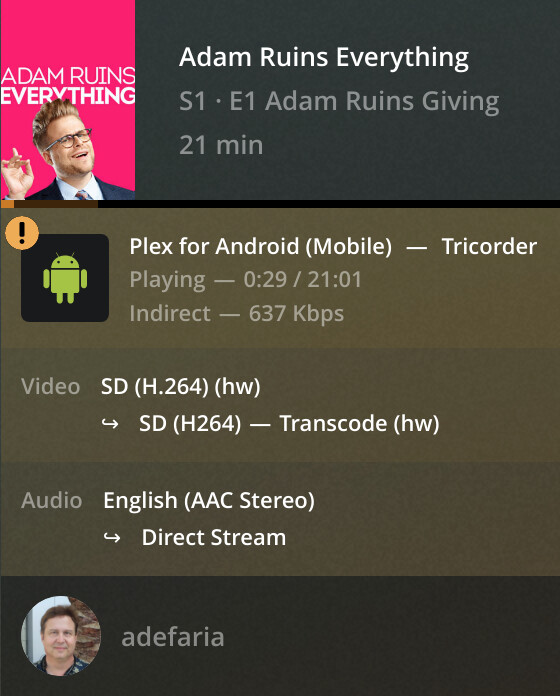
Disconnecting my phone from the wifi yields me a very weak signal. Sprint doesn’t have good coverage at my house which is why I usually just use wifi. As such connecting to my PMS just spins round and round… Ah got a connection! OK, streaming something. 4 users! Here ya go:
 g)
g)
It says indirect.
Settings > Network > Enable Relay is toggled on.
