Remote access using wrong IP

Server Version#: 1.41.0.8994
Player Version#: Web

I have two adapters in my machine — one on a 172.* network and the other on a 192.* network. My router’s port forwarding is set for the 192 IP. I have also selected the preferred adapter in Plex to the 192.* interface. However, the remote access is using the 172.* adapter. How can I force remote access to use the other IP?

image

Plex uses the machine’s primary adapter (default gateway)

Notice in my routing table, the default adapter (192.168.0.13), is part of 192.168.0.0 network, which has a default gateway of 192.168.0.1 on my router.

[chuck@lizum ~.2008]$ route -n
Kernel IP routing table
Destination     Gateway         Genmask         Flags Metric Ref    Use Iface
0.0.0.0         192.168.0.1     0.0.0.0         UG    100    0        0 br0
192.168.0.0     0.0.0.0         255.255.255.0   U     100    0        0 br0
192.168.0.1     0.0.0.0         255.255.255.255 UH    100    0        0 br0
[chuck@lizum ~.2009]$ 

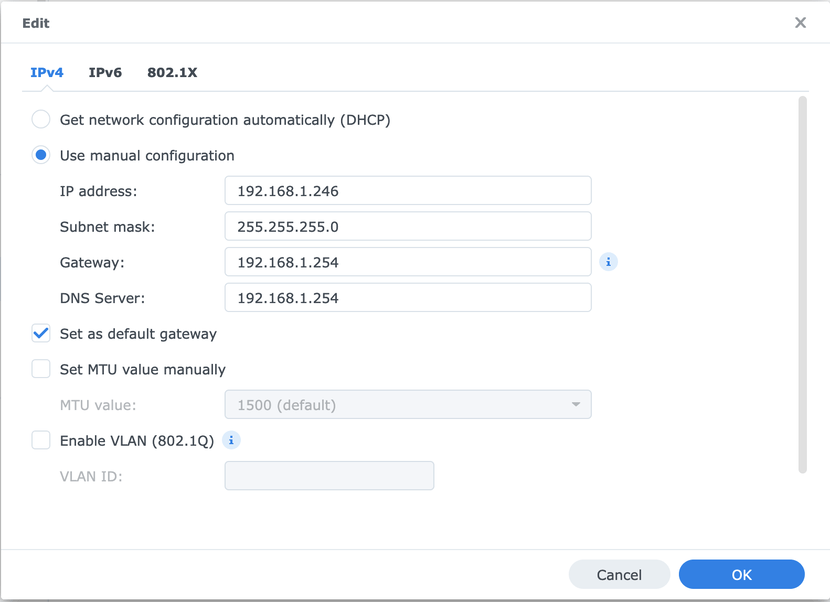
In your Syno, since it’s seeing the DHCP address 192.168.1.246 , look in your network settings (Control Panel - Network) at each adapter

Check the adapter settings for Default Gateway

This is my machine

I’ve found the best thing to do for PMS servers is to give them a STATIC IP address and set their Gateway address and DNS addresses manually.

In my case, I have 2 adapters and not using DHCP:

For completeness:

route -n
Kernel IP routing table
Destination     Gateway         Genmask         Flags Metric Ref    Use Iface
0.0.0.0         192.168.1.254   0.0.0.0         UG    0      0        0 eth0
5.182.110.110   192.168.1.254   255.255.255.255 UGH   0      0        0 eth0
10.11.112.0     0.0.0.0         255.255.255.0   U     0      0        0 tun0
172.16.0.0      0.0.0.0         255.255.255.0   U     0      0        0 eth1
172.17.0.0      0.0.0.0         255.255.0.0     U     0      0        0 docker0
172.18.0.0      0.0.0.0         255.255.0.0     U     0      0        0 docker-1a5f6655
172.19.0.0      0.0.0.0         255.255.0.0     U     0      0        0 docker-bb505c4c
181.214.167.76  192.168.1.254   255.255.255.255 UGH   0      0        0 eth0
192.168.1.0     0.0.0.0         255.255.255.0   U     0      0        0 eth0

And eth1 is the adapter it’s trying to use and the one I do not want.

That doesn’t make any sense.

Would you be kind enough to

  1. Make sure PMS server DEBUG logging is enabled (SAVE if you make changes)
  2. Restart PMS
  3. Let it run for a minute (so it gets past this part of the startup init)
  4. Download the logs ZIP file
  5. Attach that ZIP here.

I would like to see what it’s negotiating with Plex.tv because, by default, PMS will take the first adapter found.

Plex Media Server Logs_2024-10-23_18-47-29.zip (2.4 MB)
Here you go. Thanks for your help!

I hate this but it happens.

Oct 23, 2024 18:33:48.948 [140521020631696] DEBUG - Network interfaces:
Oct 23, 2024 18:33:48.948 [140521020631696] DEBUG -  * 1 lo (127.0.0.1) (00-00-00-00-00-00) (loopback: 1)
Oct 23, 2024 18:33:48.948 [140521020631696] DEBUG -  * 3 eth1 (172.16.0.101) (00-11-32-F3-59-B0) (loopback: 0)
Oct 23, 2024 18:33:48.948 [140521020631696] DEBUG -  * 4 eth0 (192.168.1.246) (00-11-32-F3-59-AF) (loopback: 0)
Oct 23, 2024 18:33:48.948 [140521020631696] DEBUG - Creating NetworkServices singleton.

Adapter enumeration #3 is eth1
Adapter enumeration #4 is eth0

The solution is easy.

  1. Delete eth1 (Erase settings and unplug one cycle)
  2. Reboot
  3. Recreate eth1 (it will be enumeration 5 in the DSM config).
    – You’ll have 1, 4, 5

Give that a shot and we’ll check the logs

There doesn’t seem to be an option to delete eth1:

Not a physical delete.

  1. Reset the eth1 configuration to DHCP
  2. Unplug the cable
  3. Restart DSM
  4. The adapter will now come back up as unitialized
  5. Plug the cable back in
  6. Assign it back to the 172.16.0.101 addresses

Fingers crossed, DSM will change the instance id. (It’s supposed to)

Okay so that got me the correct IP, but remote access still doesn’t work. On my router, I have port 32400 forwarded to the MAC address of eth0.

I also have no idea what IP 181.214.167.250 is. Here’s my current route table:

route -n
Kernel IP routing table
Destination     Gateway         Genmask         Flags Metric Ref    Use Iface
0.0.0.0         10.23.112.1     0.0.0.0         UG    0      0        0 tun0
10.23.112.0     0.0.0.0         255.255.255.0   U     0      0        0 tun0
169.254.0.0     0.0.0.0         255.255.0.0     U     0      0        0 eth1
172.17.0.0      0.0.0.0         255.255.0.0     U     0      0        0 docker0
172.18.0.0      0.0.0.0         255.255.0.0     U     0      0        0 docker-1a5f6655
172.19.0.0      0.0.0.0         255.255.0.0     U     0      0        0 docker-bb505c4c
181.214.167.250 192.168.1.254   255.255.255.255 UGH   0      0        0 eth0
192.168.1.0     0.0.0.0         255.255.255.0   U     0      0        0 eth0
  1. Forwarded to the MAC address ?
    – Port forwarding rules should be: WAN_side:Port → LAN_IP_ADDR:HostPort TCP protocol

  2. Make sure, if you have the DSM firewall enabled, port 32400/tcp is open to allow the forwarded connection into DSM.

  3. Are you using IPXO VPN ?
    – IP 181.214.167.250 –

[chuck@lizum makemkv.2001]$ whois  181.214.167.250
% IP Client: 
 % This is the RIPE Database query service.
% The objects are in RPSL format.
%
% The RIPE Database is subject to Terms and Conditions.
% See https://docs.db.ripe.net/terms-conditions.html

% Note: this output has been filtered.
%       To receive output for a database update, use the "-B" flag.

% Information related to '181.214.167.0 - 181.214.167.255'

% Abuse contact for '181.214.167.0 - 181.214.167.255' is 'abuse@ipxo.com'

inetnum:        181.214.167.0 - 181.214.167.255
netname:        IPXO
country:        US
geofeed:        https://raw.githubusercontent.com/Simonadascalu/Freedomtech-Geofeed/main/Freedomtech%20solutions%20-%20ALL?token=GHSAT0AAAAAABQKY2PBBELKSXZL6TVYIS7SYP3WQZA
org:            ORG-FA1266-RIPE
admin-c:        NOC834
tech-c:         NOC834
status:         SUB-ALLOCATED PA
mnt-by:         IPXO-MNT
created:        2022-03-02T15:03:48Z
last-modified:  2023-06-01T11:26:34Z
source:         RIPE

organisation:   ORG-FA1266-RIPE
org-name:       Private Customer
org-type:       OTHER
remarks:        End User Organization
address:        Private Residence
country:        GB
abuse-c:        FA9198-RIPE
mnt-ref:        IPXO-MNT
mnt-by:         IPXO-MNT
created:        2023-06-01T11:26:29Z
last-modified:  2023-06-16T10:41:19Z
source:         RIPE # Filtered

role:           IPXO Admin/Tech Contact
address:        Ground Floor, 4 Victoria Square, St Albans, Hertfordshire, AL1 3TF, UK
nic-hdl:        NOC834
mnt-by:         IPXO-MNT
created:        2021-07-27T09:53:47Z
last-modified:  2021-07-29T08:24:01Z
source:         RIPE # Filtered

% Information related to '181.214.167.0/24AS174'

route:          181.214.167.0/24
origin:         AS174
mnt-by:         IPXO-MNT
created:        2022-12-13T08:59:25Z
last-modified:  2022-12-13T08:59:25Z
source:         RIPE

% This query was served by the RIPE Database Query Service version 1.114 (ABERDEEN)


[chuck@lizum makemkv.2002]$ 

Believe it or not, the BGW320 firmware doesn’t allow you to choose a destination IP, just a hostname, or if one is not detected (my case) the MAC address minus the colons:

In my case, my DS920’s MAC for eth0 ends with 59:af.

I use Private Internet Access VPN, which must be what the 181* IP was. I turned off the VPN.

I poked a hole in the DSM firewall for 32400/tcp. This now points to my router’s public IP:

However, I’m still getting “Not available outside your network”.

What’s next?

Plex doesn’t like VPNs because the exit IP is not stable (static) and predictable.

Turn the VPN off and retest (off/on)

Remote Access must know , reasonably in advance, what your IP is.
VPNs are almost always changing. This is the root of the problem.

If you use a manually created port forwarding, you need to tick the checkbox “Manually specify public port” in the Plex remote access configuration.
Only forward TCP packets, not UDP.

But if it uses 32400/tcp by default, and that’s the port I’m forwarding, then why is that necessary? Setting it had no effect.

I disconnected eth1, set it to DHCP, then disconnected the VPN, unplugged the cable to eth1, rebooted, and no change.

Route table is now as follows:

route -n
Kernel IP routing table
Destination     Gateway         Genmask         Flags Metric Ref    Use Iface
0.0.0.0         192.168.1.254   0.0.0.0         UG    0      0        0 eth0
169.254.0.0     0.0.0.0         255.255.0.0     U     0      0        0 eth1
172.17.0.0      0.0.0.0         255.255.0.0     U     0      0        0 docker0
172.18.0.0      0.0.0.0         255.255.0.0     U     0      0        0 docker-1a5f6655
172.19.0.0      0.0.0.0         255.255.0.0     U     0      0        0 docker-bb505c4c
192.168.1.0     0.0.0.0         255.255.255.0   U     0      0        0 eth0

This topic was automatically closed 90 days after the last reply. New replies are no longer allowed.