Server Version#: 1.41.4.9399
Player Version#: 4.143.0
Hi there,
I’m running PMS on Ubuntu Server on my home network. I’ve created a DNS record for plex.mydomain.nl to my public home IP. In my router I forward TCP traffic on port 443 to my Synology where the reverse proxy picks it up. It forwards https://plex.mydomain.nl:443 to https://ubuntu-pms-ip:32400. All works great, I can access my Plex by typing plex.mydomain.nl in my browser. So far so good. 
Question 1
I feel I’m running into a bit of a bug with “Remote Access”. If I enable it, and I enter 443 in “Manually specify public port” and press Retry, everything goes to green (“Fully accessible outside your network”). When I browse to another section in the settings though, the green checkmark behind the “Remote Access” section becomes a red exclamation mark again. Seems like a bug, or what am I missing?
Question 2
I can also specify “Custom server access URLs” in the “Network” section of the settings. I entered https://plex.mydomain.nl:443 there, but I’m not really sure what it does. Reading the documentation it seems to be meant for my use-case, but everything works regardless of me setting it. Also, setting it or not doesn’t change the outcome of Question 1 above.
The remote access button doesn’t matter when you are using a reverse proxy.
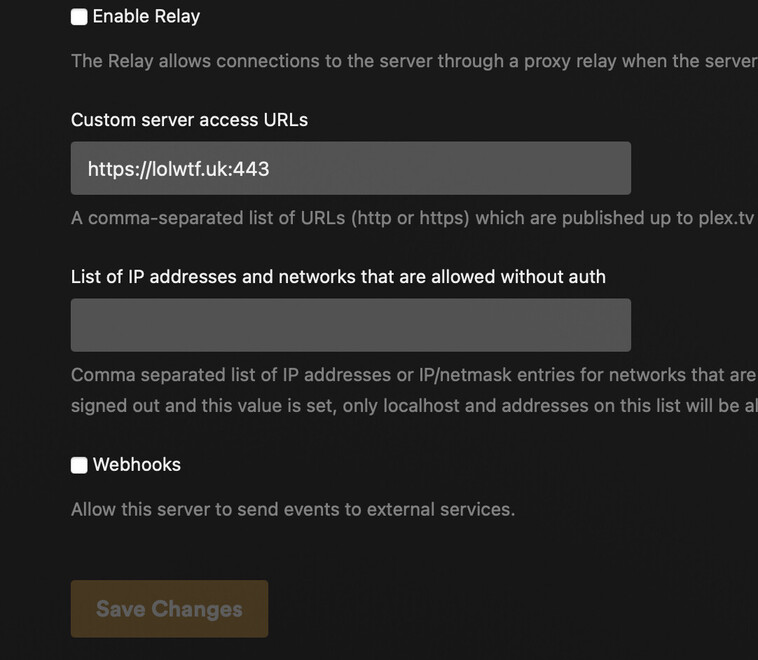
Settings > Network > Custom server access URLs - https://plex.mydomain.nl:443
Then hit save.
Optional
Settings > Remote Access - Disable Remote Access
Then remove your router port forward for 32400
What you’ll find is that remote access works. Hope this helped or makes sense at least.
Here’s mine
If you navigate to my site you’ll see it’s very much accessible, obviously just drop the port off the end of the address.
Thanks for the quick reply!
I already noticed indeed that enabling/disabling “Remote Access” in the settings didn’t really do something. I feel the behaviour is still a bug though. Anyway, I disabled “Remote Access” now indeed.
About that “Custom server access URLs”. What does this actually do? What does “…published up to plex.tv for server discovery” mean? I don’t want the whole world to be streaming from my PMS or something. I just made it publicly available to share with a few friends who I manually invited.
For example: I just tried logging in when accessing your URL. Then I just end-up seeing my own library. But it does still show your URL. I don’t understand now what comes from where.
By ‘publishing’ the url, it means when your friends log into plex on their phone app or TV it knows what the actual link to use is ie your domain.com. The only people that can stream from you are those who you invite. Even with your server link I wouldn’t be able to authenticate on your server.
Hmm, thanks!
I found this comment to be useful in this context as well:
https://www.reddit.com/r/PleX/comments/15vlb3o/comment/kh9dgv1/