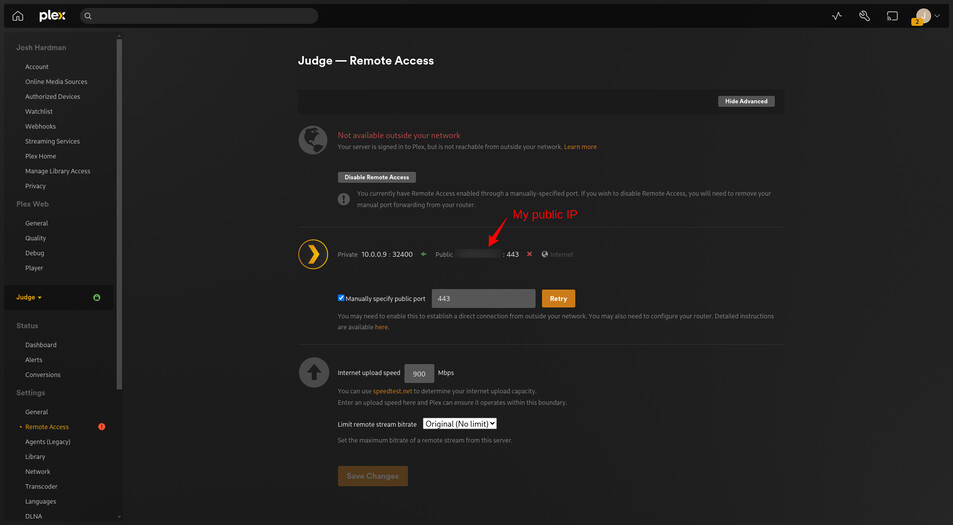
I have setup a domain name to access my plex. That domain name points to my ISP assigned public IP. I have my firewall port forward 443 to a reverse proxy with SSL in my house that has a rule for that domain name to go to the plex server on the web port 32400.
I then set the Custom Server Access URL in Plex to use that domain name.
As far as I can tell, it all works. When I am remote from my network I can go to my fqdn and it loads the web client directly from the server. I can also access app.plex.tv and it finds the server and shows all of my content and allows me to play it.
Issue is, the remote access settings page says that it is not working. Why would it say it’s not working when it really is?
The Custom server access URL and Remote Access features are separate; they provide two different means of accomplishing the same thing. One does not rely upon (or even require) the other in order to operate.
Custom server access URL allows you to manually specify a URL to publish to Plex’s servers, when then advertise it to signed-in clients when they connect.
The remote access feature is Plex’s built-in means of detecting your public IP(s) and automatically publishing it to they’re servers (along with the port you specify); that connection information is then advertised to signed-in clients as described above.
In your situation, you can actually disable remote access and your custom URL will still work.