Server Version#: 1.32.3.7162
Player Version#: 4.100.1
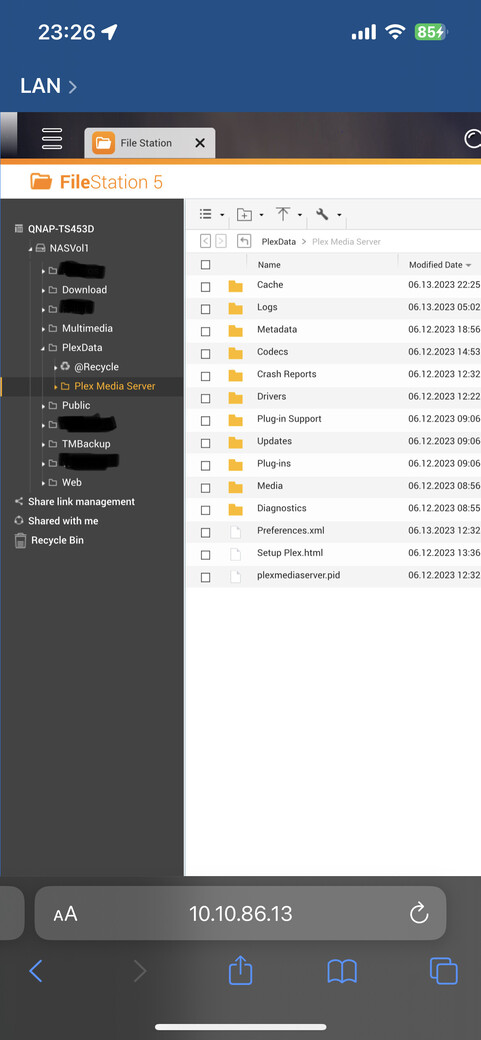
i recently tried out a beta firmware on my NAS but decided to revert back to an official release firmware. after i did that, i noticed my pms lost all the libraries i had created over time. i spent some decent amount of time organizing and setting artwork the way i wanted it. i typically go and backup the PlexData share by compressing it in QTS.
is it possible to restore it ? one thing i have to note is a recent archive of Plexdata was done while on an older version of pms.
can anyone post a how-to, if this is possible ?
i have added back a few libraries from scratch, but do not like how it’s presenting my content (it is sourcing the artwork from the media files, and they don’t crop correctly, and some items have been merged so my movies/tv shows count is not checking out with what i cataloged in my spreadsheet)
Assuming you have not moved/renamed or otherwise changed things are in, just stop the server from running, replace things with what you backed up and start server again.
yes, QTS beta. i’m not sure what happened when reverting back. i tried it out to test out if it fixed the issue i’ve been having with denied permission to compress the Plexdata folder (the beta firmware fixed that bug). but i did not like how my nas was operating on beta.
not entirely sure what happened during the process, but at some point i noticed pms was asking to reclaim the server, and i didn’t do that initially. then i noticed it was identifying 2 QNAP nas’s but could not restore the libraries, always got an error.
i also had tried stopping and starting pms, as well as signing out and back in, as well as a few reboots of the nas. those didn’t work
so that i am sure i got this correct, i can unzip the backup in the Plexdata share, let it overwrite the Plex Media Server folder already there ? the Plex Media Server folder is just a symbolic link and is just a few kB in size compared with the backup which is 11-12GB.
You didn’t back up the symbolic link you backed up the actual folders. Find the real folder the symbolic link goes to and replace it’s contents with what you backed up. I think you are overthinking this
the only real folder i know about is the one within the PlexData share. if it points to some other location, i would need to ssh into the nas and trace it.
just trying to understand this correctly before doing something that wont work.
would be easier if pms had a backup/restore option in settings, if it already does i don’t know
check mark on the “Plex Media Server” folder and then compress
it must be doing the same as what you suggested, because the archive size sounds about where it should be for the libraries i had.
if this is on the right track, then i’ll decompress the archive in the root of the PlexData share and it should replace Plex Media Server folder and everything in it
PlexData/Plex Media Server – symbolic link → /share/CACHEDEVx_DATA/.qpkg/PlexMediaServer/Library/Plex Media Server
If you don’t preserve the link then there’s risk of it messing up when PMS starts (the link is created when Plex starts by the control script in AppCenter)
I recommend creating a temporary shared folder .
Put you backup in there
Unzip it there.
Now take the contents of “Plex Media Server” and copy/paste them into PlexData/Plex Media Server (choose the overwrite option if asked)
i put the archive in the share root, then chose ‘overwrite’ when uncompressing. it took a while, but after that was complete i started up pms again and the libraries are back.
thank you for helping with this issue.
i also gather that a backup of the database restored onto a newer version of pms will not be an issue.
how about the reverse - restoring a database from a pms version that is newer than the one that is installed on the NAS ? i am thinking of a case where i would revert to an older version of pms on the NAS for some reason