Well, I guess we can pretty much say that 16 reference frames is about 12 too many.
Trust me.
General
Complete name                            : Movies/Minority Report (2002).mp4
Format                                   : MPEG-4
Format profile                           : Base Media
Codec ID                                 : isom (isom/iso2/avc1/mp41)
File size                                : 1.69 GiB
Duration                                 : 2 h 19 min
Overall bit rate                         : 1 741 kb/s
Movie name                               : Minority Report (2002)
Writing application                      : Lavf58.41.100

Video
ID                                       : 1
Format                                   : AVC
Format/Info                              : Advanced Video Codec
Format profile                           : High@L3.2
Format settings                          : CABAC / 16 Ref Frames
Format settings, CABAC                   : Yes
Format settings, Reference frames        : 16 frames
Codec ID                                 : avc1
Codec ID/Info                            : Advanced Video Coding
Duration                                 : 2 h 19 min
Bit rate                                 : 1 352 kb/s
Width                                    : 704 pixels
Height                                   : 416 pixels
Display aspect ratio                     : 2.40:1
Original display aspect ratio            : 2.40:1
Frame rate mode                          : Constant
Frame rate                               : 25.000 FPS
Color space                              : YUV
Chroma subsampling                       : 4:2:0
Bit depth                                : 8 bits
Scan type                                : Progressive
Bits/(Pixel*Frame)                       : 0.185
Stream size                              : 1.32 GiB (78%)
Writing library                          : x264 core 159 r2991 1771b55
Encoding settings                        : cabac=1 / ref=16 / deblock=1:-1:-1 / analyse=0x3:0x133 / me=umh / subme=10 / psy=1 / psy_rd=1.00:0.15 / mixed_ref=1 / me_range=24 / chroma_me=1 / trellis=2 / 8x8dct=1 / cqm=0 / deadzone=21,11 / fast_pskip=1 / chroma_qp_offset=-3 / threads=6 / lookahead_threads=1 / sliced_threads=0 / nr=0 / decimate=1 / interlaced=0 / bluray_compat=0 / constrained_intra=0 / bframes=8 / b_pyramid=2 / b_adapt=2 / b_bias=0 / direct=3 / weightb=1 / open_gop=0 / weightp=2 / keyint=250 / keyint_min=25 / scenecut=40 / intra_refresh=0 / rc_lookahead=60 / rc=crf / mbtree=1 / crf=20.0 / qcomp=0.60 / qpmin=0 / qpmax=69 / qpstep=4 / vbv_maxrate=1500 / vbv_bufsize=3000 / crf_max=0.0 / nal_hrd=none / filler=0 / ip_ratio=1.40 / aq=1:1.00
Codec configuration box                  : avcC

Audio
ID                                       : 2
Format                                   : AC-3
Format/Info                              : Audio Coding 3
Commercial name                          : Dolby Digital
Codec ID                                 : ac-3
Duration                                 : 2 h 19 min
Bit rate mode                            : Constant
Bit rate                                 : 384 kb/s
Channel(s)                               : 6 channels
Channel layout                           : L R C LFE Ls Rs
Sampling rate                            : 48.0 kHz
Frame rate                               : 31.250 FPS (1536 SPF)
Compression mode                         : Lossy
Stream size                              : 383 MiB (22%)
Language                                 : English
Service kind                             : Complete Main
Default                                  : Yes
Alternate group                          : 1
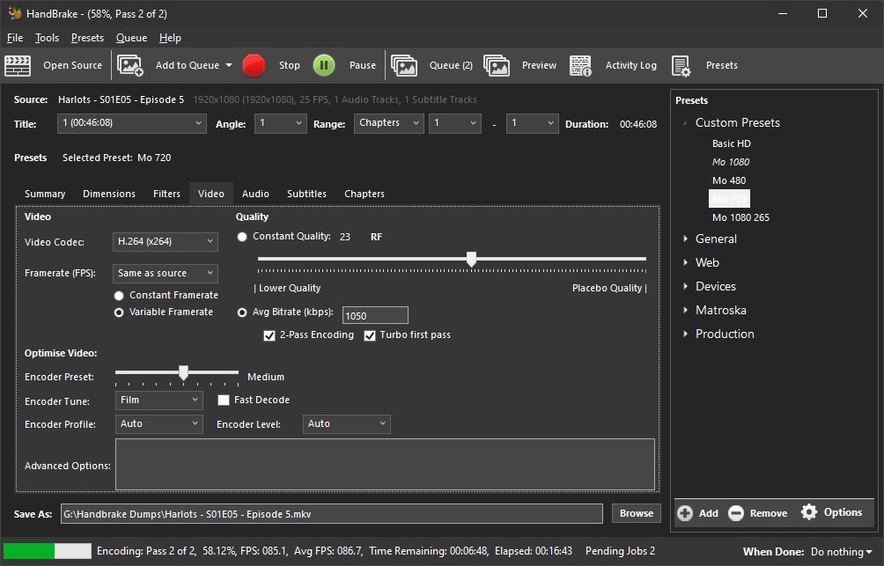
I suggest you use Handbrake - with these settings:
At least your SD encodes will actually be 480p (DVD Guide under HD Guide) - and Handbrake these days is so bulletproof it probably wouldn’t have let you make the fatal mistake you did on your own.
Yes, I knock hundreds of HD Shows down to 480p, in a short time and they look great considering they’re coming in at .5G an hour, have full 480p (not 400) and Direct Play smoothly on everything in the Plexiverse.
Remember - Crap in, Crap out.
Don’t start with crap and you won’t end up with it.
I start with 1080s - they make a decent 480 - with a little guidance. <—and 4 reference frames.
BTW:
I can do that same file in 1080 with 2650Kbps in about 2Gig.
It would look tons better than what you’re making - guaranteed.
I just made a 720 at 1050Kbps - those are about .6G per hour.
Yeah, I tried to ‘fix’ the jumping with a transcode using HandBrake and it made zero difference, but then I’m not a big HB user, preferring the grandfather of transcoding ffmpeg and command line fu.
Yes, I agree with you about crap in, crap out… I normally rip 1080p BDs at CRF and make 2 different files - an X264 AVC 720p MP4 with DD 5.1 AC3, and an X265 HEVC 1080p MKV with DTS. This covers all devices and my friends with their varying internet qualities!
The transcodes at 1080p come down from a typical 25GB BD source to about 2.5GB and are stunning - at least to my eyes and ears!
The reason for this particular movie is I was clearing out my loft and found a whole bunch of regular DVDs that I didn’t have in my Plex library… Minority Report being one of them.
I used the latest makeMKV to take the create a source MKV file with no changes to the video and audio tracks. Then, use ffmpeg 1 pass CRF to transcode it into an MP4 that you saw in the mediainfo.
Now, I am always looking for ways to improve (I have mild OCD) to perfection so any thoughts or suggestions you have for options to my ffmpeg command line, please fire away.
In the meantime, I will try those HB suggestions to that UK DVD source and see what happens.
You’re doing it all right - except the ffmpeg part.
Really, get the new Handbrake, explore my settings especially the ‘lapsharp filter’ for 480 encodes and - wait for it - your encodes will look BETTER than the source.
Try a few 240 second previews, dump 'em in an Other Videos Library and play 'em back on everything - be amazed. I was.
The thing about the new Handbrake is:
It’s idiot proof - and I outta know - I’m the sitting President of 'em all…lol
It’s not that challenging…
Here’s a 720 2 pass at 1050Kbps that’s in ‘the hopper’ right now:
Pass 1 is about 7 minutes, pass 2 about 12 - the result is .6G an hour and looks like 720 to me - better than I get from Netflix… I win.
Note:
Don’t try to constrain bit rates like I do without a 2 pass - and don’t bother with CQ. You don’t need it.
For PAL sources - use settings as shown. Same as Source, Variable Framerate - just do whatever they’re doing in that area and those settings will make it happen for ya. Don’t try to overthink it. Handbrake knows what to do.
Give it 2 passes, so it can ‘think’ about what it wants to do on the first pass -then do it on the second. You’ll be amazed, but if you do find my rates a bit weak, adjust as necessary, but do small adjustments until you find ‘your’ rate.
As you can see I use ‘Basic HD’ - actually deleted everything else and created a few of my own - all from ‘Basic HD’ exactly as shown in the Guide photos.
The ‘480’ profile is exactly as shown the photos ‘Custom Anamorphic’ 720x480 at 950Kbps 2 pass. The photos show 1050, but I dropped that to 950 and made 1050 the 720 rate… It’s working fine. The base 1080 rate is 3750Kbps - a fairly awesome version for something I care about, but TV Shows or Documentaries can come down to 2650Kbps easily - even a bit lower at times.
Throw away all that crap.
Build a couple of profiles as I have - stick to the basics.
Start creating and watching 240 second Previews in your Other Videos Library and watch 'em on everything in the Plexiverse.
Alas, the 25 FPS bug with a Roku Streaning Stick+ on my TV is still there.
I have tried using HandBrake with a standard preset (low reference frames like you mention), and ffmpeg with my usual command line script, on the DVD of Season 1 of My Name Is Earl and it still jumps every few seconds.
Why?
It is 25 FPS.
Later that same day, I transcoded the Blu-ray of Tomb Raider and it plays perfectly on all devices.
Why?
It is 23.976 FPS.
I have 1000s of Movies and TV Shows in my Plex library that play perfectly… be they SD, HD, FHD or 4K… most Direct Play and play smooth as silk.
So, without further faffing around with HandBrake or any other bit of sotware, it points down to my Roku Streaming Stick+ and / or my television.
It jumps every few seconds when the source file is 25 FPS.
Does anybody have any ideas why it jumps on a Roku and not an iPhone or Android Tablet or Chrome Web Browser???
   -r, --rate <float>      Set video framerate
                           (5/10/12/15/20/23.976/24/25/29.97/
                           30/48/50/59.94/60/72/75/90/100/120
                           or a number between 1 and 1000).
                           Be aware that not specifying a framerate lets
                           HandBrake preserve a source's time stamps,
                           potentially creating variable framerate video
   --vfr, --cfr, --pfr     Select variable, constant or peak-limited
                           frame rate control. VFR preserves the source
                           timing. CFR makes the output constant rate at
                           the rate given by the -r flag (or the source's
                           average rate if no -r is given). PFR doesn't
                           allow the rate to go over the rate specified
                           with the -r flag but won't change the source
                           timing if it's below that rate.
                           If none of these flags are given, the default
                           is --pfr when -r is given and --vfr otherwise
For these encodes, I didn’t specify anything, so it just read the 25 FPS from the source then both HandBrake and ffmpeg used 25 FPS for the target.
It is odd, but I’m up for the challenge.
Does anyone else want to chime in here?
Perhaps it’s my TV? It’s a Samsung UE49KU6400 49"… so I might go the AV Forums and look there…
…and maybe the Roku forums, but you can see why I decided to post here…
I’d make sure display rate switching is off - 'cause it’s off here on my TV (different brand, but worth a shot).
Well, we’re trying to correct a problem - not create another one…lol
Nothing odd about it to me - if things play fine the way they are - I don’t change them.
Many years ago I found out what happens when you lock a frame-rate down and the source changes the frame rate on ya when they go to CGI (older Star Treks and such). That cured me.
Since then I’ve used SAS and Variable - and it’s never let me down.
Make some 240 second ‘Previews’ from Handbrake’s Newest Version and drop them in an Other Videos Library - so you can test these things in a shorter time span.
Since we didn’t see the full MediaInfo report for your video (and why not?), I suggest you use the same Handbrake I’m using - not ffmpeg - mirror my settings EXACTLY and make some previews.
… and here are the EXACT SETTINGS I’m using and I’ve just turned out 18 great ones at 25fps - 3 of 5 Seasons of Line of Duty that are being added as we speak with the other 2 seasons in the grinder now:
DVD Section - as these I’m making are 480p, but I churned out 12 HEVC Main 1080p episodes for another 25fps show I did yesterday (and the day before, and before that) - Doc Martins/World On Fire to be exact.
… and we’ll kindly ask @ChuckPa to watch over us so we don’t do anything dumb on ‘Linus’ for ya ('cause I wouldn’t know ‘Linus’ if he jumped up from that little piano bench and bit me)… but carry on until he yells at us…lol
I haven’t fully processed this thread, but I can say that 25fps can affect the smoothness. It’s definitely not uncommon to experience a stutter in movement playing content having 25fps on a model supporting 4k content: more explained here on Roku’s site.
@JuiceWSA is it possible that you have enabled Auto-adjust display refresh rate in the Roku advanced system settings? This will fix the stutter, but as we all know, can introduce other fun things like audio sync issues.
Thanks @ljunkie I will try this tonight and report back!
Thanks @JuiceWSA for all your efforts and I’m guessing you don’t have the 4K Roku!
Certainly, my main TV has the Roku Streaming Stick+ which is a 4K capable model and that would explain why my Roku 3 and Roku Express do not have jerky 25fps videos.
This also explains why my laptop using Chrome web, or my iOS phone and Android tablet also do not have jerky 25fps videos… because they are not 4K and do not try to run at 60fps!
So, not my TV but my Roku 4K trying to be clever.
I have added that to my own Wiki on my web site to help others.
There’s one Roku Ultra 4K - and I’m using it. If you don’t have an Ultra I keep seeing a Refurb at Amazon for $75, and if I needed another one right now I’d have it. It doesn’t look like you’re using an Ultra, so it looks like you need it more than I do…lol
I didn’t see a MediaInfo report of the material you’re playing, but you said some of wasn’t 4k and that didn’t seem to matter.
Apart from some ‘broken’ HEVC Main 10s we had trouble with - I’ve not ever seen any stuttering with 25fps, or any other.
I ‘retired’ a Roku 3 a LONG time ago - when I never made it to a file to get stuttering - I got plenty of that in the app before I could play a file. I got an Ultra then - and couldn’t be happier. I also paid a heck of lot more than the $64 to $74 I’ve paid for the 3 Refurbs now in use around the Juicetown Plexiverse.
The ‘Retired’ 3 was tested at a Friend’s house who really needed a Roku, but it was inadequate so I got on the phone and had Amazon ship him an Ultra - he had something I wanted that was worth way more than I paid for his Ultra and everybody is happy when he Direct Plays everything - with no stuttering before or after he hits Play.
It was my Roku Streaming Stick+ and the Refresh Rate.
When auto-adjust display refresh rate is disabled, your 4K capable Roku player outputs all content at 60fps. A movie filmed at 24fps, or a video shot at 25fps may exhibit subtle jerkiness due to the conversion to 60fps. To avoid this behavior, follow the steps listed above and enable auto-adjust display refresh rate.