I’m running my PMS on a private network in my home. The private network is the .2 subnet so 192.168.2.1.
ALL the TVs connected to Plex are on a public network… 192.168.1.1.
There are several TVs connected and everyone is generally trusted, but we do often have guests, kids, etc. Some I know better than others.
I have this separation because my PMS is running on my Qnap NAS where I keep all my critical personal data and I always do my best to protect it.
As far as I can tell, all video streams running to the TVs from my PMS are streaming “remote”.
So a few questions about this.
- Do these streams (“remote”) actually loop up and down through the internet?
- Is doing it this way any more secure for my nas?
I should note that all connected devices are Roku TVs (vs computers) so I do not exactly see the vulnerabilities with my untrained eye. I see in the Roku menu that the Plex port is listed and if I recall correctly the PMS URL may be listed.
Thanks in advance for your insight!
Server Version#:
Player Version#:
<If providing server logs please do NOT turn on verbose logging, only debug logging should be enabled>
Am I correctly sensing you’re thinking of networks & subnets → Public vs Private as defined by Windows ?
- Anything as defined by RFC-1918 are Private, non-routed (to the internet) network addresses.
– 192.168.x.x
– 10.x.x.x
– 172.16.x.x → 172.31.x.x
Ref: Private network - Wikipedia
-
For all LAN addresses originating and terminating “inside” your modem/router, the traffic will, at most, pass through the modem/router (loop around and back through). It will not leave your home because both source and destination are non-public IP addresses.
-
For almost all cases like yours, you need to decide how you want to separate the network.
-
Understand, simple subnet boundaries are not what secures a network. They only help control broadcast packets (broadcast packets do not cross subnet boundaries).
-
PMS uses the host’s (QNAP’s) subnet mask (relying on the TCP/IP networking stack) to determine what is local (same subnet) or remote (different subnet).
– NOTE: Different subnet could be as you have things or even WAN IP different. The rule here is “Is it same subnet?” Yes → Local ELSE Remote.
-
The most important ways to keep your QNAP secure:
– Only install software you know to be safe and trustworthy.
– Only allow controlled access to it from the internet (like Plex Remote Access)
– QNAP Remote Login is dangerous if you don’t have a strong (14+ character) password but even those are breakable when not created correctly.
If I were to create a subnet using your LAN:
– TV’s on the 192.168.1.x network
– Personal (non-media) equipment on another subnet
I would:
- Change 192.168.2.x → 192.168.0.x in the modem router and for all devices
- Keep the TVs where they are on 192.168.1.x
- In the QNAP, where PMS is running,
– Put it on the 192.168.0.x network, netmask 255.255.254.0 so it can see both subnets (your computer(s) and the Roku/TVs)
- If everything is DHCP then you only need to change the subnet and DHCP range in the modem/router (DHCP Server page)
– Anything static defined should be moved first to the new subnet.
- Last things to move: QNAP to its new 192.168.0.x address (restart if needed)
and then your computer to the 192.168.0.x address as well
When done restarting everything, it will all talk again as it did before.
Think of this as setting up dominoes. The last three to ‘fall’ are:
– QNAP (reboot when changing)
– Modem/router & DHCP server (reboot after changing)
– Wait for modem/router and qnap to reboot then change and reboot computer.
(your control point)
Think this through… Walk the steps – draw it out so you can see the chain
This is most appreciated and educational. Many thanks!
I will start executing and post progress here.
I certainly do not want to change this to a Qnap post, but you said that Qnap Remote Login is dangerous. Qnap Remote Login may be a specific protocol, but I’m not sure.
We don’t login with MyQnapCloud or any other tools. We only login via the URL when on our local network. And we have 2FA active. We can login via our VPN when we are outside of our network.
That type of login is not what you mean by dangerous, correct?
@ChuckPa Thanks again. I’ve changed the configuration of my system to your suggestions and everything seems to be working fine.
The Roku TVs that are connected to my PMS are still showing as remote streams. According to your post, this seems to be expected. I just wanted to confirm however if this is the best recommended course vs a direct stream. No complains on my end, just want to tune things if needed/suggested.
The Rokus should not be showing as remote.
The intent here was to put media devices on the same subnet (they will all appear local to Plex)
The intent / plan is this: (Let me know if incorrect ??? )
-
The QNAP sits at the top of the pile, servicing both subnets.
That as a requirement, it must have an IP address we can easily exploit.
-
You want the Roku’s & TVs in their own ‘media’ subnet.
That said,
-
The modem/router is at 192.168.0. 1 (?) or 192.168.0.254 (?).
-
We put the QNAP manually at:
– LAN IP: 192.168.0.??
– Netmask: 255.255.254.0
– DNS: LAN.IP.of.Router
-
The Roku’s have their IP config set manually
– LAN IP: 192.168.1.x
– Netmask: 255.255.255.0
– Default gateway: (LAN IP of your modem router – 192.168.x.??)
– DNS: LAN.IP.of.Router
-
The computers will all live on the 192.168.0.x network:
– LAN IP: 192.168.0.??
– Netmask: 255.255.255.0
– Gateway IP: LAN.IP.of.Router (192.168.0.??)
– DNS: LAN.IP.of.Router
What we’ve done.
- Created a LAN network which starts at 192.168.0.1 → 192.168.1.254
- Partitioned it such that the computers are on “0” and all media are on “1”
- By default, devices stay in their partitions HOWEVER you can make both sides visible to any device by changing the netmask .
Questions:
- You ask if 2FA with VPN is sufficient to protect remote login – YES.
- 2FA on LAN isn’t required but if you want it, it’s fine.
- “Dangerous” is when the external login mechanism isn’t protected.
You have 2FA and VPN. That’s pretty good. 2FA on each valid account blocks all brute force attempts. (make sure you also secure ‘admin’ too)
That is the plan, confirmed.
Looks like I had a slight issue with configuration. I will adjust the Netmask and repost.
Thanks for the insight on the NAS security.
Many thanks!!
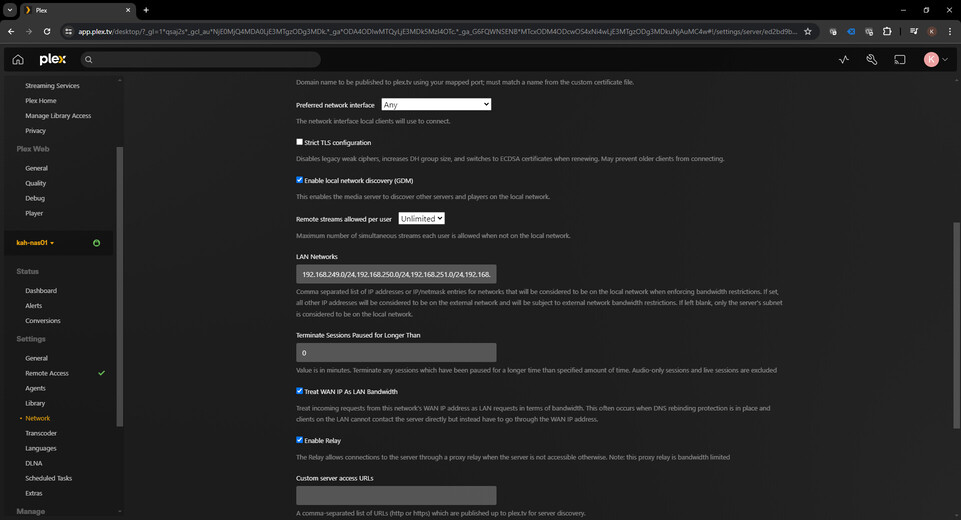
Why wouldn’t you just add the additional subnets into the server in where you enter the local subnets? My wired NVDIA Shield Pros (192.168.249.0/24) and wireless NVDIA Shield Pro (192.168.252.0/24) are on different subnets, both different subnets from my server (192.168.250.0/24).
Interesting, thanks @kahilzinger I did not know this control existed.
I’ve already followed @ChuckPa’s protocol, but for future reference, adding the subnet this way would render the same result with regard to security and functionality?
Security: Would not introduce any new vulnerabilities to the .3 subnet (or at least any more than in the other protocol)
Functionality: This would be a true local (LAN) stream.
Not entirely…
What I helped you create was a “master subnet” definition (the /23) for the QNAP.
By knowing the “1” bit (‘/23’ vs ‘/24’) the QNAP would see both subnets as the same local subnet.
Subnets can be added by changing the netmask in most cases.
e.g 192.168.0.x → 192.168.15.x (16 subnets)
(subnet mask 255.255.240.0)
This is different from adding multiple subnets because – important –
- “Broadcast packets do not cross subnet boundaries”
As one subnet, the QNAP discovers everything and everything discovers it as same subnet all while still being separated on their own subnets.
Networking is a funny thing. There are multiple ways to achieve goals. It’s always a give & take trade.