Scanning Libraries

Server Version#: DS716+
Player Version#: 1.29.0.6244-7000

Trouble scanning TV Shows. When I scan TV Shows it seems like Plex gets stuck in a continuous loop. Plex goes offline and the activity indicator just keeps spinning. This does not happen when I scan Movie libraries.

Thoughts?

By default, TV episodes have intro detection enabled.
On a DS716+, this will take time after initial scanning is completed.

The transcoder is involved so it’s very possible the NAS is heavily loaded and slow / might not respond in time to certain apps.

What does the CPU activity indicator show?

It starts at about 28% utilization (6% user; 22% system). then when I think it is “stuck” if is around 38% (21% user; 18% system). It just keeps cycling through things that say device-power, PNP0COE-power, etc.

where do you see these?

I attached a screenshot. Upper right hand corner the yellow circle around activity arrow just keeps spinning giving various messages. The plex server is inaccessible unless I stop it and reboot the server.

Under settings –> Scheduled tasks
What time is your server set to run maintenance tasks?

The only time I ever see “optimizing database” is during scheduled tasks that run late at night and it shouldn’t get frozen like that. Generally, that message pops up intermittently and very quickly disappears

Under settings –> Troubleshooting

Download your logs and drop the zip file here on your next post

Chuck has a tool to repair your database if there’s some kind of corruption. If that’s not it, I’m sure he can figure out what’s going on by reviewing the logs

I uploaded the logs from today. If this doesn’t show the problem I’ll send logs after I have the problem again.
Plex Media Server.log (188.2 KB)
com.plexapp.system.log (35.8 KB)
com.plexapp.agents.imdb.log (8.2 KB)
Plex Tuner Service.log (2.2 KB)
Plex Media Server.1.log (4.0 MB)
Plex Tuner Service.1.log (3.1 KB)

Plex Media Server Logs_2022-12-01_17-38-29.zip (2.3 MB)

Maybe this was the one I should have sent?

I don’t see any obvious signs of a corrupted database. Unfortunately, that’s about as far as my log reading skills go

I do see some errors

ERROR - Versions: empty version set query, unable to update status for generator 45
Dec 01, 2022 13:25:22.624 [0x7ff60cdd9b00] DEBUG - BPQ: generator 45 is in failed state

HTTP error requesting GET https://45-128-36-178.6fe1f6c3b67244f4981965cd992be520.plex.direct:21071 (7, Couldn't connect to server) (Failed to connect to 45-128-36-178.6fe1f6c3b67244f4981965cd992be520.plex.direct port 21071: Connection refused)

HTTP error requesting GET /media/providers (3, URL using bad/illegal format or missing URL) ()

You’ll have to wait for Chuck to see exactly what the problem might be
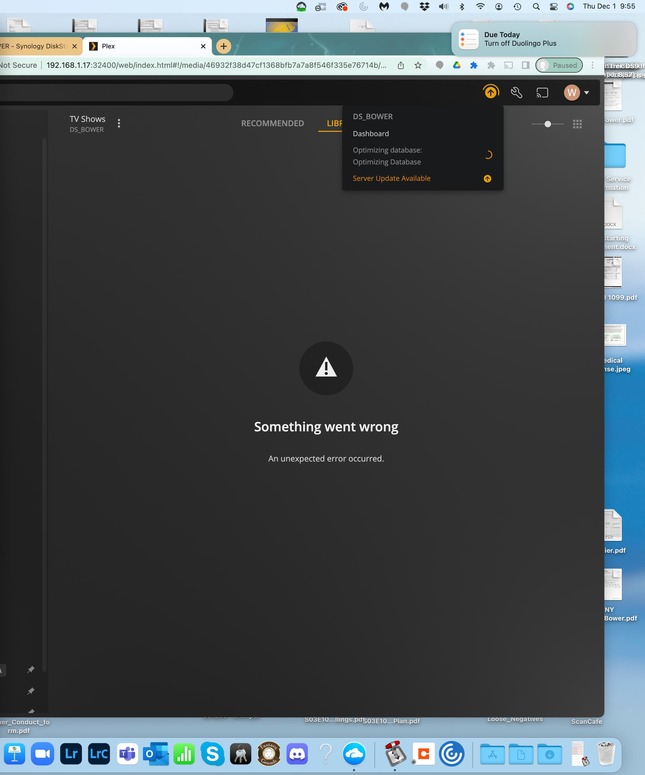
same problem on windows. Plex gets stuck and closes the server when i try to scan for movies. didn;t find a fix yet

Interesting. I can scan movies just fine it is TV shows that cause a problem.

Plex Media Server Logs_2022-12-02_12-08-59.zip (2.2 MB)

Attached are the logs from after I scanned TV Show Library files and it seemed to get stuck after scanning the files. I had to stop and reboot Plex.

@Willie_30084

Please check the directories you listed in your library sections !!! (TV Shows)

You have an error.

Dec 02, 2022 11:55:18.756 [0x7ff60cb96b00] ERROR - IsDirectory failed boost::filesystem::status: Symbolic link loop: “/sys/bus/platform/drivers/cherryview-pinctrl/INT33FF:03/firmware_node/physical_node/firmware_node/physical_node/firmware_node/physical_node/firmware_node/physical_node/firmware_node/physical_node/firmware_node/physical_node/firmware_node/physical_node/firmware_node/physical_node/firmware_node/physical_node/firmware_node/physical_node/firmware_node/physical_node/firmware_node/physical_node/firmware_node/physical_node/firmware_node/physical_node/firmware_node/physical_node/firmware_node/physical_node/firmware_node/subsystem/drivers/processor/LNXCPU:02/subsystem/devices/PNP0A08:00/device:19/device:1a/subsystem/devices/PNP0A08:00/PNP0C02:02/subsystem”

It looks like you specified / by accident and PMS is trying to index the whole NAS !!

:scream:

:rofl:

Thank you! This is probably it. “PNP0A08:00-device” is one of the terms that kept repeating itself.

Is there a step by step instruction for someone who is only moderately tech savvy to fix this?

Never mind. I figured it out.

Thank you for all your help.

This topic was automatically closed 90 days after the last reply. New replies are no longer allowed.
