I’m trying to identify the artists who are missing the Country tag. This is nearly impossible unless I’m missing something. The interface only lets you choose between “is” and “is not” and doesn’t accept wildcards or an empty field. Please add “is blank” or wildcard support.
I have quite a bit of media where the metadata either isn’t available or wasn’t scraped correctly, so there are fields that are empty (like Title, Album, Director, etc.) I primarily have issues with my music library (2TB of music can do that to you) and I generally go back and manipulate it manually.
It would be extremely helpful if I could create a filter that shows when a field is empty (i.e. “Artist Title Is Empty”) similar to the dropdown fields like “Artist Rating Is Empty” The best I was able to do was a filter where the “title does not contain <a vowel>”, which helps except for tracks aren’t in English or that only contain letters. I would keep adding filters, but after a while I ran out of screen space.
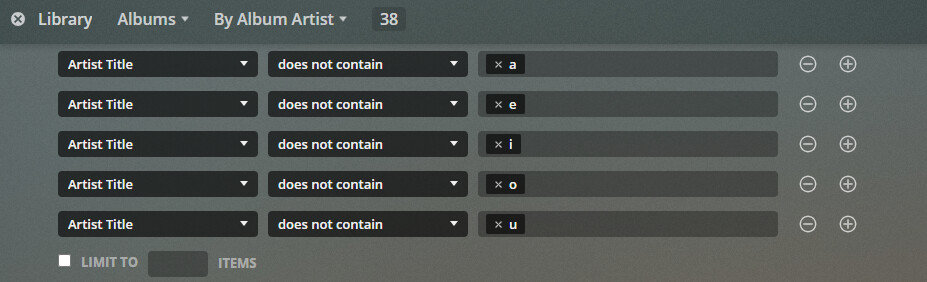
Mod-Edit:
Moved this thread into an already existing suggestion to avoid duplicates/distraction of votes.
Rather than the custom filters, this would be easier if you use Track view (in Music) or List view (Movies).
In Music libraries:
Set Library view to Tracks:

Select the columns you want to see:
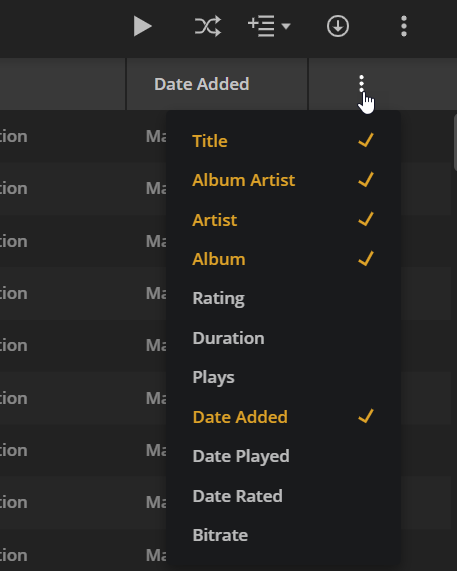
Click on the “Artist” column to sort. tracks with empty Artist will appear first. Click column heading again to sort in reverse order.

In Movie libraries:
Movies can be done in much the same way, but the first step is a little different. Set the Movie library to List View:

Then proceed same as in Music.
I’ve actually tried that as well and it doesn’t work for most fields.
It works for Artist, but not for everything. For example, if I sort by Title looking for tracks that don’t have a Title, the ones that are blank just don’t show up.
Plus, even if that did work, that’s more of a workaround than a working feature.
