Server Version#: 1.22.3.4392
Player Version#: 4.56.4
In the last 23 hours My server has shown the server unavailable or the server can’t connect securely. when I check the service status, it shows PMS as active and running. When I check htop, I can see PMS PID’s moving to the top of the CPU usage is selected. I have also looked through the logs and nothing stands out to me .
The weirdest part is to fix it, I mean to put a band-aid on it, is to restart the service. Plex works for a few hours then, all of a sudden, nothing. Then again, nothing out of the ordinary in the logs.
Now I do know, I may very well have missed something in the logs, or I may have something miss configured.
Any suggestions for a starting point would be greatly appreciated.
And if you are using external clients it can help to clear cache/data within the apps and/or re-link them to the account (afterwards). Not sure why, but it did with me (only showing “recommended” sections e.g. not loading anything else during the time i could reach the plex-instance)
I confirmed that the server does state it is claimed and that preferences.xml does have my information within it.
I performed the requested steps and have attached the logs for the 2ish minutes.
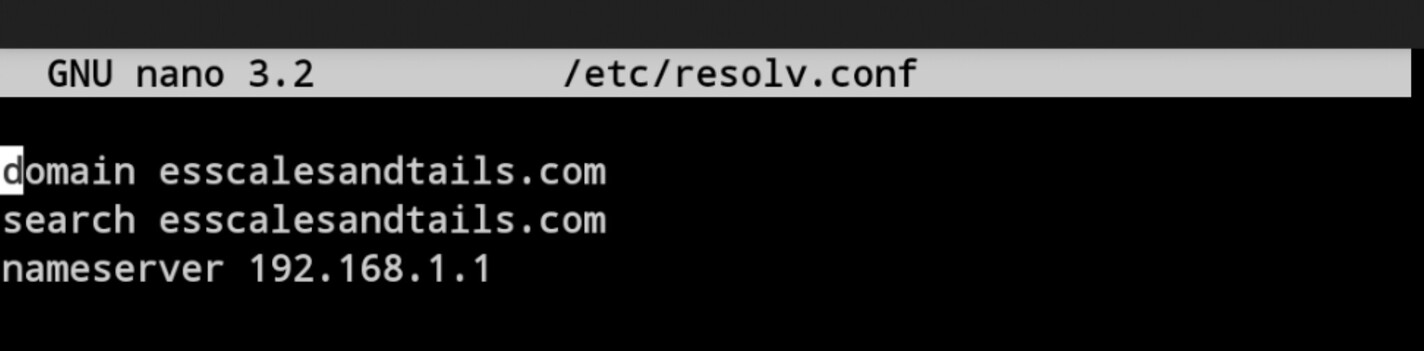
I did notice, looking at them, that there where quite a few “(6, Couldn’t resolve host name) (Could not resolve host: plex.tv)”
$ip route show
default via 192.168.1.1 dev enp35s0
192.168.1.0/24 dev enp35s0 proto kernel scope link src 192.168.1.6
192.168.88.0/28 dev enp1s0 proto kernel scope link src 192.168.88.3
Apt-get update doesn’t seem to have an issue.
Just tried curl www.google.com there was no apparnt issue getting the webpage.
Yes, curl http://app.plex.tv does show “Moved Permanently”
@CostaHT
Sorry, I miss typed the 10g network is 192.168.88.0/28.
I did double check that all there machines do have the same subnet.
Update… It has been 7 days since I’ve had any issues with plex showing it is unavailable and still be running on the server. No setting have been changed in Plex or for the server itself and there fore there is no definitive reason noted for this issue.
Upon closer inspection of system logs, the server was getting it’s DHCP information while it was unable to connect to plex.tv (in post #6)
I will report back if this happens again.
Thank you all, for your time.