I had to create a new account because my account is locked. Here’s the problem: The browser keeps going to www.plex.tv and I fail to notice. On that page, the logon form appears and disappears so fast I can’t do anything. I suspect that’s a bug and not a feature. So, I get frustrated and keep clicking out of anger. Then, I realize I need to go to app,.plex.tv, but by then my account has been locked due to too many attempts. I also cannot logon to this forum. Thus my creation of a new account.
This is so frustrating… Why am I rerouted to a page with a signon that doesn’t work? I don’t need or want the www page, yet every time it’s forced upon me against my will and desire. I just want to post a video I just created. So, now I have friends waiting and have to wait how long? The “Try again later.” statement just increases the frustration.
So, to ease this frustration, perhaps someone could unlock my account sooner rather than later. It would be nice if someone could PM me so we can exchange my real account credentials. That would be most appreciated.
I made a video of the sign on problem but can’t upload it. The form on the www page really does flash for a fraction of a second and then disappear. It does it with this new account, too. It’s barely on the screen long enough for me to recognize it as a sign on form.
Do you experience the same if you open the page in a private browser window?
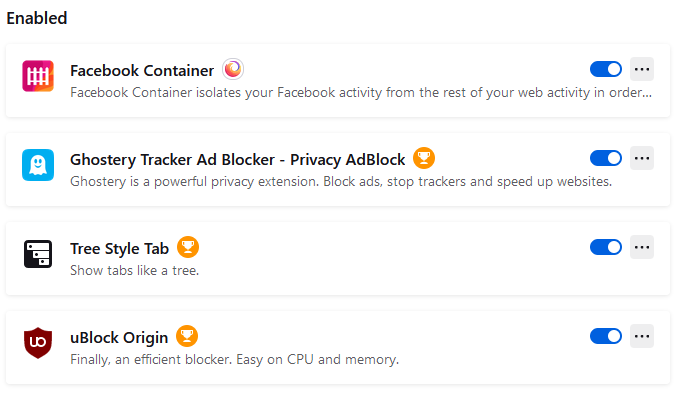
Similarly… do you experience the same behavior if you disable browser add-ons and potentially using a different browser?
Hi Tom. I haven’t tried either of those, but I will and let you know. I don’t think I have any browser add-ons other than ad blockers. Those aren’t new, though.
New or not; browser add-ons, especially those designed to block specific content are known to mess with web pages and their behavior. So let’s at least rule them out.
It’s still not working in the regular, non-private browser. The same problem of flashing the sign on form. Hmmm… Maybe disabling ad blockers for the page? I’ll try that.
The auth page is a specific URL that is different than whatever page you started from. Protection software can see this as a cross origin problem like a site that is trying to trick you by getting you to enter credentials.
It is likely Ublock origin which I use as well. You can disable it per site by clicking in it in the toolbar when on plex.tv ( i use chrome not sure if in the same place in all browsers)
Thanks so much and I’m so sorry for the expression of frustration. I’m a good writer and a fast typist, so the words tend to spill out too rapidly sometimes. I understand your explanation and it makes perfect sense to me now. It didn’t during my moment of frustration. I don’t like needing to have so much security, but that’s the world we live in. Sigh. Thanks again.