Now I understand why.
I don’t know how to manage the LinuxServer image.
I think you have to manually disable their auto-update code.
What I shared with you was for the Plexinc/pms-docker image.
Now I understand why.
I don’t know how to manage the LinuxServer image.
I think you have to manually disable their auto-update code.
What I shared with you was for the Plexinc/pms-docker image.
Yeah, I know 
But, whatever I tried in their image, I can’t stop pms, nor the autoupdate process…
I’m duplicating my config directory, in case of something goes wrong, and I’m build a docker-compose with your image.
After docker compose up -d it, I’ll see to redo the update, and stop process before.
I will try to look later and see if I can figure it out but
Not My Image 

(no, i’m not that cruel lol)
For now, I can’t succeed to get your image working
2023-04-26T21:14:02.233393346Z Starting Plex Media Server.
2023-04-26T21:14:02.253320116Z PMS: failure detected. Read/write access is required for path: /config/Library/Application Support/Plex Media Server
2023-04-26T21:14:02.257265168Z Stopping Plex Media Server.
2023-04-26T21:14:02.260783653Z kill: usage: kill [-s sigspec | -n signum | -sigspec] pid | jobspec ... or kill -l [sigspec]
Do you have any idea ?
here my docker-compose.yml :
## docker-compose.yml pour PMS version Asustor
---
version: "2.4"
services:
  plex_PlexMediaServer:

    image: plexinc/pms-docker:latest
    container_name: plex_PlexMediaServer
    network_mode: host

    # ports:
    #   - 32400:32400

    environment:
      - PLEX_UID="1004"   # Utiliser la commande (en SSH) : id NOM_UTILISATEUR
      - PLEX_GID="100"    # Ici, ces valeurs correspondent à l'utilisateur : Docker-MediaServers
      - CHANGE_CONFIG_DIR_OWNERSHIP="false"
      - TZ="Europe/Paris"

      - ALLOWED_NETWORKS="192.168.2.0/24"
      # Si plex est en mode HOST, la ligne suivante n'est pas nécessaire.
      # - PLEX_CLAIM=claim-
      #obtain claim token https://plex.tv/claim expire within 4 minutes.

    # ###############
    # Le label ci-dessous permet à Watchtower de faire les mises à jour automatiquement
    # Cela peut-être supprimé si Watchtower n'est pas utilisé.
    labels:
      - "com.centurylinklabs.watchtower.enable=true"
    # ---------------------------------------------------------------------------------

    volumes:
      - "/volume1/Docker/plex/config-bis:/config"
      - "/volume1/Docker/plex/transcode:/transcode"   #optional

      - "/share/Plex-Optimisations:/data/Plex-Optimisations"
      - "/share/Plex-Medias:/data/Plex-Medias:ro"


    # Ce qui suit permet au conteneur PMS d'accéder à l'accélération matériel sans avoir besoin d'exporter puis éditer le fichier de configuration JSON du conteneur
    #
    # Il faut quand même faire le script de modification de permissions.
    devices:
      - /dev/card0:/dev/dri/card0
      - /dev/dri/renderD128:/dev/dri/renderD128

    # restart: unless-stopped
    restart: always

    # Les valeurs ci-dessous sont à adapter à la quantité de RAM de votre NAS.
    # Sur mon AS6704T j'ai 16Go de RAM.
    mem_limit: 4096M
    mem_reservation: 2048M
    memswap_limit: 4096M
I may have found the problem…
I create another folder, and use it.
Plex started fine. But the permissions aren’t the same as the old folder I want to keep…
I had to remove the “” for the PLEX_GID and PLEX_UID, and set permissions again to 1004:100. ANd then it’s working !!!
Let’s try your version.
@ChuckPa : by the way, there isn’t any version.txt in the /config folder.
But in the container, it’s in the root / .
edit : I succeed by doing a /plex_service.sh -d to stop PMS, then i paste this :
mv version.txt version.txt.bak
echo "version=1.32.2.6997-416face2b
plex_build=linux-x86_64
plex_distro=debian" > version.txt
And then /plex_service.sh -u to start again PMS.
I tried a container reboot, and the version is still 1.32.2.6997-416face2b 

Sadly, this version isn’t able to HW transcode for me… 


In the container, I’ve got :
root@Asustor-AS6704T:/# ls -lah /dev/dri
total 0
drwxr-xr-x 2 root root       80 Apr 26 22:08 .
drwxr-xr-x 6 root root      360 Apr 26 22:08 ..
crw-rw-rw- 1 root root 226,   0 Apr 26 22:08 card0
crw-rw-rw- 1 root root 226, 128 Apr 26 22:08 renderD128
It seams the permissions are OK for this.
I hope you’ll get the end of it for this CPU… It’s killing me…
I’m about to go back on the Synology DS920+ for the PMS…
Did I ever tell you how much I hate putting Servers in Dockers???
It’s a system service – why abstract it ?
It’s just another layer of added complexity and places for mistakes.
Finding the root cause with the N5105 will fix the docker package too
At my beginings with Plex, I only had a Synology DS920+. With Docker capability 
But, on DSM, the Plex package was (and I think is) out of date, several versions late.
My only choices were (and are):
I choose Docker to have the latest version easy to get, and must of all, easy to update with watchtower: it checks every morning at 5:00 if my docker images have a new version, and it download it if there is a new version and recreate the associated containers.
Several month ago, I decided to migrate my PMS ton the Asustor, more powerful.
I juste had to copy (rsync) all the docker/plex/config directory into the asustor.
Change some permissions, and re-do the creation of my container with adapting the path for the volumes.
Easy 
I think both sides have some pros and cons.
We just had to deal with it on one side or the other 
I really hope you’ll find the problem and a fix to it 
@ChuckPa and other Asustor’s owners 
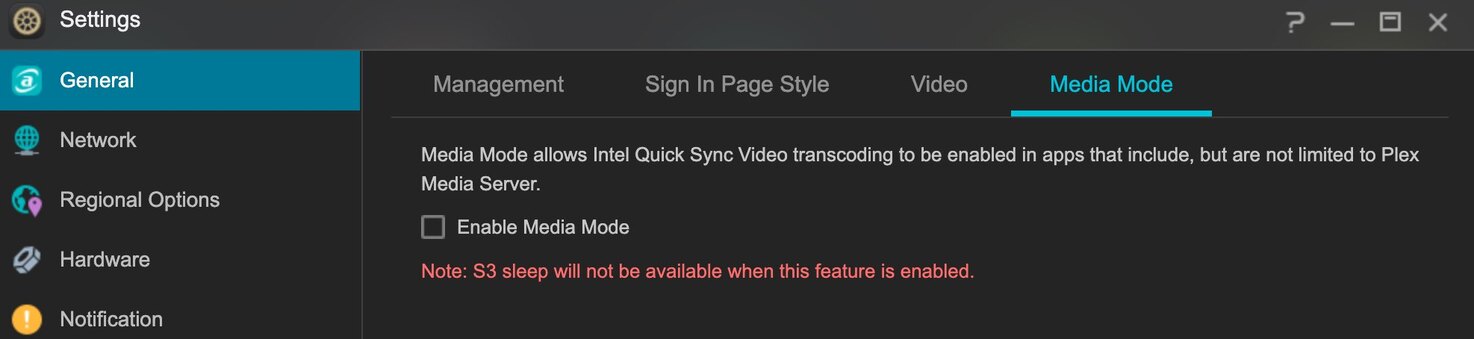
I may have (with little help on another forum) find where is the problem, or was ! Because I now have my HW transcode back !
So, where was the problem?
On the Asustor ADM side!
With a recent update of ADM, there is a new setting I totally didn’t see :
I’ll get back to you after I ran some more tests.
But I think it’s working.
But there is a medium cpu usage while transcoding : about 35%. I think this is a bit too much for HW transcoding, but the 4k hdr transcoded is smooth.
That’s a good report.
35% CPU is the AUDIO transcoding which is VERY resonable on a smaller 5xxx CPU.
@ChuckPa : This is a bit high, even for an audio transcode…
But, it can be this because after several seconds (20-30), the CPU % usage go down to 3-4 %.
I’ll have to try with the ADM package version to see if it’s working or not…
And by the way, the HW transcode is working with the Tone Mapping activated ! 
@ChuckPa With the Plex from ADM, the HW transcode works fine
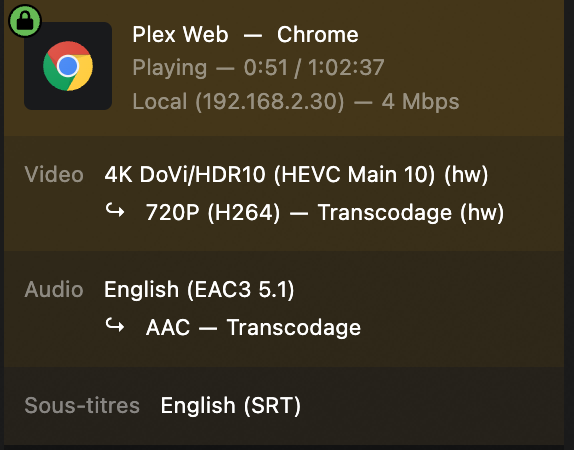
(with the option checked of course )