Yeah, they should be. I even asked on the forums a couple of weeks ago about being notified about new requirements for OpenCL when I installed an updated version of plex. I was foolish enough to not take a screen shot. I was told to stop, remove it, and then reinstall it. so I could see the notification about openCL again. Ridiculous. Of course I did it, but then I stumbled across the whole opencl reply in a post. Very frustrating that even Plex employees didn’t connect it when I specified I was having problems with an i5-9400.
I’ll take that action item (to get the documentation updated).
That’s on me since i am the package maintainer.
Appreciate you calling me out and keeping me honest.
I also apologize for not connecting the dots and providing the correct info. (some days are worse than others)
No worries. I got it working. And that really is the whole point of this forum. But, when we have issues, updating the documentation is helpful. And those who have had issues do want to see Plex be better for more. Thanks for your efforts.
Here’s the info which will be going into the documentation.
Intel Core i3/i5/i7 processors, SKU -7xxx and -8xxx require packages (available from the distro):
- beignet-opencl-icd
- ocl-icd-opencl1
Intel Core processors i3/i5/i7/i9 -9xxx and above require packages: (available at: Releases · intel/compute-runtime · GitHub
- intel-gmmlib
- intel-igc-core
- intel-igc-opencl
- intel-ocloc
- intel-level-zero-gpu
- ocl-icd-opencl1
example: an i9-9550 or an i5-10550 requires the Intel Compute Runtime support packages.
Again, Thank you for calling me out on this. It should have been done a long time ago.
3 Likes
Oh well that is interesting. It sounds like the installation routine also may want to account for that distinction in requirements by processor type. I have an i5-11400 and although I pre-installed the Intel runtime libraries, the Plex installer was still “asking” for beignet and ocl.
Now if we can get QuickSync working properly on the 10th/11th gen chips we will really be off to the races!
Thank you for receiving the feedback and volunteering to update the documents.
The installer already does.
It does an inventory of the system.
You still do want the ocl libraries because that’s how Engineering interfaces (from what I’ve been told to implement)
I did have a problem with the installer wanting Beignet when it shouldn’t have.
I did fix that. I think that’s about to be released.
If you find it requesting incorrectly, PLEASE save the file: /tmp/installer.log so I may see what decisions it made.
The installer has become quite the bit of code with a lot of variables in flight. It’s possible I missed a one. I do know that my embedded list of 10th and 11th gen processors isn’t complete. The “G” series seems to keep growing. I need to keep after it whenever one pops up.
You are right, I am sorry. I missed the trailing “* ocl-icd-opencl1” for the newer processors. I will let you know if I discover any oddities during my next installation.
Hi ChuckPa,
Thanks for your work on this topic. I unfortunately am running on a similar issue, but on Ubuntu Server 20.04.3 (fresh install).
I did install the latest releases of the following packages as you advised:
- intel-gmmlib
- intel-igc-core
- intel-igc-opencl
- intel-ocloc
- intel-level-zero-gpu
- ocl-icd-opencl1
Unfortunately, hardware transcoding still isn’t working for me for HDR content, only when HDR tonemapping is enabled.
HDR Tonemapping enabled:
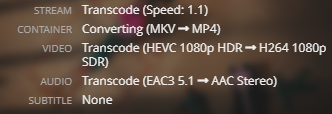
HDR Tonemapping disabled:

What else could be the cause of this behavior? Where could I look on my server / host OS to fix it? I’ll admit, I’m lost 
My CPU is an Intel i9-10900, iGPU is UHD Graphics 630.
Thanks in advance for your precious time and help!
Cheers,
I need to see the DEBUG (not VERBOSE) log files which capture what’s happening.
- Start Playback
- Let play 20 seconds
- Stop Playback
- Wait 30 seconds
- Download Logs ZIP file
- Attach ZIP file.
Thanks for your prompt response. Here it is:
- Your hardware transcoding is working. Notice the codecs are
vaapi.
Oct 28, 2021 00:28:01.756 [0x7f61c21dbb38] DEBUG - [Transcode] TPU: hardware transcoding: final decoder: vaapi, final encoder: vaapi
Oct 28, 2021 00:28:01.757 [0x7f61c21dbb38] DEBUG - [Transcode/JobRunner] Job running: EAE_ROOT='/tmp/pms-9fa01427-67e8-47e7-9707-5b85f983c023/EasyAudioEncoder' EnableExtendedVaFormats='1' FFMPEG_EXTERNAL_LIBS='/var/lib/plexmediaserver/Library/Application\ Support/Plex\ Media\ Server/Codecs/be22e26-4019-linux-x86_64/' LIBVA_DRIVERS_PATH='/usr/lib/plexmediaserver/lib/dri' NEOReadDebugKeys='1' X_PLEX_TOKEN='xxxxxxxxxxxxxxxxxxxx' '/usr/lib/plexmediaserver/Plex Transcoder' '-codec:0' 'hevc' '-hwaccel:0' 'vaapi' '-hwaccel_fallback_threshold:0' '10' '-hwaccel_output_format:0' 'vaapi' '-hwaccel_device:0' 'vaapi' '-codec:1' 'eac3_eae' '-eae_prefix:1' 'up2qehtibxf7ts2c8uysn66f_' '-analyzeduration' '20000000' '-probesize' '20000000' '-i' '/mnt/medias/tvshows/Squid.Game.S01.KOREAN.1080p.NF.WEBRip.x265.10bit.HDR.DDP5.1.Atmos-AGLET[eztv.re]/Squid.Game.S01E01.Red.Light.Green.Light.1080p.NF.WEB-DL.DUAL.DDP5.1.Atmos.HDR.HEVC-AGLET[eztv.re].mkv' '-filter_complex' '[0:0]hwupload[0];[0]scale_vaapi=w=1920:h=1080:format=p010[1];[1]hwmap=derive_device=opencl[2];[2]tonemap_opencl=tonemap=mobius:format=nv12:m=bt709:p=bt709:r=tv[3];[3]hwmap=derive_device=vaapi:reverse=1[4];[4]hwupload[5]' '-map' '[5]' '-metadata:s:0' 'language=kor' '-codec:0' 'h264_vaapi' '-b:0' '21991k' '-maxrate:0' '29322k' '-bufsize:0' '58644k' '-r:0' '23.975999999999999' '-force_key_frames:0' 'expr:gte(t,n_forced*3)' '-filter_complex' '[0:1] aresample=async=1:ocl='\''stereo'\'':rematrix_maxval=0.000000dB:osr=48000[6]' '-map' '[6]' '-metadata:s:1' 'language=kor' '-codec:1' 'aac' '-b:1' '256k' '-f' 'dash' '-seg_duration' '3' '-dash_segment_type' 'mp4' '-init_seg_name' 'init-stream$RepresentationID$.m4s' '-media_seg_name' 'chunk-stream$RepresentationID$-$Number%05d$.m4s' '-window_size' '5' '-delete_removed' 'false' '-skip_to_segment' '1' '-time_delta' '0.0625' '-manifest_name' 'http://127.0.0.1:32400/video/:/transcode/session/up2qehtibxf7ts2c8uysn66f/42686b32-73e8-4f9a-9f12-eca2ca43d1aa/manifest?X-Plex-Http-Pipeline=infinite' '-avoid_negative_ts' 'disabled' '-map_metadata' '-1' '-map_chapters' '-1' 'dash' '-start_at_zero' '-copyts' '-vsync' 'cfr' '-init_hw_device' 'vaapi=vaapi:' '-filter_hw_device' 'vaapi' '-y' '-nostats' '-loglevel' 'quiet' '-loglevel_plex' 'error' '-progressurl' 'http://127.0.0.1:32400/video/:/transcode/session/up2qehtibxf7ts2c8uysn66f/42686b32-73e8-4f9a-9f12-eca2ca43d1aa/progress'
Oct 28, 2021 00:28:01.757 [0x7f61c21dbb38] DEBUG - [Transcode/JobRunner] Jobs: Starting child process with pid 1890
- Now, notice here, they are not.
Oct 28, 2021 00:28:01.966 [0x7f61c5358b38] DEBUG - Stopping transcode session up2qehtibxf7ts2c8uysn66f
Oct 28, 2021 00:28:01.966 [0x7f61c5358b38] DEBUG - Starting a transcode session up2qehtibxf7ts2c8uysn66f at offset 0.0 (state=3)
Oct 28, 2021 00:28:01.966 [0x7f61c5358b38] DEBUG - TPU: hardware transcoding: enabled, but no hardware decode accelerator found
Oct 28, 2021 00:28:01.966 [0x7f61c5358b38] DEBUG - [Universal] Using local file path instead of URL: /mnt/medias/tvshows/Squid.Game.S01.KOREAN.1080p.NF.WEBRip.x265.10bit.HDR.DDP5.1.Atmos-AGLET[eztv.re]/Squid.Game.S01E01.Red.Light.Green.Light.1080p.NF.WEB-DL.DUAL.DDP5.1.Atmos.HDR.HEVC-AGLET[eztv.re].mkv
Oct 28, 2021 00:28:01.966 [0x7f61c5358b38] DEBUG - Codecs: hardware transcoding: testing API vaapi
Oct 28, 2021 00:28:01.972 [0x7f61c5358b38] DEBUG - [FFMPEG] - Format 0x41524742 -> bgra.
Oct 28, 2021 00:28:01.972 [0x7f61c5358b38] DEBUG - [FFMPEG] - Format 0x42475241 -> argb.
Oct 28, 2021 00:28:01.972 [0x7f61c5358b38] DEBUG - [FFMPEG] - Format 0x41424752 -> rgba.
Oct 28, 2021 00:28:01.972 [0x7f61c5358b38] DEBUG - [FFMPEG] - Format 0x52474241 -> abgr.
Oct 28, 2021 00:28:01.972 [0x7f61c5358b38] DEBUG - [FFMPEG] - Format 0x58524742 -> bgr0.
Oct 28, 2021 00:28:01.972 [0x7f61c5358b38] DEBUG - [FFMPEG] - Format 0x42475258 -> 0rgb.
Oct 28, 2021 00:28:01.972 [0x7f61c5358b38] DEBUG - [FFMPEG] - Format 0x58424752 -> rgb0.
Oct 28, 2021 00:28:01.972 [0x7f61c5358b38] DEBUG - [FFMPEG] - Format 0x52474258 -> 0bgr.
Oct 28, 2021 00:28:01.972 [0x7f61c5358b38] DEBUG - [FFMPEG] - Format 0x30335241 -> unknown.
Oct 28, 2021 00:28:01.972 [0x7f61c5358b38] DEBUG - [FFMPEG] - Format 0x30334241 -> unknown.
Oct 28, 2021 00:28:01.972 [0x7f61c5358b38] DEBUG - [FFMPEG] - Format 0x30335258 -> unknown.
Oct 28, 2021 00:28:01.972 [0x7f61c5358b38] DEBUG - [FFMPEG] - Format 0x30334258 -> unknown.
Oct 28, 2021 00:28:01.972 [0x7f61c5358b38] DEBUG - [FFMPEG] - Format 0x36314752 -> unknown.
Oct 28, 2021 00:28:01.972 [0x7f61c5358b38] DEBUG - [FFMPEG] - Format 0x50424752 -> unknown.
Oct 28, 2021 00:28:01.972 [0x7f61c5358b38] DEBUG - [FFMPEG] - Format 0x50524742 -> unknown.
Oct 28, 2021 00:28:01.972 [0x7f61c5358b38] DEBUG - [FFMPEG] - Format 0x56555941 -> unknown.
Oct 28, 2021 00:28:01.972 [0x7f61c5358b38] DEBUG - [FFMPEG] - Format 0x30303859 -> gray.
Oct 28, 2021 00:28:01.972 [0x7f61c5358b38] DEBUG - [FFMPEG] - Format 0x3231564e -> nv12.
Oct 28, 2021 00:28:01.972 [0x7f61c5358b38] DEBUG - [FFMPEG] - Format 0x3132564e -> unknown.
Oct 28, 2021 00:28:01.972 [0x7f61c5358b38] DEBUG - [FFMPEG] - Format 0x32595559 -> yuyv422.
Oct 28, 2021 00:28:01.972 [0x7f61c5358b38] DEBUG - [FFMPEG] - Format 0x59565955 -> uyvy422.
Oct 28, 2021 00:28:01.972 [0x7f61c5358b38] DEBUG - [FFMPEG] - Format 0x32315659 -> yuv420p.
Oct 28, 2021 00:28:01.972 [0x7f61c5358b38] DEBUG - [FFMPEG] - Format 0x30323449 -> yuv420p.
Oct 28, 2021 00:28:01.972 [0x7f61c5358b38] DEBUG - [FFMPEG] - Format 0x50313134 -> yuv411p.
Oct 28, 2021 00:28:01.972 [0x7f61c5358b38] DEBUG - [FFMPEG] - Format 0x48323234 -> yuv422p.
Oct 28, 2021 00:28:01.972 [0x7f61c5358b38] DEBUG - [FFMPEG] - Format 0x56323234 -> yuv440p.
Oct 28, 2021 00:28:01.972 [0x7f61c5358b38] DEBUG - [FFMPEG] - Format 0x50343434 -> yuv444p.
Oct 28, 2021 00:28:01.972 [0x7f61c5358b38] DEBUG - [FFMPEG] - Format 0x33434d49 -> unknown.
Oct 28, 2021 00:28:01.972 [0x7f61c5358b38] DEBUG - [FFMPEG] - Format 0x30313050 -> p010le.
Oct 28, 2021 00:28:01.972 [0x7f61c5358b38] DEBUG - [FFMPEG] - Created surface 0.
Oct 28, 2021 00:28:01.972 [0x7f61c5358b38] DEBUG - [FFMPEG] - Direct mapping possible.
Oct 28, 2021 00:28:01.980 [0x7f61c5358b38] DEBUG - TPU: hardware transcoding: final decoder: , final encoder:
Oct 28, 2021 00:28:01.981 [0x7f61c5358b38] DEBUG - [JobRunner] Job running: EAE_ROOT='/tmp/pms-9fa01427-67e8-47e7-9707-5b85f983c023/EasyAudioEncoder' FFMPEG_EXTERNAL_LIBS='/var/lib/plexmediaserver/Library/Application\ Support/Plex\ Media\ Server/Codecs/be22e26-4019-linux-x86_64/' LIBVA_DRIVERS_PATH='/usr/lib/plexmediaserver/lib/dri' X_PLEX_TOKEN='xxxxxxxxxxxxxxxxxxxx' '/usr/lib/plexmediaserver/Plex
If you were running in a Docker or LXC container, I would see your CPU here.
Instead I see “Common KVM Processor” which tells me you’re running in a VM.
Oct 28, 2021 00:05:09.242 [0x7f61c7f1eb38] INFO - Plex Media Server v1.24.5.5173-8dcc73a59 - Ubuntu PC x86_64 - build: linux-x86_64 debian - GMT 00:00
Oct 28, 2021 00:05:09.244 [0x7f61c7f1eb38] INFO - Linux version: 20.04.3 LTS (Focal Fossa), language: en-US
Oct 28, 2021 00:05:09.244 [0x7f61c7f1eb38] INFO - Processor Common KVM processor
Oct 28, 2021 00:05:09.244 [0x7f61c7f1eb38] INFO - Compiler is - Clang 11.0.1 (https://plex.tv e0c29d5827bc4eaaa2ceb882cbeed224b0960173)
Oct 28, 2021 00:05:09.244 [0x7f61c7f1eb38] INFO - /usr/lib/plexmediaserver/Plex Media Server
What’s going on ?
Do you have other processes sharing the QSV ASIC ?
Thanks again for your speedy response!
I am indeed running PMS inside a VM, on Proxmox. Here are its specs:

The PCI passthrough is for the iGPU part of the CPU.
I have nothing else on this machine that would/could be using the iGPU. In fact, hardware transcoding using the iGPU works fine for every other content I have… Except when it’s HDR → SDR with HDR Tonemapping enabled.
ProxMox is beyond my knowledge.
Even with all the machines I have here; NAS vendors, ESXi, native hosts, I don’t have any spares which I could dedicate to installing ProxMox.
When I did try it in a VM, I only got so far.
One thing I can relate, which might be at the root of your problem:
- ESXi likes to grab the vga (i915) for the console display.
- Hardware transcoding will not engage in the VM if it is grabbed exclusively by the hypervisor.
- My resolution was to have ESXi (the hypervisor itself), disable the VGA adapter so it was free for HW tone mapping to engage. Once I set
VGA="FALSE"in the configuration – Tone mapping worked flawlessly and continues flawlessly to this day. My only access to the machine is via SSH. (vga = “false”, uhd630 = Passthrough)
This might be why it works sometimes in your logs but not in the other tests – It was screen blank and had let go of the lock.
I must unfortunately suggest you pursue this one further in the ProxMox forums -OR- search our forums here for similar posts but I don’t have an answer for you. I am very sorry about not being able to answer.
Hi again ChuckPa,
No worries, thanks for taking the time to try and help me.
I highly doubt this problem comes from Proxmox, since (HW) transcoding works perfectly for every cases out there, except HDR content when HDR tonemapping is enabled. I’m thinking it’s a driver problem or some such.
Regarding the VGA adapter, I’ve already removed it when installing this VM as you can see on my previous screenshot (Display: none (none)). I don’t have access to the console, I need to SSH my way in too. 
Would you mind helping me understand a little bit better the bits of logs you’ve taken and shared here from my zip file? What exactly is PMS saying? When HDR Tonemapping is enabled and I try to transcode an HDR content, how is it reacting? I’m having trouble identifying the exact moment in the logs. I hope this will help me to find a solution, of course. Thanks in advance!
Hi again ChuckPa.
Problem solved!!
I simply followed MrSliff’s solution on this topic and it now works!!
HDR tonemapping enabled, and here is an HDR to SDR transcode… Using hardware!
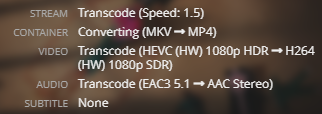
Just for fun, I tried to start 10 of those streams (which was totally impossible before, as a single stream being transcoded drained all of my CPU) and of course, it works flawlessly since it’s now using the iGPU!
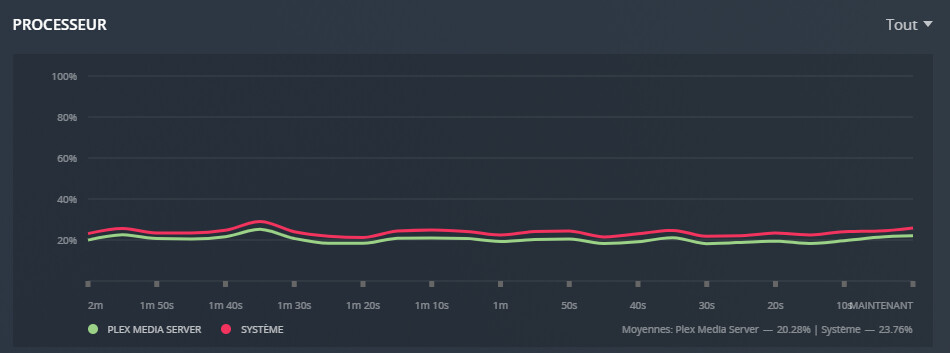
CPU being super chill while 10x HDR → SDR transcodes are going on…
Anyway, thanks a lot to both of you for your help on this topic, it helped me as well!
Tip for anyone who will try to follow MrSliff’s solution on this topic: don’t fret if the make -j8 command shows a lot of warning in the CLI, just go ahead with it and it’ll work just fine.
Damn, I’m happy. Thanks again to everyone!
EDIT: Just for being precise, I’m running Ubuntu Server 20.04.3, so this solution applies to Ubuntu versions beyond 18.04 somehow!
Hi, does this same setup still work for you (hw transcoding with HDR tonemapping) on Ubuntu 21.04 or 21.10?
Trying to figure out why my system on 21.10 isn’t working after doing all of the same things detailed here. Thanks for any help!
@ChuckPa are there any plans to fix the installer for this issue? This issue is still present on the installer I pulled from the plex website on Jan 10, 2022.
- Vanilla Ubuntu 20.04 LTS x64
- fully updated all packages via apt-get
- Deb package from here
- CPU: i5-9400
Whenever I attempted to transcode 4K 10bit HEVC, my log would have
TPU: hardware transcoding: enabled, but no hardware decode accelerator found.
The fix was to follow MrSliff’s solution on this topic and manually build the Beignet driver. Now Plex shows HW transcoding and my CPU usage is as low as expected.
Please help me understand what I need to change in the installer ?
It’s set, and has been this way for some time now,
- Intel CPUs -2xxx → -8xxx all use Beignet & OpenCL
- Intel CPUs -10xxx and above, including the new Celeron 10th gen “G” series, use Intel Compute Runtime.
Regarding the linked Fix for the code, rcombs is Ridley. Ridley is our transcoder developer so I expect whatever she fixed there is already in Plex.
This is why I need to understand what’s missing / incorrect.
It sounds like you’re saying Beignet is needed for -9xxx CPUs and not Intel Compute Runtime as stated by Intel ?
If so, I must then ask if Beignet, which is available through apt is where the deficiency exists.
I wish I knew what changes needed to take place, but I am more of a hobbiest than a developer.
Given the age of this thread and that I had the same issues so much later, I wanted to chime in that it was still an issue with the latest installer. HW Transcoding was not working at all with my i5-9400 and a pretty much unchanged ubuntu 20.04 install except for mounting network shares, updating all packages, and installing plexmediaserver. Everything is working great once I completed the entirety of the instructions Mrsliff posted, which includes references to both intel-compute and buignet.
I’ve attached below a couple different ways of viewing my iGPU info in case that is helpful. Is there a command or log I can run that would show you what runtime/driver is being used during the plex transcoding? Is that information contained in the logs? I have logs from before and after the fix.
sudo clinfo -l
beignet-opencl-icd: no supported GPU found, this is probably the wrong opencl-icd package for this hardware
(If you have multiple ICDs installed and OpenCL works, you can ignore this message)
beignet-opencl-icd: no supported GPU found, this is probably the wrong opencl-icd package for this hardware
(If you have multiple ICDs installed and OpenCL works, you can ignore this message)
beignet-opencl-icd: no supported GPU found, this is probably the wrong opencl-icd package for this hardware
(If you have multiple ICDs installed and OpenCL works, you can ignore this message)
Platform #0: Intel Gen OCL Driver
 `-- Device #0: Intel(R) UHD Graphics Coffee Lake Desktop GT2
Platform #1: Intel(R) OpenCL HD Graphics
 `-- Device #0: Intel(R) UHD Graphics 630 [0x3e98]
Platform #2: Intel Gen OCL Driver
sudo lshw -c display
  *-display
       description: VGA compatible controller
       product: UHD Graphics 630 (Desktop 9 Series)
       vendor: Intel Corporation
       physical id: 2
       bus info: pci@0000:00:02.0
       version: 02
       width: 64 bits
       clock: 33MHz
       capabilities: pciexpress msi pm vga_controller bus_master cap_list rom
       configuration: driver=i915 latency=0
       resources: irq:128 memory:a0000000-a0ffffff memory:90000000-9fffffff ioport:4000(size=64) memory:c0000-dffff
inxi -G
Graphics:  Device-1: Intel UHD Graphics 630 driver: i915 v: kernel
           Display: x11 server: X.Org 1.20.13 driver: i915 resolution: 1920x1080~60Hz
           OpenGL: renderer: Mesa Intel UHD Graphics 630 (CFL GT2)
           v: 4.6 Mesa 22.0.0-devel (git-912acbf 2022-01-12 focal-oibaf-ppa)
Hi @P0mme, on a related note, do you have any issues with your Proxmox setup where Plex uses 130%+ CPU when transcoding audio? It keeps happening to me after ~10 minutes of playing, but only when hardware-transcoding HDR along w/ audio (usually EAC3). Note: I have Plex in a container instead of VM.


