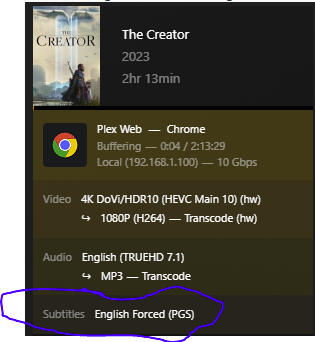
TLDR - Subtitles cause very high CPU usage - Settings - Languages - UNTICK “Automatically select audio and subtitle track” - Subtitle mode = MANUAL
Server Version#: 1.32.8.7639
Player Version#:
Hi All, been running plex on a Windows box and then a Qnap NAS for a number of years, finally moving on to some decent hardware and wanting to use Proxmox as the host with Plex running in LXC.
Having a few issues with transcoding.
After using the Tteck Proxmox Scripts I have followed the guide provided by Constiens (awesome guide, Plex HW acceleration in LXC container - anyone with success? - #35 by constiens) and running in to a few issues.
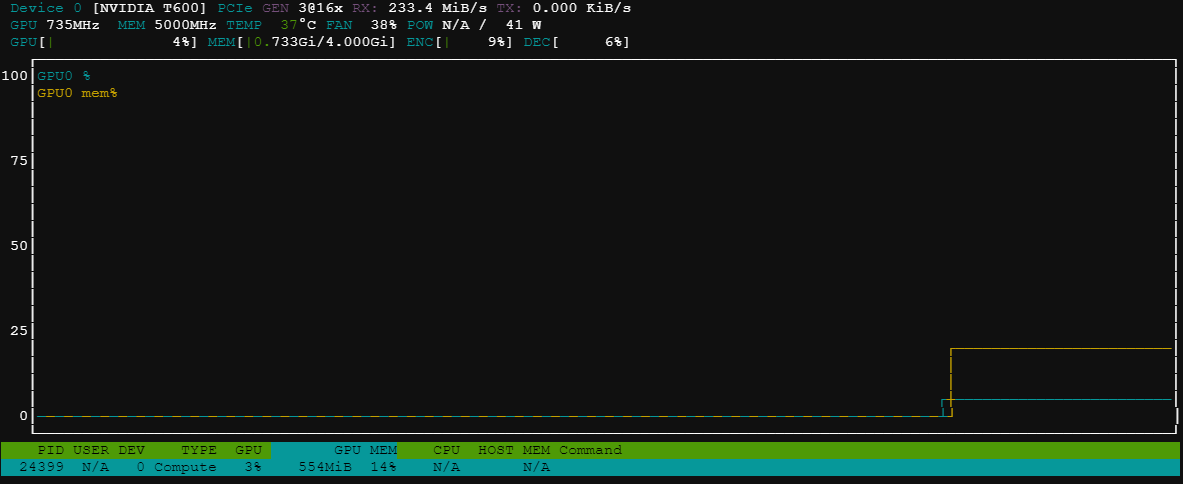
I can only ever get HW transcoding working once. this is at testing once configured and working. NVTop on the instance is showing the GPU getting used correctly.
After rebooting the host or the LXC following this test I am only seeing 6% usage of the GPU and massive increase in CPU usage (up to 75%) and the video playback of the 4K file used in the initial testing is buffering.
NVidia-SMI is working and loading correctly.
NVIDIA Persistence Daemon is enabled and running.
I have been through reinstall and reconfig of the proxmox box a number of times, switched from LXC to VM and getting the same issue, back to LXC to double check I was getting the setup correct and still the same.
Would someone be able to point me in the right direction in getting this working consistently?
Thanks.
You must pass the Nvidia through to the LXC as a physical device and enable the runtime library passthrough as well (Nvidia drivers are installed on the HOST, not LXC)
You must then add the GPU GID
Lastly, you need UID/GID to use to access the host
Here’s a working Plex LXC config with P2200 GPU
[chuck@glockner ~.2001]$ lxc config show plex
architecture: x86_64
config:
  image.architecture: amd64
  image.description: ubuntu 20.04 LTS amd64 (release) (20230616)
  image.label: release
  image.os: ubuntu
  image.release: focal
  image.serial: "20230616"
  image.type: squashfs
  image.version: "20.04"
  nvidia.driver.capabilities: all
  nvidia.require.cuda: "true"
  nvidia.runtime: "true"
  security.privileged: "false"
  volatile.base_image: d4e689d3c383471c62dc80fff40a2b467342a5c6c0954546a7ccca8e89187bf9
  volatile.cloud-init.instance-id: b0a14d05-abbc-460e-88e2-4b824d0bddf2
  volatile.eth0.hwaddr: 00:16:3e:1e:2f:64
  volatile.idmap.base: "0"
  volatile.idmap.current: '[{"Isuid":true,"Isgid":false,"Hostid":996,"Nsid":0,"Maprange":1000000000},{"Isuid":false,"Isgid":true,"Hostid":996,"Nsid":0,"Maprange":1000000000}]'
  volatile.idmap.next: '[{"Isuid":true,"Isgid":false,"Hostid":996,"Nsid":0,"Maprange":1000000000},{"Isuid":false,"Isgid":true,"Hostid":996,"Nsid":0,"Maprange":1000000000}]'
  volatile.last_state.idmap: '[{"Isuid":true,"Isgid":false,"Hostid":996,"Nsid":0,"Maprange":1000000000},{"Isuid":false,"Isgid":true,"Hostid":996,"Nsid":0,"Maprange":1000000000}]'
  volatile.last_state.power: STOPPED
  volatile.uuid: 86009cde-72a6-42f3-98b5-a6b4396a6b62
  volatile.uuid.generation: 86009cde-72a6-42f3-98b5-a6b4396a6b62
devices:
  PlexAppDir:
    path: /plex
    source: /vol/lxd/lxc-storage/plex
    type: disk
  media:
    path: /vol/media
    readonly: "true"
    source: /vol/media
    type: disk
  p2200:
    gputype: physical
    type: gpu
ephemeral: false
profiles:
- default
stateful: false
description: ""
[chuck@glockner ~.2008]$ lxc profile list
+---------+---------------------+---------+
|  NAME   |     DESCRIPTION     | USED BY |
+---------+---------------------+---------+
| default | Default LXD profile | 5       |
+---------+---------------------+---------+
| nvidia  | Nvidia profile      | 0       |
+---------+---------------------+---------+
[chuck@glockner ~.2009]$ lxc profile show nvidia
config:
  nvidia.driver.capabilities: all
  nvidia.require.cuda: "true"
  nvidia.runtime: "true"
description: Nvidia profile
devices:
  eth0:
    name: eth0
    nictype: bridged
    parent: br0
    type: nic
  root:
    path: /
    pool: default
    type: disk
name: nvidia
used_by: []
[chuck@glockner ~.2010]$
Thanks for the reply Chuck.
I forgot to mention I am using the tteck proxmox script to get the LXC built.
I do have the Nvidia kernel module and drivers installed on the host, the drivers are only installed on the client.
This is from my config file.
more config
lxc.cgroup.relative = 0
lxc.cgroup.dir.monitor = lxc.monitor/100
lxc.cgroup.dir.container = lxc/100
lxc.cgroup.dir.container.inner = ns
lxc.arch = amd64
lxc.include = /usr/share/lxc/config/ubuntu.common.conf
lxc.apparmor.profile = generated
lxc.apparmor.allow_nesting = 1
lxc.apparmor.raw = mount fstype=nfs,
lxc.apparmor.raw = mount fstype=cifs,
lxc.apparmor.raw = mount fstype=fuse,
lxc.mount.entry = /dev/fuse dev/fuse none bind,create=file 0 0
lxc.monitor.unshare = 1
lxc.tty.max = 2
lxc.environment = TERM=linux
lxc.uts.name = 4k-plex
lxc.cgroup2.memory.max = 4294967296
lxc.cgroup2.memory.high = 4261412864
lxc.cgroup2.memory.swap.max = 536870912
lxc.rootfs.path = /var/lib/lxc/100/rootfs
lxc.net.0.type = veth
lxc.net.0.veth.pair = veth100i0
lxc.net.0.hwaddr = BC:24:11:08:09:1D
lxc.net.0.name = eth0
lxc.net.0.mtu = 1500
lxc.net.0.script.up = /usr/share/lxc/lxcnetaddbr
lxc.cgroup2.devices.allow = a
lxc.cap.drop =
lxc.cgroup2.devices.allow = c 188:* rwm
lxc.cgroup2.devices.allow = c 189:* rwm
lxc.mount.entry = /dev/serial/by-id dev/serial/by-id none bind,optional,create=dir
lxc.mount.entry = /dev/ttyUSB0 dev/ttyUSB0 none bind,optional,create=file
lxc.mount.entry = /dev/ttyUSB1 dev/ttyUSB1 none bind,optional,create=file
lxc.mount.entry = /dev/ttyACM0 dev/ttyACM0 none bind,optional,create=file
lxc.mount.entry = /dev/ttyACM1 dev/ttyACM1 none bind,optional,create=file
lxc.cgroup2.devices.allow = c 226:0 rwm
lxc.cgroup2.devices.allow = c 226:128 rwm
lxc.cgroup2.devices.allow = c 29:0 rwm
lxc.mount.entry = /dev/fb0 dev/fb0 none bind,optional,create=file
lxc.mount.entry = /dev/dri dev/dri none bind,optional,create=dir
lxc.mount.entry = /dev/dri/renderD128 dev/dri/renderD128 none bind,optional,create=file
lxc.cgroup2.devices.allow = c 195:* rwm
lxc.cgroup2.devices.allow = c 508:* rwm
lxc.cgroup2.devices.allow = c 237:* rwm
lxc.mount.entry = /dev/nvidia0 dev/nvidia0 none bind,optional,create=file
lxc.mount.entry = /dev/nvidiactl dev/nvidiactl none bind,optional,create=file
lxc.mount.entry = /dev/nvidia-modeset dev/nvidia-modeset none bind,optional,create=file
lxc.mount.entry = /dev/nvidia-uvm dev/nvidia-uvm none bind,optional,create=file
lxc.mount.entry = /dev/nvidia-uvm-tools dev/nvidia-uvm-tools none bind,optional,create=file
lxc.cgroup2.cpuset.cpus =
Honestly, the lxc configuration was so fiddly I didn’t stay with it long. I need my Plex server to be stable and it just had too many issues and the performance payback wasn’t there.
Is there a reason you want to go lxc?
Wanting to have something that’s kinda lightweight, I am also toying with the idea of installing Plex on to the Proxmox host. I do currently have Plex running in Docker on my NAS. Relying on Qnap to get things right has been a headache, I was running on an older release of Plex for a number of month after the broke “something”, also HW Transcoding performance isn’t the best, even with a P600 installed.
HW Transcoding, when it worked the initial time, was giving me some good indications that performance would be a significant uplift when compared to the Qnap.
I have also seen the same issue with Transcoding only working once when I had Plex in a VM, again everything looked to be passed through correctly.
I went from lxc to vm to docker. Currently I’m passing my GPU to the docker container inside a proxmox Linux vm.
My experience has been that Plex just doesn’t need that low level lxc container performance. It’s just not worth the troubleshooting headaches.
Your problem sounds strange. It would be unusual for it to work then not work. How are you verifying it stopped working?
Initially the Transcoding worked playing a 4K file.
After I had moved the server to where it was going to be living, I retested the same 4k file, It was buffering and the CPU usage on Plex was up at 75% when previously it was maybe 5%.
More digging and getting NVtop installed after a rebuild, initially NVTop was showing good GPU utilisation, after the client was rebooted NVtop was showing a max of 6% usage.
All with the same file, on the same CIFS share.
So it was working, then you powered down the server and physically moved the server to a new location and it stopped transcoding after you booted it back up?
initially yes, but after seeing that and going through a rebuild and then testing, it seems to stop working after it has transcoded one item, then stops transcoding.
The recent rebuild I had an issue with network shares not loading after the network was fully up, so getting that working took several reboots.
After that was working, Transcode was working, so rebooting was not the issue, but only worked once. Following the initial Transcode, everything looked to be being done by the CPU
Does Plex say it’s doing HW transcoding, similar to this?

It is showing HW Transcoding, but it is using CPU and not GPU.

The GPU is doing something, probably audio, but nothing for the video.
It’s using the GPU, it says (hw) next to both the video lines. Your CPU is doing audio transcoding from TRUEHD 7.1 to MP3
Check your nvidia-smi output for the plex transcode process

Considering what I have seen the usage to be during initial testing and this same file playing smoothly with out buffering, I am still of the opinion that there is something going on. I also wouldn’t expect the audio track to be causing this much CPU usage. As again initial testing was showing next to nothing hitting the CPU.
I can do a rebuilt of the LCX and update with screen grabs showing the usage on NVtop and Plex.
From the LXC
From the Host.
This was also the same during initial testing.
I would tell you that its not a GPU issue. If you are seeing (hw) on both the video lines in plex and the plex transcoder process is showing up in nvidia-smi then you can be pretty certain it is both decoding and encoding the video with your GPU.
I’m not saying there isn’t an issue, I’m saying its not a GPU issue.
I’d agree with what you’re saying if performance wasn’t so poor.
Everything I can see on the server is saying it’s working, but the high CPU usage and buffering is suggesting otherwise.
Wondering what else I can use to determine where the issues are.
I will have a play with the subtitles and see if that resolves the issues. I don’t think they are set to be auto enabled.
Fecking Thing!
It was the subtitles!
Is this normally turned on by default?
I am now seeing good playback and decent usage on NVtop.not just the usual 6%.