Server Version#: 1.15.2.793
Player Version#: Android / Chromecast
Docker Host: docker-machine driver=VirtualBox os=Windows
NAT: Double / transparent (i.e. nataliasmode1=proxyonly,sameports)
Reverse Proxy: yes
Treat WAN IP As LAN Bandwidth: no
LAN Networks: 192.168.0.0/255.255.0.0
Custom server access URLs: https://mydomain.com:443,http://192.168.x.x:32400
Plex is unable to distinguish between local and remote traffic. I believe my config to be correct and have installed iftop inside the Plex container to diagnose.
Connections appear in the container (and thus Plex) as below:
Plex appears to ignore my LAN Networks configuration in this scenario. Additionally, it seems to ignore HTTP headers such as REMOTE_ADDR, X-Real-IP or X-Forwarded-For which all contain my real remote address (confirmed by running a fastcgi backend in another container).
This issue also may apply to List of IP addresses and networks that are allowed without auth which also does not behave correctly in this setup.
Proposal: allow a configuration option of trusted headers to obtain the remote ip address, e.g. X-Real-IP.
I have a similar configuration and I’m experiencing the same issues. Definitely a Plex problem.
Plex configuration:
Remote Access off
Custom SSL Cert configured
Custom server access URL: https://plex.example.com
LAN Network: 192.168.1.0/24
Treat WAN IP As LAN Bandwidth: off
HAProxy configuration:
http mode
terminates TLS
multiplexes :443 (for other services), forwards plex.example.com to 192.168.1.8:32400 (HAProxy ↔ Plex connection is also TLS)
option forwardfor (sends X-Forwarded-For)
I can confirm from Plex logs that it receives the correct X-Forwarded-For header, and even acknowledges that it’s using it (screenshotted)
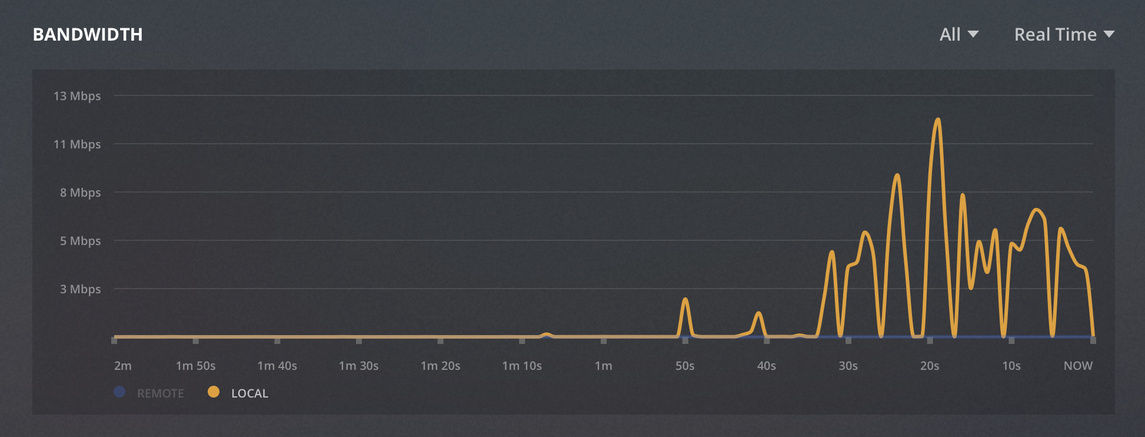
However, the bandwidth dashboard shows remote traffic as local (also screenshotted).
From this I assume that other important settings (“Remote streams allowed per user” for example) are also ignored.
Having enabled verbose logs after seeing LukeChannings’ reply I can also confirm that Plex sees the correct remote IP address via X-Forwarded-For in my setup too.
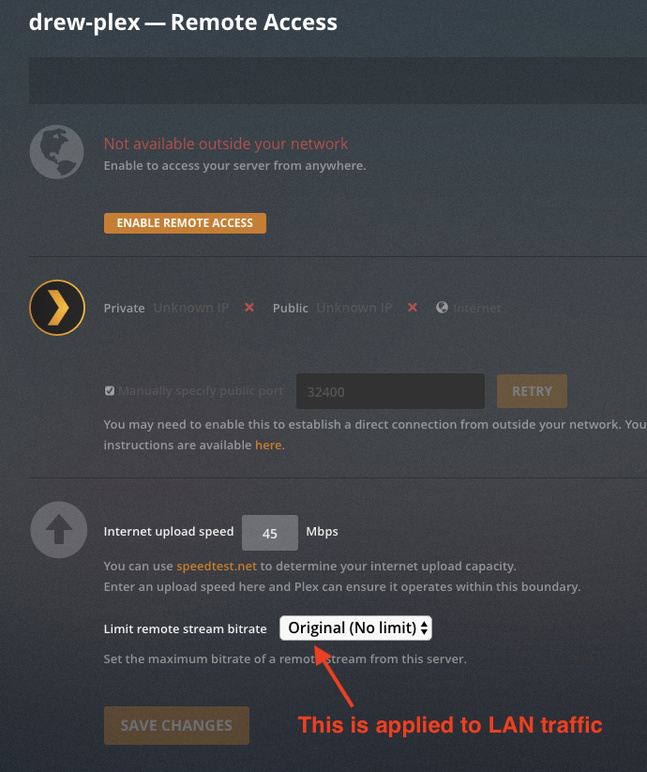
Plex Bandwidth monitor is treating all traffic as local, but the bandwidth limiter is treating all traffic as remote. LAN IPs that are visibly identified as LAN in Tautulli are being restricted from passing the Remote stream bitrate limit when it’s set on the Remote Access Settings page.
I have it set to Unlimited to bypass this issue for now.
I’m also using a reverse proxy to terminate SSL connections, and I intentionally bring local traffic in via the reverse proxy through WAN interface using NAT reflection rather than talking directly to the private IP in my DMZ. The LAN IP is seen by Plex and traffic is recognized as LAN traffic in Tautulli.
I check for updates and do not see any—I’m purposefully using the public release channel as I expect it to be more stable, and I assume you guys are on the Pass/beta channel.
I switched to the Beta channel after seeing Luke’s reply and looking at the changelog forum post and confirming the fix is not yet (as of last week) in the Stable channel.