I gave up awhile ago on Shield as a PMS. Between Plex and nVidia, too many bugs. I have found that Win10 PMS with Shield as a client has been far better for me. As an example, the Shield PMS would often fail to record a program for no reason. That never happens with Win10 PMS. My Win10 is nothing really special. A Lenovo micro PC with an i5 and 8G ram. I have other uses for this so I had it anyway. In addition, when I record programs for my wife for later watching with commercial removal, it is like 3-5x faster in the post processing.
I see another update made to the PMS but still no progress on this critical issue!
1.18.2.2058
Actually, I could use another toilet. Let me know how much you want for it.
Considering that the issue appears to be resolved on several platforms like Plex for Android TV, Shield TV, Plex for LG and Plex for Sony, Plex for Windows, it would suggest that the fix will need to be coming to players on platforms that are still not working, like the ROKU and ATV4K, etc.
As promised, I tested for this issue on my Amazon Fire TV 4K dongle this morning.
I scheduled Fox NFL Kickoff to record at 10:00 am central time. At about 10:45 am, I turned on my TV and the Fire TV. I started the Plex for Fire TV App, browsed the Guide to the FOX channel and found the show that I had scheduled to record.
When I clicked on it, I was prompted with two options…
Watch from start (started 48 min ago) and Watch life.
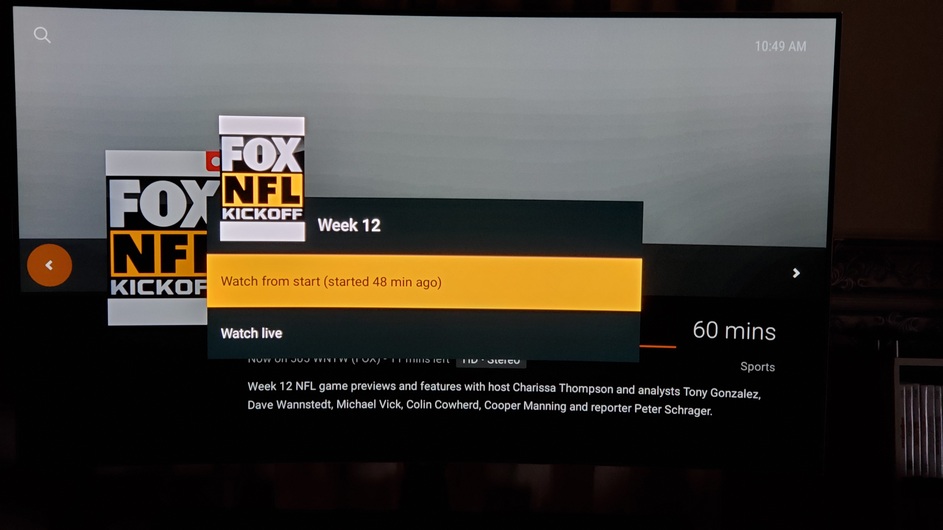
I chose to Watch from start and the show tuned in at the beginning of the recording. I was able to fast forward and rewind many times without any issues. I hit pause and play and the show paused and then began playing again.
I then stopped the show, went back to the guide and did it all over again, and it worked.
So, another platform appears to be working! This would suggest that more progress has been made.
So far, working platforms for me appear to be
Plex for Android mobile
Plex for Shield TV (Android TV)
Plex for LG
Plex for Amazon Fire TV
Plex for Windows
Plex Web
Just tried the following so first hand knowledge here.
Plex for Android mobile - Samsung Galaxy S8+ - DOES NOT WORK
Plex for Shield TV (Android TV) - At a neighbors - DOES NOT WORK
Plex for Amazon Fire TV - At a neighbors - DOES NOT WORK
Plex for Windows - Is broken again, has been on/off throughout this discussion
Plex Web - Who cares?
Plex for ATV4K - DOES NOT WORK
Plex for ROKU - DOES NOT WORK
What is your point to continually try to convince people this reliably works when it does not? Only you keep up this mythical drum beat.
Again, the vast majority of users/devices do not have a reliable platform but you already know that. Do they pay you by the post? Bless your heart!
ALL software at the latest available release at the time of the post. That includes windows, device firmware and PLEX version. If a ROKU is involved it’s Plex Preview. I am on PMS Windows Beta channel.
For those posting that it works or doesn’t work, it would be useful to post what version of Plex Media Server you tested!
ATV4 is working 100% for me. 
It was a long time since I tested (before just now) but it used to always crash the app and stop the recording. I started playing from beginning when it had been recording for 43 minutes. Pause, skip ahead/back, all working great.
Tech details:
Transcoding 1280x720 signal (Fox  )
)
MPEG2VIDEO - H264 @ 10.1Mbps
HD Homerun tuner
Copying audio (AC3)
Player “mpv“
PMS for Windows, v1.18.2.2058
Addendum: very strong and stable antenna signal, I’ve felt in the past that Plex recording does not deal well with weak or interrupted signals.
100% fail here, 95+% signal and quality Did you try to time shift multiple times?
Just tried again and it failed. Everything is latest software from windows to server to atv4K to plex.
100% fail
Did a small test with timeshifting a live stream (Panthers vs Saints on Fox8) that’s recording and it had no problems using 1.18.2.2058 for PMS, (using Roku 4K stick) I’m not confident that its fixed since I’ve had it work normal for a period of time before only to totally screw up and get lost in the timeline. When I watch the Ohio State-Michigan game next Saturday that will be the real test. Today’s test , the recording was going for about 66 minutes I started to play from the beginning and scanned close to live TV pausing the the show a few times (one time paused for about 5 minutes) no mess-ups in the time line. Hopefully this was more than good luck, but if there was a fix, surely you would think it would have been mentioned in the release notes, so I am guessing its not fixed yet.
BTW is there a way to get a percentage of the signal strength, if so can you share? Or does 95% just mean clear signal with no digital breakups that you observed?
Can you guys with the working/not working reports please mention whether or not you are using hardware transcoding? I see different behavior on my Roku when I have hardware transcoding disabled.
I don’t transcode, I use the original mpeg2 stream.
Ah, well that might be a giant clue. My rokus only play MPEG4 (AFAIK), so transcoding is always going. Of course it’s silly for us to be doing all this diagnosis. I’m sure that Plex QA has a big list of what’s working and what is not.
I take it back, after working flawlessly during my trial run (which was for about an hour during the early game), when I wanted it to work (during the Patriots game) it was a complete disaster. I couldn’t skip forward or back reliably, I randomly got kicked out of the stream a few times, it would jump to the beginning of the recording when it felt like it. Just a complete failure. It was the same channel, the same Apple TV, the same network, the same everything as the early game.
So yeah, that wasn’t fun.
I doubt it’s working flawlessly on any platform…some parts of recording in progress timeshifting work correctly most of time time on some platforms is a fair statement.
Just was watching a football game which had finished recording, while plex was recording another game. The game I was watching was working fine while i was fast forwarding through commercials. I then hit rewind to re-watch a play…and instead of skipping backwards it skipped forwards, and continued to skip forwards when i selected skip backwards…making it impossible to skip backwards.
I then exited out of watching that game. Then, the game which was recording…stopped recording without me telling it to. I was able to restart the the game that had finished recording fine, but lost some of the game that was recording…I had to re-tell Plex to record that game which was now 20 minutes into the game.
I’ve never had a timeshifting issue in plex when plex wasn’t recording TV…so there’s clearly plenty of bugs in timeshifting…because this isn’t the only example of a problem.
I have had timeshifting work pretty well most, but not all, of the time on nVidia Shield the last two to three months with just a single recording in progress.
PMS 1.18.2.2031 on nVidia Shield
Client 7.24.3.13840 on nVidia Shield
Smokindog,
Could you please post LOGS for every system you tested?!?!? This would be really helpful to the DEV’s to take a look at ALL the system you have access too.
Clearly you are NOT going to do that and we all have to see every other post being you saying DOES NOT WORK or 100% FAIL. It gets old… As others have said… JUST MOVE ON…
I’ve done that all in the past. As soon as they post the plans to fix these things and show progress towards resolution I’m not posting any more logs. ALL of these issues are easy to reproduce, they’re not “hidden nor one off” issues.
Sorry, I’m all about helping but they’ve taken money from thousands of people and have demonstrated virtually zero willingness to resolve these problems. This thread goes back to July of 2018.
As to moving on, I purchased a product that hasn’t worked since day 1. I don’t rely on PLEX but I help a number of people who are stuck for now. My suggestion would be that you move on if having the truth reported bothers you. I only post after a new release of one or more components is released and I can test it for progress OR when someone continues to claim something works when it does not.
What gets old is that we continually get new releases of software components and the problems that have existing for months are not addressed.
I’m not just claiming that it works. It does work for me and NO I do not work for PLEX and NO they are not paying me to post. I take offense at you calling me a lair.
NFL Football is the primary reason for me to be time shifting and I have been able to skip through commercials and half time week after week. I have been able to rewind when I Fast Forward to far and go back and see each and every play.
Also, I am NOT the only one that has reported that it is working for them.
What is working in my two environments…
Plex Media Servers
Plex Media Server in Missouri @ Version 1.18.2.2058
Custom Built PC with Core i7-4790K & 16 GBs of DDR3 RAM
Running on Windows 10 Professional 1909 on Solid State Hard Drive
Seagate 10 TB hard drive for content storage
DVR - two HDHomeRun Connect Quatro
Plex Media Server in New York @ Version 1.18.2.2058
Custom Built PC with Core i7-6700 & 16 GBs of DDR4 RAM
Running on Windows 10 Professional 1909 on Solid State Hard Drive
Seagate 6 TB Hard Drive for content storage
DVR - one HDHomeRun Prime with Verizon FIOS CableCard
Plex Players
Plex for Android (Mobile) Version 7.24.3.13840 on Galaxy S10+
Plex for Android (TV) Version 7.24.3.13840 on Shield TV Pro 2019
Plex for Android (TV) Version 7.24.3.13840 on Shield TV Gaming 2017
Plex for Android (TV) Version 7.23.0.13018 on Amazon Fire TV 4K
Plex for LG Version 4.7.1 on LG OLED64C6-U
Plex for Windows Version 1.4.0.924
Plex Web Version 4.14.2 with Chromium Browser
It does indeed work at least for Android TV. Ive been using it all season watching NFL. We are in week 11. I watched Pats/Cowboys yesterday timeshifted with no issues at all.
SHIELD Android TV
7.25.0.14108
Plex for Android (TV)
1.18.2.2058-e67a4e892
Plex Media Server
PC
Windows 10.0 (Build 18363)
You can claim all you want that it doesnt work on any platform. That simply is not true.
FWIW, I gave Plex till the start of NFL season to fix the issue. If it wasnt fixed, i already had a couple of alternate solutions tested out and would have moved on Vs being in here every day complaining.
