Server: 1.19…5.3112
Client: Multiple including 8.6.0.20315 android TV
I recorded an NFL game starting at 9 am and also had a recording to start immediately after (the next game) at noon. Started watching the first game around 10 am. Caught up to live. Finished the game. Went away. Tried to start watching the second game ~11am. It wouldn’t start playing…on any app…I tried multiples of them to include android TV, webOS, and the web app.
I haven’t visited this thread for quite a while, because, the issues with playing a recording in progress were pretty much resolved for me.
I will say that the original issue that started this thread, namely, “Start Watching Recording in Progress from Beginning” is still working for me.
However, I am back now, due to that some of the other issues that have been discussed in this threat (fast forwarding and rewinding) are back again now. This is especially true for when watching the recording in progress once it goes beyond the normal ending time.
For the most part, I only watch a recording in progress during football season. I like to wait about 1 hour or so after a game starts so that I can fast forward through the commercials.
I am running the most current versions of Plex Media Server and Plex App for Android TV.
Plex is going backwards now. I’m trying to watch today’s NFL game, which was scheduled to record. I was offered to watch from the beginning (120 minutes ago).
Normally, I FastForward through all of the commercials and get to the start of the game. Well, guess what? Yup, you guessed it right. You can’t Fast Forward anymore. No rewind either.
The ability to Fast Forward and Rewind are must haves for DVR.
To make matters worse, about 8 to 10 minutes into the stream, it just froze. Would not play anymore. My only option was to back out and restart the game. But guess what, I can’t Fast Forward to get back to the point where I was when it froze up.
I even tried to watch the game on my HTPC with the web based player. I wasn’t even given the option to watch from the beginning.
I guess I will just have to wait until the recording is finished and watch the game later.
This is unbelievable. Perhaps it is finally time to start looking at other solutions for Live TV and DVR.
Plex Media Server Version 1.20.3.3483
Plex Player - Android on SHIELD TV Version 8.8.0.21200
I agree, I’ve got the same behavior. At one point this became almost quite usable, but some how it has regressed, now when I start watching a current recording from the beginning I don’t dare try to skip forward or backward.
Plex Media Server Version 1.20.3.3483
Plex Player - LG TV 5.2.1
FF and RW also continue to fail when the program moves to the “next program” on the TV guide. Watch from start and time-shifting consistently work well for me with the above server/client combo until moving to the “next program”.
Like @adutchman I was watching the NFL today and started watching from the start about 60 min after the game started. I FF through commercials etc. It all works great until the end of the game when the TV guide data shows its the next program (the next game time slot). Then hitting fast forward takes you back to the start of the current TV guide time slot instead of jumping forward 30 seconds. This is pretty infuriating when you are trying to skip forward and it jumps back 3 min and you can’t skip forward anymore.
Plex time-shifting ALWAYS breaks when you reach the next program time slot. i.e. near the end of every TV sports event ever.
Can you acknowledgement this issue @DaveBinM and say it is actively being investigated? It’s been around for years and easy to reproduce.
Even when FF and RW were working pretty well for me, there was always a problem when the show reached the end of it’s scheduled broadcast time is over. Very frustrating when you are watching a game, ever it it doesn’t go into over time and you hit FF and the stream just barfs.
Same problem last night. I had the Seahawks/Cardinals game set to record with 60 mins additional time, I started watching from the beginning about halfway through the game, and it worked flawlessly until it hit the scheduled end, at which point I was dumped straight into Live. Thankfully the game had ended and it was another show, so I could open the recording and skip through it up until the point as was at and it worked fine. Would have been a major disappointment had I only been say 20 mins behind as it would have dumped me straight into the end of the game.
After updates to both Plex Media Server and the Plex for Android TV app, the issue with not being able to FF or RW at all seems to be resolved at the moment.
I will post an update on this again after NFL games this Sunday.
I hate to jump in this with kind of stupid request, but can anyone explain how time shifting suppose to work, please?
I have PMS with live TV being recorded and connect to it with either: Mac player, Web player or iOS players and simply cannot find way to even get option to start watching recorded show from beginning. Whichever way I try, all I can do is watch recording in progress in real time. No way start from anywhere else and move back in time. So I am impressed by reports that it works - BUT HOW?
Please, provide sensible step-by-step instructions how to get to this…
Thanks!
It appears to be broken in Plex for Windows and Plex Web App again now. I mainly use Plex for Android TV to watch and time shift Live TV, and that is working.
So, in any case, I suppose there are a couple of ways go about this, so when it is working, here is one way to do it.
First you want to have a something that is being recorded. Here are some basic steps for that…
Launch a Plex Player and go to Live TV & DVR
Select the Guide and find a program that you want to record
Click the record button and then chose your record options.
Click on Record button to schedule the recording
(or in my example it started recording immediately)
Once a program has started recording, you are supposed to be able to go back to the guide and find the show that is being recorded, like this…
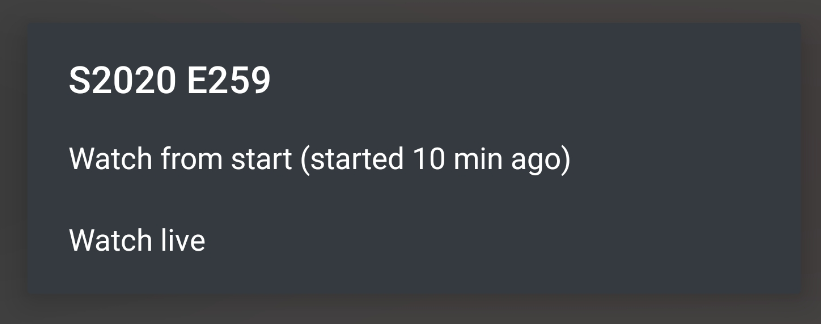
And then click on the Title and you should be prompted to Watch from the beginning like this…
Great instructions. Thanks a lot.
It’s not working now and I do not remember that ever working with Plex Web player. I’ll try using MacOS app and iOS app, those are my other choices.
It is so annoying that this does not work, that I have to I record using EyeTV copy of each show I intent to possibly time shift. And EyeTV (3) is complete disaster by now, basically abandonware, but time shifting still works perfectly fine. But sharing over web is disaster…
update: Works on iOS application. DOES NOT WORK on macOS and Web Applications.
At one point in time, when it failed to work properly in Plex for Android TV, I would go back to Windows and use either the Plex Media Player or Plex for Windows app and it always seemed to work better there at those times.
I hate to bash the Plex Developers but when something is working and then a patch or update is released that breaks features that were previously working, well, frankly, that’s very poor quality control.
[quote=“DaveBinM, post:1026, topic:278653”]
There is a known issue with the Plex for Mac/Windows apps at the moment. It should now be working on app.plex.tv[/quote]
It is NOT working on app.plex.tv using Safari on macOS.
I also tried Chrome on macOS and it is NOT working.
Version of what? I point my browsers to : https://app.plex.tv/desktop
I am on the latest Catalina if that is the question. Safari is version 14.0 and Chrome is 86.0.4240.183. As far as I can say, I am current on everything.