Server Version#: 1.21.0.3711
Has there been any progress made to launch PMS on a Mac without a user WindowServer context?
Thanks
Server Version#: 1.21.0.3711
Has there been any progress made to launch PMS on a Mac without a user WindowServer context?
Thanks
Want to chime while I have a chance to share what I’m trying on macOS 10.15.6 (2010 mac mini server)
I’ve had much success using launchd to get Emby to start (and my initial exploration of Plex last night and experiencing multi-server content integration is having me seriously reconsider my media server choice!  )
)
This article is super helpful to read:
Here is my /Library/LaunchDaemons/tv.plex.plist:
<?xml version="1.0" encoding="UTF-8"?>
<!DOCTYPE plist PUBLIC "-//Apple//DTD PLIST 1.0//EN" "http://www.apple.com/DTDs/PropertyList-1.0.dtd">
<plist version="1.0">
<dict>
	<key>Label</key>
	<string>tv.plex.plist</string>

	<key>UserName</key>
	<string>USER</string>

	<key>Program</key>
	<string>/Volumes/Apps/Plex Media Server.app/Contents/MacOS/Plex Media Server</string>

	<key>RunAtLoad</key>
	<true/>
</dict>
</plist>
be sure to replace “USER” with the login user (shortname) you want to run your Plex Media Server.
quit your PMS if it’s running.
then load the daemon:
sudo launchctl load /Library/LaunchDaemons/tv.plex.plist
and then start it:
sudo launchctl start /Library/LaunchDaemons/tv.plex.plist
If you get the menu bar icon you’re in good shape.
Test to see if you can connect with a Plex client.
then cross your fingers with me it starts on boot without having to log in!
I’ll be sure to report back if I run into any tweaks to get it to work.
Hope this is useful in working towards something that works!
my server got a reboot and sad to report the launch daemon that works with Emby doesn’t work with Plex 
in the log:
% cat Plex\ Media\ Server.log
Feb 13, 2021 17:46:53.572 [0x700009044000] INFO - Plex Media Server v1.21.3.4021-5a0a3e4b2 - Apple Mac x86_64 - build: darwin-x86_64 macos - GMT -08:00
Feb 13, 2021 17:46:53.578 [0x700009044000] INFO - MacOSX version: 10.15.6, language: en-US
Feb 13, 2021 17:46:53.578 [0x700009044000] INFO - Processor Intel(R) Core(TM)2 Duo CPU     P8800  @ 2.66GHz
Feb 13, 2021 17:46:53.578 [0x700009044000] INFO - /Volumes/Apps/Plex Media Server.app/Contents/MacOS/Plex Media Server
Feb 13, 2021 17:46:55.599 [0x70000914a000] DEBUG - Job running: '/Volumes/Apps/Plex Media Server.app/Contents/MacOS/CrashUploader' '--directory=/Users/squatter/Library/Application Support/Plex Media Server/Crash Reports/1.21.3.4021-5a0a3e4b2' '--version=1.21.3.4021-5a0a3e4b2' '--platform=MacOSX' '--platformVersion=10.15.6' '--serverUuid=0f55ad581c4d98207af867c28f81e79fc3c82919' '--userId=$USERID' '--sentryUrl=https://sentry.io/api/1233455/minidump' '--sentryKey=xxxxxxxxxxxxxxxxxxxxxxxxxxxxxxxx' '--vendor=Apple' '--model=x86_64' '--device=Mac' '--allowRetries=0'
Feb 13, 2021 17:46:55.615 [0x70000914a000] DEBUG - Jobs: Starting child process with pid 343
and
% cat Plex\ Crash\ Uploader.log
Feb 13, 2021 17:46:56.913 [0x70000ac51000] INFO - Crash Uploader - Platform: MacOSX ServerUUID: 0f55ad581c4d98207af867c28f81e79fc3c82919 UserId: login@chinarut.com Version: 1.21.3.4021-5a0a3e4b2
Feb 13, 2021 17:46:56.915 [0x10a7a3dc0] ERROR - Too many crashdumps detected / retries disallowed!
and a process looks like it’s orphaned:
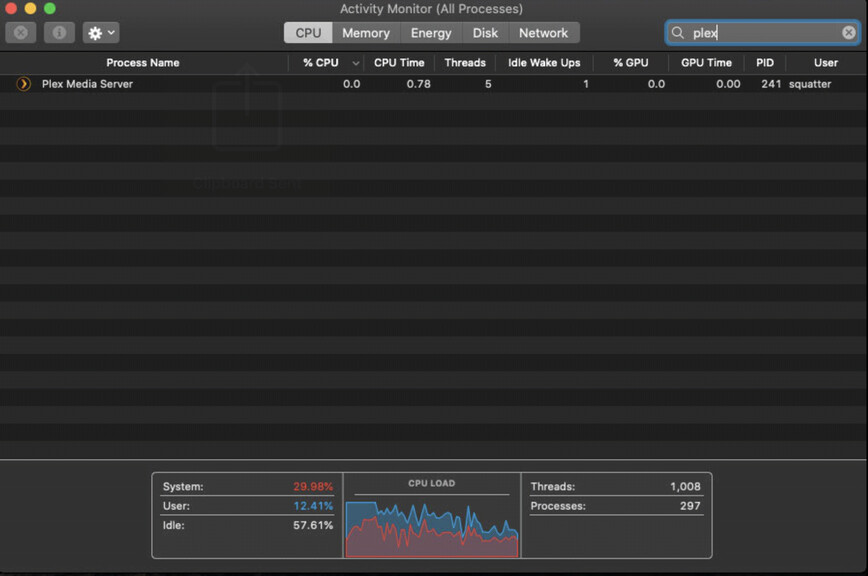
I force quit the process and just started it manually while logged in 
can someone who’s been successful getting a launch daemon written, provide us some hints?
The issue isn’t trying to create the appropriate LaunchDaemon .plist file, it is the fact that the Plex binary is using a “Regular” activation policy in the NSApp ActivationPolicy property, which allows it to appear in the Dock and display windows. When no user is logged the application cannot connect to the dock or display server. This then causes PMS to hang. The fix is to change NSActivationPolicyRegular to NSActivationPolicyProhibited (and remove any code that talks to the display server, including sending an Apple Event to launch http://localhost:32400/web/) and for that we need the code, which only Plex have access to, so the ball is in their court.