STILL no Plex icon....

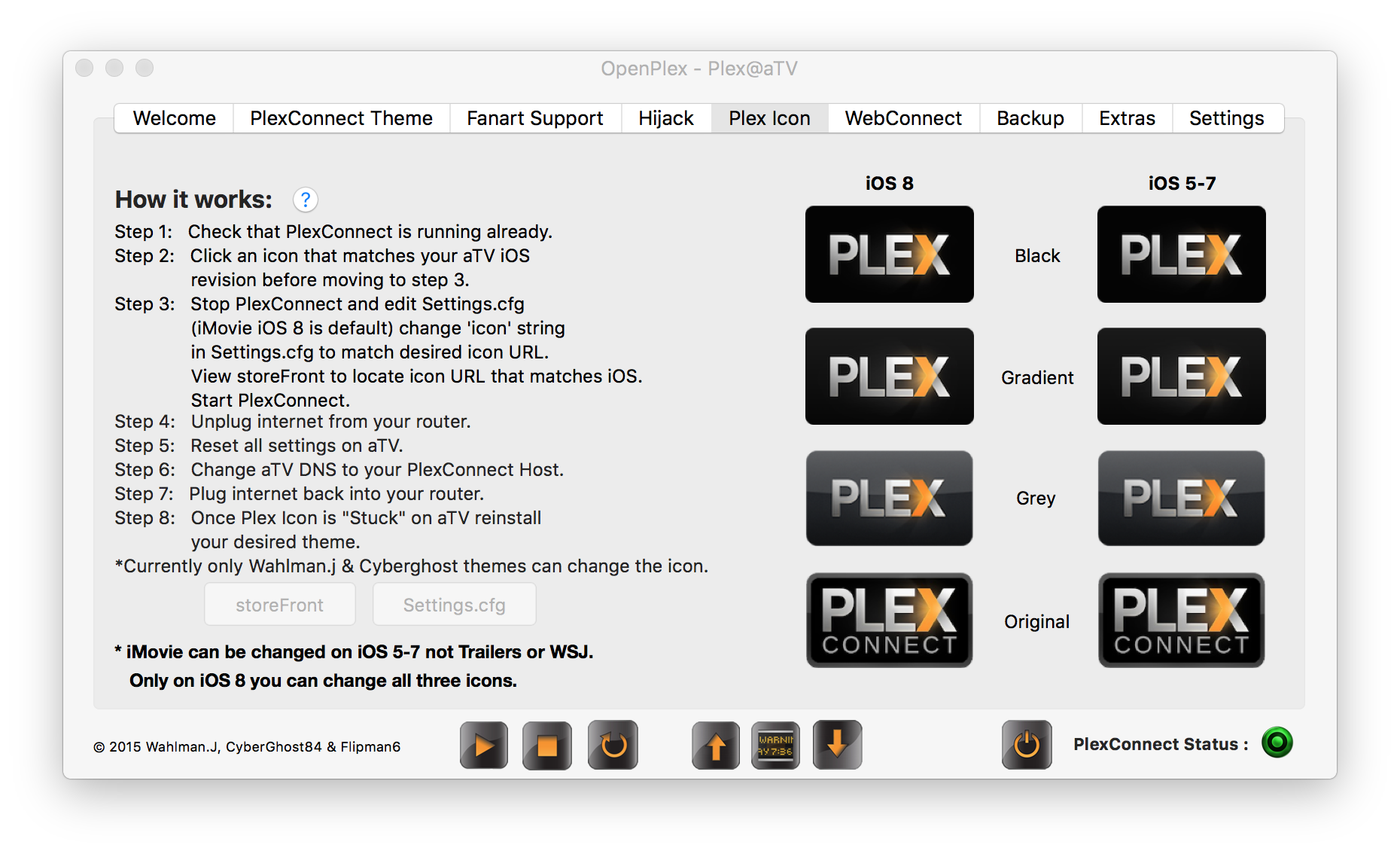
Ill say again, only Cyberghost84’s theme or mine can currently change the icon. Other themes can but you would need to edit the themes files to do so. Both themes are set to change iMovie icon by default. Also both themes are ready to upload the icon to iMovie theater without doing anything to the theme WHATSOEVER. Just do the upload process by unplugging your router etc and it will work. I personally installed just my theme on my jailbroken non aTV iOS device and uploaded it without doing outside of the steps outlined in the OpenPlex app:

You can skip step 2 unless you want a different icon there are some here. Step 3 you can skip if changing iMovie theater. Step 8 you can skip if not changing your desired theme from the one used to upload the icon.

Sorry for dont understanding…

If i want to stick with using trailers hijacking i need to replace the line in Settings.cfg to “icon = movie-trailers” correct?

Icons are currently labeled to icon@1080.png and @720.png. Should i rename them to match the string above, ie. movie-trailers@1080.png and movie-trailers@720.png?

Then unplugg internet, reset settings, when booting up again set plexconnect dns and then plug internet back? Do i understand correct? Can i stick with the default plexconnect from iBaa’s git hub??

EDIT: Can i create my very own icon as long as i keep correct resolution!?

Another user had issues in his geo location changing trailers, you might not I’m not sure. I would recommend to keep it easy to use one of the themes I described first to upload the icon, after your done you can change to baa’s. You are correct with changing the icon string to movie-trailers if it works. You can also make your own icon if desired if you keep the proper icon dimensions. You only need to change the icon string to movie-trailers if desired to change that icon but if it doesn’t work I would recommend using iMovie or another. You can view the storeFront using curl and find another icon/hijack using the command from this site (Linux should be able to do it or another host os):

https://www.nccgroup.trust/us/about-us/newsroom-and-events/blog/2014/february/apple-tv-hacking-counterattacks-and-certificate-pinning/

OK, i’ll try trailers first… i do need to change the name of the icons to movie-trailers@ also? Now they are just named “icon”.

Just leave them named icon@1080.png & icon@720.png, it’s coded to pull those file names.

My git doesn’t require pillow to be installed @CyberGhost84 git does:

So make sure you have pillow installed if you use his to upload the icon or want fanart in general for any theme:

https://forums.plex.tv/discussion/123222/official-plexconnect-fanart-views/p1

OK… but i red somewhere to change some string in Webserver.py to fetch the icons from /assets/ too, dont need to do this?

EDIT: What do you mean with " I would recommend to keep it easy to use one of the themes I described first to upload the icon, after your done you can change to baa’s." ? :slight_smile:

You don’t need to edit anything besides the icon string in the two themes that are coded to upload the icon. I mean use either theme that’s coded already to upload the icon first then switch to any theme after the icon is stuck. I edited my prior post in this topic for you also to explain a bit more.

OK, i pull your git to the server and use that version of plexconnect.

Currently you have this: icon = com.apple.imovietheatre.appletv <- i need to change that to “icon = movie-trailers” and then create new certs?

Follow the image to upload the icon in the other post in this topic and read what I said about what steps you can skip if needed. You need to stop PlexConnect first then edit Settings.cfg as the instructions say. You don’t need to mess with certs while uploading the icon. When you are all done you need to generate & upload the certs with whatever theme you choose to use after the icon is uploaded.

I’ll try. Downloaded CyberGhosts PlexConnect aswell and looked into the folder. If im correct he brings a whole new look? There are many images thats diffrent from the standardlook.

Yes a lot of themes have different looks & features but his requires pillow, instructions in this topic on the post I edited. You need pillow installed and fanart turned on in each theme in the settings tab of PlexConnect on the aTV to use fanart.

PMS: plexgdm, ip_pms, port_pms
DNS: ip_dnsmaster - IP of Router, ISP’s DNS, … [dflt: google public DNS]
IP_self: enable_plexconnect_autodetect, ip_plexconnect - manual override for VPN usage
Intercept: Trailers-trailers.apple.com, WSJ-secure.marketwatch.com, iMovie-www.icloud.com
HTTP: port_webserver - override when using webserver + forwarding to PlexConnect
HTTPS: port_ssl, certfile, enable_webserver_ssl - configure SSL portion or webserver
“”"
g_settings = [
(‘enable_plexgdm’ , (‘True’, ‘((True)|(False))’)),
(‘ip_pms’ , (‘192.168.178.10’, ‘([0-9]{1,3}.){3}[0-9]{1,3}’)),
(‘port_pms’ , (‘32400’, ‘[0-9]{1,5}’)),

(‘enable_dnsserver’, (‘True’, ‘((True)|(False))’)),
(‘port_dnsserver’ , (‘53’, ‘[0-9]{1,5}’)),
(‘ip_dnsmaster’ , (‘8.8.8.8’, ‘([0-9]{1,3}.){3}[0-9]{1,3}’)),
(‘prevent_atv_update’ , (‘True’, ‘((True)|(False))’)),
(‘intercept_atv_icon’, (‘True’, ‘((True)|(False))’)),
(‘icon’, (‘com.apple.imovietheatre.appletv’, ‘[a-zA-Z0-9_.-]+’)),

(‘enable_plexconnect_autodetect’, (‘True’, ‘((True)|(False))’)),
(‘ip_plexconnect’ , (‘0.0.0.0’, ‘([0-9]{1,3}.){3}[0-9]{1,3}’)),
(‘hosttointercept’ , (‘www.icloud.com’, ‘[a-zA-Z0-9_.-]+’)),

(‘port_webserver’ , (‘80’, ‘[0-9]{1,5}’)),
(‘enable_webserver_ssl’ , (‘True’, ‘((True)|(False))’)),
(‘port_ssl’ , (‘443’, ‘[0-9]{1,5}’)),
(‘certfile’ , (’./assets/certificates/trailers.pem’, ‘.+.pem’)),

(‘allow_gzip_atv’ , (‘False’, ‘((True)|(False))’)),
(‘allow_gzip_pmslocal’ , (‘False’, ‘((True)|(False))’)),
(‘allow_gzip_pmsremote’ , (‘True’, ‘((True)|(False))’)),

(‘loglevel’ , (‘Normal’, ‘((Off)|(Normal)|(High))’)),
(‘logpath’ , (’.’, ‘.+’)),
]

Just to make clear i understand:

('icon', ('com.apple.imovietheatre.appletv', '[a-zA-Z0-9_.-]+')),
('hosttointercept' , ('www.icloud.com', '[a-zA-Z0-9_.-]+')),

These will hijack iMovie?

('icon', ('movie-trailers', '[a-zA-Z0-9_.-]+')),
('hosttointercept' , ('trailers.apple.com', '[a-zA-Z0-9_.-]+')),

These will hijack Trailers?

Why diffrent methods? Is one preferable over antoher?
@wahlman.j said:
Yes a lot of themes have different looks & features but his requires pillow, instructions in this topic on the post I edited. You need pillow installed and fanart turned on in each theme in the settings tab of PlexConnect on the aTV to use fanart.

Pillow is installed on my Ubuntu server box. I may try this one… it looked good :slight_smile:

You need to be editing Settings.cfg not Settings.py follow the instructions in the image in the prior post. Different methods? I assume you mean different settings? Each theme has its own settings since each has its own set of features. Settings.cfg is not generated until you start PlexConnect.

@wahlman.j said:
You need to be editing Settings.cfg not Settings.py follow the instructions in the image in the prior post. Different methods? I assume you mean different settings? Each theme has its own settings since each has its own set of features.

I know! Dont have the settings.cfg file generated yet as i just downloaded your git packs… this strings in here will generate the cfg file. But its correct names & host to intercept regarding which hijack method being used?

I mean why choose to hijack either iMovie or Trailers?

Different app to hijack is the only difference. PlexConnect works on many apps but doesn’t work/look any different besides the theme you use. If you use iMovie or any other hijack URL you must change your hosttointercept in Settings.cfg to match. The URL for iMovie is:

www.icloud.com

@wahlman.j said:
Different app to hijack is the only difference. PlexConnect works on many apps but doesn’t work/look any different besides the theme you use.

Both you too seems to prefer using iMovie. Does that mean the iMovie icon will be replaced with a plex icon and then i start plexconnect via that and not the trailers app?

Yes, read my prior post.

@wahlman.j said:
Yes, read my prior post.

Tnx for all help! I think i can figure it out now…!

I think it might work… still no icons at all, all black. Elepeased time now 20 mins. Trying with iMovie highjack. Could take long time to load all icons?

Keeping an ssh session to ubuntu server open in terminal and i guess this progress is for loading icons? :

12:45:30 DNSServer: Source: (‘192.168.1.99’, 64427)
12:45:30 DNSServer: Domain: trailers.apple.com
12:45:30 DNSServer: ***forward request
12:45:30 DNSServer: → DNS response from higher level
12:45:30 DNSServer: DNS request received!
12:45:30 DNSServer: Source: (‘192.168.1.99’, 58969)
12:45:30 DNSServer: Domain: ocsp-ds.ws.symantec.com.edgekey.net
12:45:30 DNSServer: ***forward request
12:45:30 DNSServer: → DNS response from higher level
12:45:37 DNSServer: DNS request received!
12:45:37 DNSServer: Source: (‘192.168.1.99’, 57850)
12:45:37 DNSServer: Domain: www.icloud.com
12:45:37 DNSServer: ***intercept request
12:45:37 DNSServer: → DNS response: 192.168.1.90

If so its also correct blocking iCloud since that icon will come from assets/icons? If they won’t load i maybe try the trailers app hijack instead? For how long should i wait? :slight_smile:
