HD audio and subtitles are the 2 top things to look at in regards to unexpected 4k transcoding.
I was hoping that would work, but it did not. Tried with subtitles turned off and also Forced SRT on both files; unfortunately both files kept transcoding (hw).
From the guide I linked earlier.
“Enabling subtitles of any type will require them to be transcoded (burned) into the video stream.”
Right?.. a little confused by your response. Am I doing something wrong still?
I selected “No Subtitles” in the Tivo menu, and restarted playing and it still transcoded.
So what should I do differently?
Do you have the option enabled in your user profile to automatically choose a subtitle? Maybe it’s still picking one.
I would need to see logs to know for sure, but something is triggering the transcode.
I’ll check the settings again. But once I select No Subtitles, stop and then play the title from the beginning again, shouldn’t that stop the transcoding?
Yes, assuming something else isn’t causing the transcode. You’ll need to provide the PMS log with the logging from the Tivo enabled.
@anon18523487
Ok so the only general setting on Tivo at the Home page of the Tivo Plex app is subtitle size - tiny, small, normal, etc… There is no off/on option.
I sent you the latest logs and the XML files (again just in case). I had played the files around 8:08 am.
I went in to each of the two h.265 files and set the subtitle to None. Then played from the beginning. Both transcoded.
Oddly I recently updated the Windows Plex Server to the latest version 1.15.4.993. And now the Infinity War file transcodes but is not activating Intel Quick Sync, as there is no (hw) next to the word Trancode. So now it is playing with no GPU activation AT ALL! this is horrible. CPU cranks to 100% and GPU is 0%. Stuttering playback.
The Venom file still transcodes (hw) with Intel Quick Sync and GPU usage at 10-13%, CPU usage at 50%. So Quick Sync activation just got more spotty after the latest update.
I see 1.15.4.994 just came out, so I’ll see if that changes anything.
But either way transcoding is still getting activated despite no subtitle usage and audio on supported AC3 5.1 (which is Direct Streaming).

Months later and still ongoing.
I did some testing of these HEVC files on different clients.
Plex Windows App
CPU - 6-10%
GPU - 1-2%
Direct Play for both Audio (AC3 5.1) and video (4K (HEVC Main 10 HDR), flawless playback.
Fast forwarding and rewinding without issue
Plex Web App
CPU - 8-18%
GPU - 2-25%
Transcoding both audio (AAC) and video (1080p)
fast forwarding and rewinding pretty good.
Plex Tivo App
CPU - 8-30%
GPU 2-18%
Transcoding video to 1080p and Direct Streaming Audio (AC3 5.1)
Fast Forwarding and rewinding have improved.
But still no reason it should be transcoding on a 4K Tivo Mini Vox on a 4K LG TV.
Subtitles were set to none.
I’m going to open up a new issue in the Streaming Devices forum.
Thank you so far @anon18523487
Any push from you to the team members that deal with Tivo issues would be appreciated.
As I mentioned in the last PM, not sure if you saw it, something on your system is causing subtitles to still get chosen. I don’t know if the TiVo has an overall subtitle setting that might be affecting this. Your logs were showing subtitles still being burned in, hence the transcode.
There is no setting in Tivo causing this that I can find. That’s why it seems there is an issue with the Tivo app itself. If it’s enabling subtitles with no subtitles selected and no settings in the main menu for that, then there is a problem with the app.
Who in the Plex team deals with Tivo app issues?
There’s other issues as well, that I posted here:
2nd issue noticed on Tivo app only:
With MOV’s that were recorded in portrait mode (iOS, iPhone), during playback there is a magenta frame blur at the bottom of the video.
Not on the TV, on the user account. Check in Plex Web like I posted above.
I missed your link before. Have you always been using MOV files? The TiVo app does not support direct playing MOV files. 4K videos MUST be in mp4 container.
yes I unchecked “automatically select audio and subtitle tracks”, in the plex web app which connects to the server.
I have always played MOV’s on plex, recorded from my iPhone. On all players except the Tivo, they are played fine with the mov container. Only the Tivo app when playing mov’s recorded in portrait mode ONLY, there is this weird magenta flicker at the bottom of the video. Landscape video, in an MOV container plays fine. No other client player does this.
I can ask the devs to look into this flicker issue, but it won’t solve your initial subtitle issue.
So why are subtitles enabling?
Can they look into that?
Your earlier logs were showing it your automatic selection was enabled. Can you toggle the option to make sure it’s set correctly, then try again.


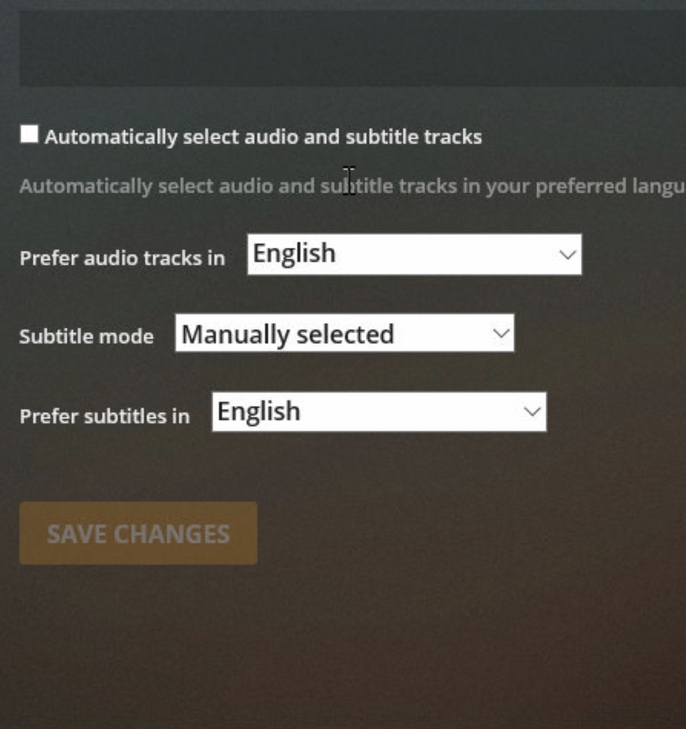
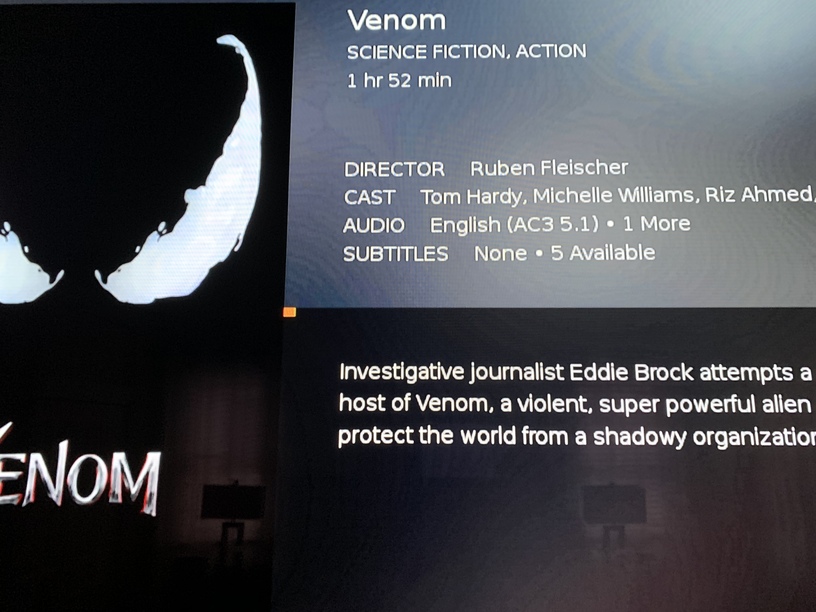
There are no subtitles this time. I’ll still need to see the logs to check why it’s transcoding this time. If you can provide me the XML for that movie, that may explain it too.
I PM’d you the XML and the log files.
This isn’t the only file either.
In previous posts, I mentioned another movie file. They were both HEVC in MKV containers.
Basically Plex on Tivo keeps transcoding HEVC compressed files. And if it’s because of subtitle activation, then that’s a glitch. Because it isn’t happening with those same files playing on Plex for Windows app.
