Subs wont allow movies to play on LG TV, but will on Samsung

TVs: 2019 LG C9 OLED, 2016 Samsung KS8000 (Player Version on both is 5.69.1)
Plex Server: Synology NAS DS1522+ (Ryzen chip), Version 1.32.1.6999
Transcoder settings: “Enable HDR tone mapping” checked, “Disable video stream transcoding” checked, “Use hardware acceleration when available” NOT checked, “Use hardware-accelerated video encoding” NOT checked, “Maximum simultaneous video transcode” set to 10.
Samsung/LG TV Plex settings: Video Quality - Original, Burn Subtitles - Never, Allow Direct Play/Stream checked.

I purchased and set up my Synology NAS about 3 weeks ago, and I’ve had the Plex server set up on it for about 2 of those weeks. In the first week I was able to test out some movies with PGS subtitles (Godfather II, Black Orpheus) and they displayed fine on my LG TV. PGS subtitles are currently working on my Samsung TV, showing the video is a “Direct Stream”, audio as “AAC - Transcode”, and Subtitles as “English Forced (PGS)”.

On Friday I purchased Plex Pass, and now all of the sudden these movies will not play on my LG TV because it says I don’t have enough CPU for conversion, however my older Samsung TV can still play them with PGS subtitles. I have to turn off subtitles in order to get these videos to play on the LG.

From my research, when a movie has PGS subtitles it requires transcoding, which my NAS is not capable of doing (why PGS subtitles were working on the 2 movies I tested BEFORE buying Plex Pass, and why it’s not showing as a transcode currently on my Samsung, I don’t know). I’ve also read that .SRT subtitle files will not require transcoding, however when I upload and select an .srt file for The Godfather, my LG TV still says there’s not enough CPU to play the movie (my Samsung will play the movie, but won’t display the .srt subs).

I’ve spent the last 3 days trying to troubleshoot this, and it’s driving me crazy. To my surprise, 15% of the 4K rips that I have include forced subtitles, so subtitle support is a pretty big deal for my library. I’m just hoping that there’s a way for my LG TV to go back to functioning the way that it did before I bought Plex Pass, I believe the characteristics were the same as my Samsung, where it played the movie without transcoding but was able to display forced PGS subs.
Short Answer

Acquire an Nvidia Shield Pro (not “tube”) or other Android TV device such as an Amazon FireStick or Chromecast with Google TV.

Long Answer

You are running into (a) the limitations of the NAS and (b) the limitations of the Plex Smart TV app.

The NAS

The DS1522+ has an AMD Ryzen CPU which does not have an embedded GPU. Without a GPU, it is not capable of hardware accelerated transcoding. It is limited to software transcoding. At best, it will transcode lower bitrate 1080p video.

The Plex LG App

The LG TV does not support DTS or TrueHD audio. If you play media with either format, the audio will be transcoded by Plex Media Server to a compatible format.

With the Plex LG app, if the media is direct streaming, such as when audio is transcoding, enabling any type of subtitle results in a video transcode. Furthermore, Plex Media Server must burn the subtitles into the video stream. Subtitle burning uses additional CPU resources (it cannot be hardware accelerated). This is a “double whammy” on your system, since transcoding is already using the CPU.

Bottom Line

With your current setup, do not enable subtitles if the media has DTS or TrueHD audio. Doing so will result in a video transcode. Your system is not powerful enough and playback will fail.

Alternatives

Different Plex Client

Use a Plex client that will not force a video transcode when subtitles are enabled.

Android TV devices such as the Nvidia Shield Pro, Amazon FireStick 4K/4K Max, and Chromecast with Google TV are examples.

The Plex Android TV client is much more capable than the Smart TV client. It will play subtitles without requiring a video transcode.

The Nvidia Shield Pro will passthrough (bitstream) lossless audio such as DTS-HD/:X & TrueHD + Atmos to attached audio equipment (receiver, soundbar, etc).

Other devices will not passthrough lossless audio. It will be converted by the device or transcoded by Plex Media Server to a compatible format.

Note 1: The FireTV Cube v3 will passthrough TrueHD + Atmos. For DTS audio formats, passthrough is limited to the lossy DTS 5.1 core.

Note 2: The Shield non-Pro “tube” model is not recommended. It has problems playing high bit-rate media such as 4K HDR rips/remuxes.

More Powerful Server

The other option is to run Plex Media Server on a more powerful system, such as one with an an Intel i3/5/7/9 CPU. It will be capable of transcoding video when subtitles are enabled.

There are limitations depending on operating system (Windows vs Linux), and 4K media will still pose a problem (subtitle burning uses the CPU). Research is definitely required before buying hardware.

Incredible response, thank you! Looks like I’ll have to look into getting a Shield, or AppleTV, though by the sound of it the Shield is more appealing in being able to passthrough hi-res audio.

Would the standard Shield suffice, or should I spend the extra $50 for the Pro? The specs seem to be relatively the same, besides the USB ports and plex media server capability.

The Apple TV does not passthrough lossless audio. DTS/-HD/:X & TrueHD are converted to PCM. While the conversion is lossless, any :X and Atmos information is lost in the process.

If you get a Shield, get the Shield Pro.

The non-Pro “tube” model has problems with high bit-rate media such as 4K HDR rips & remuxes.


FYI, I’ve been through the frustration with the LG Plex app. I’ve an LG B7 and quickly grew frustrated with the Plex app limitations. I’ve a Shield Pro 2015. It direct plays everything I throw at it.

Shield Pro ← HDMI → Denon AVR-X4300H ← HDMI → LG B7 OLED

This is wrong for DTS!
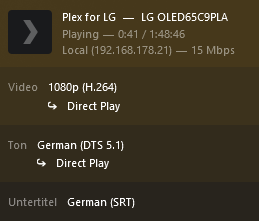
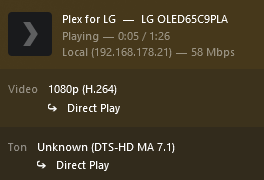
I have an LG C9 and can play DTS without transcoding just fine. And since the audio is not transcoded, burning the subtitles is also not needed. So everything plays with direct play.

DTS support depends on your TV model. The C9 (2019 model year) still supported it. Later DTS support was dropped by LG, bevor it came back with the current (2023) model year.

Note that I’m only taking about DTS here, not DTS:X. (But DTS-HD HRA/MA works fine.)

grafik

grafik

This topic was automatically closed 90 days after the last reply. New replies are no longer allowed.
