3rd line should be dpkg -i /tmp/pms-PlexMediaServer-1.40.6.8820-a3b5dd1b4_amd64.deb
fyi
Seems to be very performant on my setup:
HDR Tone Mapping still busted though.

ASUS ROG STRIX B450-F GAMING mobo
Ryzen 5 2600X
48GB RAM (2x16 + 2x8)
256SSD (Samsumg 840 PRO)
1TB SSD (WD Blue)
3x3TB rust (HGST something)

Host:
PVE (256GB SSD)
CPU(s) 12 x AMD Ryzen 5 2600X Six-Core Processor (1 Socket)
Kernel Version Linux 6.8.12-1-pve
Boot Mode Legacy BIOS
Manager Version pve-manager/8.2.2/9355359cd7afbae4
Repository Status Proxmox VE updates Production-ready Enterprise repository enabled

LXC:
Debian 12.2-1, unprivileged
6 cores
24GB ram
128GB storage
So I asked this in the LSIO Discord, and their answer was to put this in your env variables:
PLEX_DOWNLOAD=https://artifacts.plex.tv/plex-media-server-experimental
VERSION=1.40.6.8820-a3b5dd1b4
You can then update the version number if new experimental builds become available, and it will persist through container restarts etc
Great! Worked on my end!!
Just gave this build a spin and noticed a massive improvement.
My PMS is running in a Proxmox LXC (Ubuntu 22.04 LTS) with an i7-12700K. Fired up a 4K DoVi file in the web player and was able to hardware transcode the video, tone map to SDR, and burn subtitles without a single stutter. CPU usage was minimal the whole time.
This file was totally unplayable before this test build. If I find any issues, I’ll update my post, but so far so good!
EDIT-
Just tested this build on my system ( Nvidia windows ) a massive improvement as others have shown,
A-B tested one file, before this version it was at 0.5 - 0.9 with subtitle burn in , after installing its jumped to 8.0 - 10.0 ! HUGE. thats with HDR - SDR as well
I don’t see any green lines as someone else mentioned on Nvidia GPU as well

Correct me if I’m wrong but that’s rather a limitation of the web app compared to the native apps you use which support direct streaming of subtitles (SRT pretty much anyway, PGS/ASS is a different story).
Plex Web does not support PGS subtitles, so Plex Media Server burns them into the video.
Plex for Android supports PGS subtitles, so Plex Media Server does not have to burn them into the video. The same for iOS & SRT subtitles.
You can force burning by setting Burn Subtitles = Always in the client settings.
thanks @chris_decker08 @Disgustipated I was able to deploy this on Docker using the env variables. works great so far! Will continue testing 
It was impossible to watch with subs on my Chromecast because my hardware wasn’t strong enough to keep up, I tried with this version and it’s smooth sailing just like if I didn’t even have subs!
DSM 7 with Intel Celeron J4025.
Following up with this…
HDR Tone Mapping off, I can hw transcode wonderfully, sub burn-in enabled or not. Here are two crash dumps that occurred within 12 seconds of one another when I enable HDR tone mapping and try to transcode without sub burn-in enabled. With sub burn-in enabled it transcodes via software.
FizzBEAUC-Crash-Dumps.zip (161.6 KB)
Green bar present. Roku player, web player, but NOT Chromecast.
PGS subtitles. With SRT (or no) subtitles there is no green bar present.
Otherwise everything is amaing. This should be a major release!
Confirming that I have the same issue. HDR tone mapping causes a hard crash of the server.
@FizzBEAUC I suspect I have a solution for your issues, I intend to post a new build once I have the green line issue tracked down
I have updated the builds to hopefully fix the following issues:
- Green line on NVIDIA
- Performance for older intel devices on linux
- The crash a couple users ran into
Hello, testing this on my x86-64 QNAP 451+ using a Celeron J1900 8G RAM
The new build works great transcoding 1080p H264 → 720p H264 (hw) with direct stream AAC audio and burn in PGS subs. The CPU load is about 40%.
My Celeron can’t manage a 4K HDR → 720p SDR even without subs.
I’ll look for my 4K SDR and test.
Trying the new build 1.40.6.8838-0f37280c7
HDR Tone Mapping OFF
Using Web client
Transcoding to 8Mbps
No subtitles:
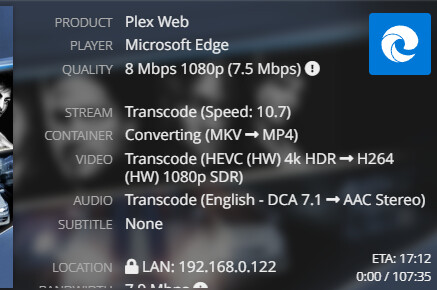
SRT subtitles:

PGS subtitles:

HDR Tone Mapping ON
Using Web client
Transcoding to 8Mbps
No subtitles:

SRT subtitles:

PGS subtitles:
SLOW TRANSCODES / NO HW TRANSCODING
This was started with PGS subs enabled… was not turned on after starting to play.
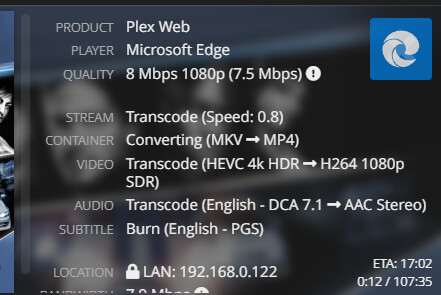
Turning off subtitles, and playing previous movie caused Plex to crash.
I left the tonemapping Al Gore Rhythm at hable; should the algorithm matter? This is all foreign to me:

DUMP:
FizzBEAUC-CRASH-DUMP-1.40.6.8838-0f37280c7.zip (80.2 KB)
I can confirm that the green line I was seeing with Windows+NVIDIA when hardware transcoding with PGS subtitles has been resolved with the new 8838 build and is no longer present.
crash_dump.zip (63.8 KB)
Pretty much in the same boat as FizzBEAUC. Server hard crashes on build 8838 after enabling tone mapping and trying PGS burn-in. Working fine when tonemapping is disabled.
