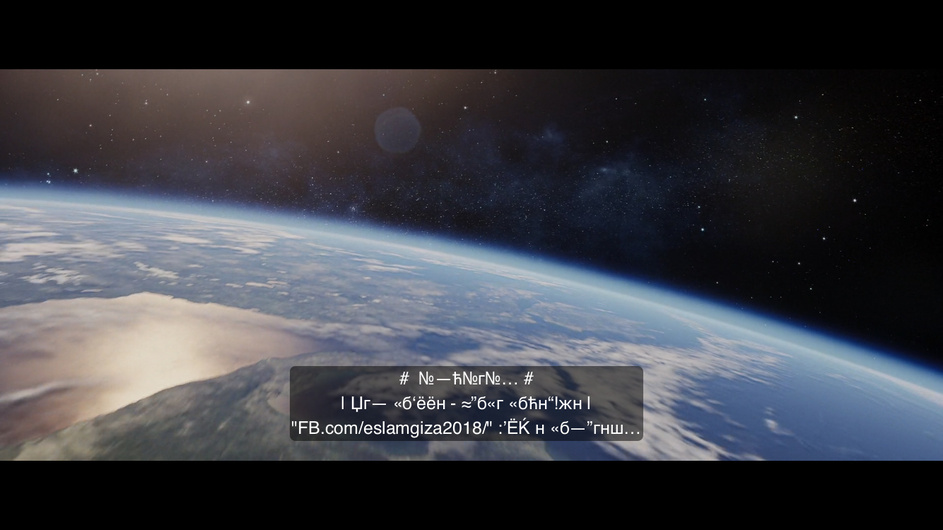
The new subtitles feature doesn’t work properly with Arabic subtitles. Most of the downloaded subtitles shows strange characters and shapes. This is mainly due to encoding. All subtitles should be encoded to utf-8 as Sub-Zero plugin do it. And you need to take care of RTL as well for Arabic, Hebrew…etc, There should be a fully functional solution after deciding to remove the plugins.
Now it’s not different from the already existing opensubtitles agent which wasn’t functional for languages that uses different characters and letters. And that was the main reason to find solutions like Sub-Zero (amazing plugin).
I’ve attached few screenshots and I downloaded the file itself manually as well but I’m not able t upload .srt files here. If you search in OpenSubtitles.org for Skyscraper movie, Arabic subtitles you will find the file there.
I’m using my iPhone in this example. But the issue is the same in Apple TV and Samsung TV.
The issue is encoding as when I save the file as UTF-8 manually it will work perfectly. And this issue was solved by Sub-Zero automatically as the plugin convert all subtitles to UTF-8.
I don’t know if that would help. But in macOS to fix this kind of issues manually, I have to choose “Arabic Windows” in TexEdit -> Preferences -> Open File encoding. And then save it as UTF-8.
Moreover, in ffmpeg, to encode Arabic subtitles to UTF-8, I have to determine the current encoding and then set the target encoding. So it will be from windows-1256 to UTF-8.