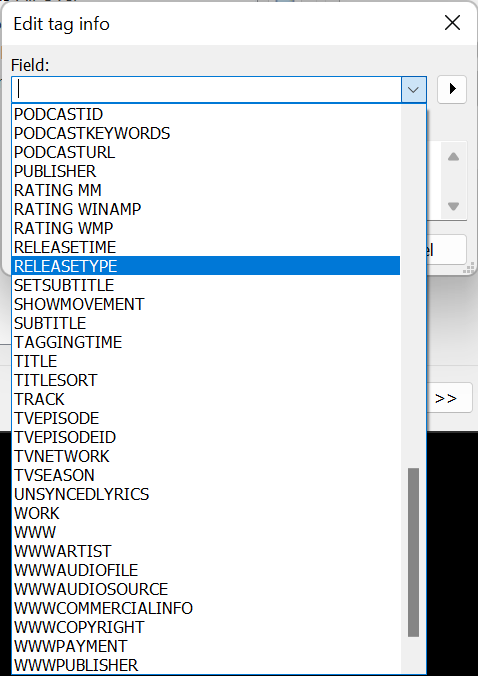
BTW Dokuro - it appears that Picard cannot tag MKA files at all. So even if I got instructions on how to do it there, I cannot see the files in the folder structure.
For those that use mp3tag - which will tag MKA files - it would be cool if you can point out the correct MusicBrainz tag so I can give this a shot.
As dokuro said, it’s probably better to use the “official” tags, but for me “releasetype” didn’t work either somehow. The difference in your case seems to be the spelling, I used “MUSICBRAINZ ALBUM TYPE” (added my own field, not a pre-formatted one). So instead of your “MUSICBRAINZ_ALBUMTYPE” you could maybe try my spelling and see if it works?
Perhaps - since you use the tool - you can recommend a mult-ichannel format that is taggable in Picard?
PS: I have groups enabled and Albums., Live, Singes/EPs, are grouped properly - although its amazing how many “live” albums are stuck in Albums. Probably because they are not “matched”. I’ll get around to that later… Focused on getting my surround stuff working.
I went with what mp3Tag auto-populated in that Drop Down. Presumably they have the XML schema for MusicBrainz in their code base… I did not think of creating my own version. Take a look above - seems like they all have MusicBrainz tags with underscore between words… you think they made ALL those errors?
No I don’t think they made any error at all
It’s just that RELEASETYPE or MUSICBRAINZ_ALBUMTYPE didn’t work for me neither, but it somehow worked with the different field/spelling I described above, 2 spaces and no underscore (but maybe that’s just because of my different tagging software?).
But if you can get the “official” tagging syntax to work, it’s better to go with that anyway.
Got it. Interesting. I compared to other files I have and it looks like internally, that tag is stored as “MUSICBRAINZ ALBUM TYPE”. Using MP3tag, it shows the tag as “MUSICBRAINZ_ALBUMTYPE” but is saved with the spaces.
Could you send me a file using the tag that doesn’t work. I wonder if TagScanner is actually writing the tag as-is.
This is the problem with inadequate documentation …where the tag is not clear or the syntax - or, users are relying on folks posting here …and then there are questions on spelling, punctuation, tagging tool, version, yada, yada.
I’m a software developer; I don’t get it: document, document, document.
Thanks MovieFan.Plex - a good “academic” read… but no practical information on how metadata should be added using Picard tagging software.
Anyway… I still think that AlbumType should be a Tag that could be added to Plex tags directly. This would allow users to organize there collection directly.
For example, Picard cannot tag MKA files - and there are audio file formats that even Plex sees (example DTS) but that does not really use tags - at least not in the ID3 tag sense. These could be organized separately if such a system existed.