Support Music release type Album + Spokenword

Server Version#: Version 1.28.2.6151
Player Version#: Version 4.90.1

Plex currently supports music release types like Compilation, Soundtrack, Single etc… but seems to not support Spokenword.

Here is an example of an album with this sub release type:
Lana Del Rey → Violet Bent Backwards Over the Grass
https://musicbrainz.org/release-group/308ca82c-ce3c-492c-9ecb-69d26420f661

It should be supported, but we don’t show a row for every type. Check the XML for that album and see what it lists?

Just did a test and it is detected.

<Format id="229826" filter="format=229826" tag="Album"/>
<Subformat id="253357" filter="subformat=253357" tag="Spoken Word"/>

I’m away from my PC atm but will check later.

BTW… Is it grouped in the UI? For me it ended up under the normal Album group whereas I’d expect it under Spoken Word.

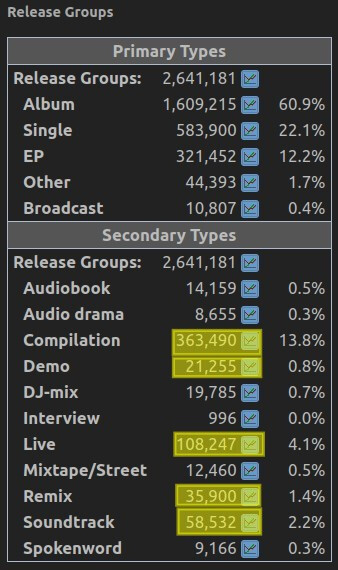
Looks like we only group albums into 5 categories. The others are under “Album”.

Soundtrack
Compilation
Live
Demo
Remix

Well, I guess that is the point of my post :grin:

Side question, for my education: How do you get to the XML for an album? I only know how to find it for a track, via the ‘Get Info’ menu item.

When you get info on a track examine the parentRatingKey from the xml and replace that value in the URL to get the album. Using grandparentRatingKey will give you the artist in case you ever need it.

Got it. Thanks.

BTW… confirmed its picked up it xml.

<Format id="255955" filter="format=255955" tag="Album"/>
<Subformat id="299182" filter="subformat=299182" tag="Spoken Word"/>

Still, would be nice to have the UI detect this but understand there has to be limits …

There are 11 secondary format options at MusicBrainz. Looks like Plex chose the top 5, based on number of entities:
image

Maybe the talking music content with secondary types (audiobook, audio drama, interview and spoken word) could be combined into a single grouping in plex? Like what is done for single + ep :thinking:

That seems like a reasonable option. The MetaBrainz organization is building another database called BookBrainz. Personally, I think audiobooks should be moved to that, since they aren’t really music. But that idea doesn’t seem very popular in the MusicBrainz forums.

2 Likes

Very interesting thread - but I am having a hard-time understanding - or extracting rather - whether a user can do something manual in the tags/metadata - to force an album to be detected as a specific “Release Type”.

In my situation I’d like tag Surround recordings - typically DTS - to be in the “Remix” group… so they are not mixed will all the other stereo FLAC/mp3 albums.

Any direction here would be hugely appreciated.

Yes, you can tag your mp3 files manually to force them into a specific category.

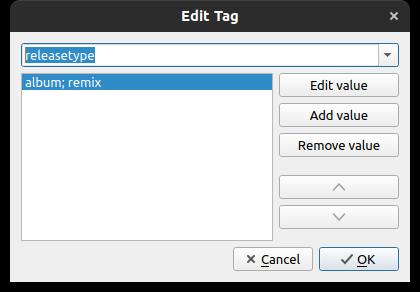
I use TagScanner, so with other software it might be a little bit different, but I just add a tag/field called “MUSICBRAINZ ALBUM TYPE” with the value “album;remix” there and Plex picks it up.

Remember to have Plex set up to use only local metadata, otherwise it probably won’t work.
And the only release types to get separated in the client are the ones mentioned above.

Have you maybe thought on renaming this thread to “Support all Music Release Types” or something?
Or is there already a feature suggestion for that?
If not, maybe we could join forces here, as I’m desperate to get my mixtapes and dj mixes separated :smiley:

MRKJZG: I can’t seem to get

I use mp3Tag and cannot get this to work - here is the Extended tags for a surround album:

Any ideas?

The metadata name you are using is not correct, it should be releasetype. Example below …

Screenshot from 2022-12-20 07-40-56

Hmmm… I do not see release type:

If I scroll down to the “r’s” - it’s not there either. Sorry for being dense.

Are you somehow adding your own tag?

Rob

Sorry, I use musicbrainz picard for all my tagging. Cannot speak for how their tags map in other tools.