I get that. I have my Capsule II Projector for trips as well. Now I have to hope I get a good internet connection when I travel to ensure remote streaming works.
With the still missing features compared to the Sync function this must still be considered a DOWNGRADE.
How can you still be in the progress of disabling sync (it no longer syncs episodes) when there is SO many comments and resistance in this forum.
Read the posts of your paying customers and add the MISSING features before BREAKING Plex!
I had an issue crop up about two months ago regarding the downloaded content not playing. The only fix was to reboot the phone. It was indicated in the forums that you could disable notifications and it would stop having that behavior. I updated to the latest and that broke again. I find that if my phone has not been showing Plex content and I go to open the app and play downloaded materials, it acts like it will play but shows a black screen, then I can see the controls and everything works except it won’t play anything. I have to reboot my phone to get it to work.
I’m getting this exact problem on my Android Phone and my Amazon Tablet. It seems to be working correctly on my laptop, buy not the phone of tablet. It was working fine before the January update debacle so I’m hoping I’ve missed a setting or something since I had to rebuild my server on my Shield
Any solution to this yet?
I’ve had the issue where I was unable to download any videos for months on my Pixel 5a. Here is how I was able to work around the issue. I found that I was able to download successfully on cell data, so it has to be something with in-network wifi. I found several other threads that seem to indicate DNS-related issues.
After trying several things, here are 3 options (pick one) that all worked for me:
- Set a static IP for my home wifi on my phone using Googles DNS servers (8.8.8.8 and 8.8.4.4). No decrease in speed. This is the solution I ended up choosing, but the next two work as well
- Use the (free) 1.1.1.1 app which can route traffic over a VPN profile for DNS resolution. The ‘Warp’ setting and the ‘DNS only’ setting both worked. I suspect any VPN would work. BUT there was probably a 25% decrease in speed over wifi using the tunnel. But it’s easy to enable and disable as needed. It’s also an easy way to test if DNS is your issue.
- Start the download using cell data, then enable wifi. Downloads still proceeded.
I wish we didn’t need to do this, but the above solutions all worked for me. I think ultimately the issue seems to be inside your network DNS related.
Changing my network’s DHCP DNS servers to Google’s did NOT work (at least in my testing). I didn’t have the ability to disable DNS-rebind protection on my router.
Hopefully, this helps someone.
1 Like
oki i think i found some kind of bug, but im not sure at all.
when I try to sync / download
then my app on Iphone, Ipad Samsung S20 MUST be open, otherwise the job of transcoding on the server stops after about 30 min and the server waits for mine to open the app again so it can continue from where it left off.
Is it seriously meant to have your app open to transcode?
I run latest plex editions on all devices. The error occurred way back in January. I’ve just tried what I could to fix the issue myself, but have to admit that it’s not something I can fix
Sorry for the spelling issues. I am dyslexic and English does not come naturally to me…
All the best
/Daniel 
hi, im the only one who has download feature on android not working? when an episode reach end of download it says it can’t be downloaded, swipe for remove,click to retry
tried many devices and app versions, also beta
on windows plex client no problem so far. any advice?
there’s plenty of space and authorization are fine, app side on android
I would love this feature to work but it has never worked, I always get a error. Can download via DS File app with no trouble at all though
Hello all
I also have the issue with not being able to Download any Media to my Phone or Tablet.
I have a Samsung Galaxy S21+ and a Samsung Galaxy Tab 7.
I am using the Internal Storage on both Devices.
Thanks in advance
Kevin
It might be good to describe exactly what steps you took to download Media and how it failed to meet your expectations (ya know things like error messages, etc.)
Hello
Thanks for the reply and apologies for not adding more detail at the time as I was in a rush.
I have just worked through the steps again and have taken screenshots, these are from my Samsung Galaxy Tab S7 but the Errors are the same on my Samsung Galaxy S21 Plus.
In the Music Library, I open the Context Menu on an Album and Select Download.
These are the Errors that I get:
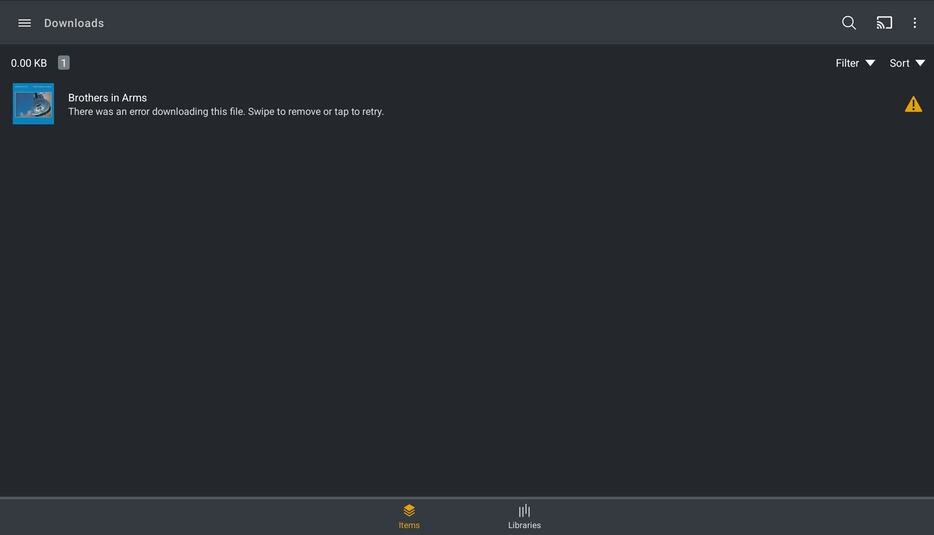

I have just tried Downloading an Album over Cellular rather than Wi-Fi and that worked but is not practical.
I have BT Broadband with the BT Hub 6.
I am not sure when this issue started as it worked fine when Sync was replaced and I Downloaded my entire Music Library to my Phone and Tablet.
Thanks in advance
Kevin
Hi Kevin,
I have the exact same problem. I used to be on BT Broadband and then moved to Vodafone fibre broadband but the problem remains the same.
If I have a phone or laptop on the same network as the Plex server, downloads fail. If I switch to the mobile network so the connection to the Plex server is coming into the house externally, it starts fine. I have even found that if I start the download over mobile and then switch back to the home network, the download of the movie will continue, but if I have queued a few movies to download, only the current one will complete and then the next one will fail again until I switch to the mobile network again.
I have also tried downloading when I am out of the house connected to a public WiFi network and the downloads start and work fine, so it seems to be exclusively something to do with initiating the download over the same network the Plex server sits on.
I have checked the server Dashboard while my phone is trying to initiate a download and there is no activity showing at all. As soon as I switch my phone to the mobile network the Dashboard shows the server preparing the download and then sending it.
Don’t know if any of this helps pin point the issue, but happy to provide server logs etc. if anyone needs them to help diagnose the problem.
Hello
Thanks for the reply.
Your issue mirrors mine, hopefully this can be sorted soon.
The two Devices I have are used by an Autistic Adult to listen to Music whilst he is out and about as it helps him cope.
Due to another issue, the Music on both Devices has been Deleted.
Not being able to Download the Music again, on either Device, is going to make life difficult for him when out.
Hopefully this issue can be resolved sooner rather than later.
Thanks in advance
Kevin
Hello all
I think I have made some progress with this issue but more testing is needed.
My Wi-Fi SSID included a Hyphen, removing this from the SSID has allowed the Media to be Downloaded.
I am testing it now but it seems to be working.
Thanks
Kevin
Hello all
Well, it worked, for a few Albums then it started producing the same Error as before.
I have now narrowed it down to using a Wi-Fi Network on the same Network as the Server being the issue, I think.
If I connect my Phone to my Local Wi-fi then I am not able to Download any Media to my Phone.
However, if I connect my Phone to the Public Wi-Fi (Hosted on my BT Hub 6) then I can Download Media fine, albeit relatively slowly.
The only difference, that I can see, between the two Wi-Fi Networks is that my Local Wi-Fi is Protected with WPA2 and is Password Protected.
This is a strange issue, hopefully someone from Plex will respond, soon.
I will continue to troubleshoot and if I find anything else I will Post.
Thanks
Kevin
Hello
Well, I did some more troubleshooting Yesterday.
As before, when connecting to my Private Home Wi-Fi I am not able to Download any Media to either of my Devices.
Connecting to the Public, unprotected BT Wi-Fi, hosted on my BT Hub 6, I am able to Download Media to both Devices.
To fix the Download Speeds I removed the Bandwidth Restrictions in Plex Media Server, doing this increased the speed at which I could Download the Media.
I have now managed to Download my Music Library, in its entirety to both Devices which will make at least one person very happy.
So, the issue definitely seems to be connected to trying to Download Media using a Private Wi-Fi as opposed to a Public, unprotected one.
Hopefully the above will help someone and hopefully the issue will be resolved soon.
Thanks
Kevin
+1 with @kncowans, I’ve been using the legacy as it just works while I have never gotten the downloads to work on my Android device. I haven’t tried going on an unsecure wifi but that seems like an odd thing to get it to work o_0. Hope this issue is resolved as I rely on offline support in my area.
This topic was automatically closed 90 days after the last reply. New replies are no longer allowed.
