Server Version#: 1.23.4.4775
Player Version#: Android version 8.19.3.26473
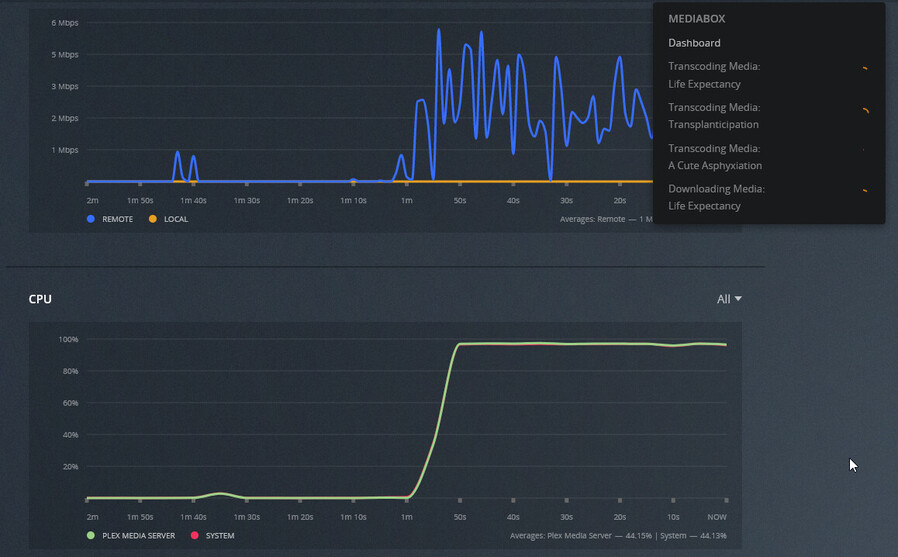
So I’m trying out the new ‘downloads’ feature and it seems to be missing a few items I really liked about sync. The first is that when downloading more than a few episodes, plex will chew up 100% of my CPU if it needs to transcode. This would be fine if my Linux box was a dedicated Plex server… However, it does run a few other apps that need to share resources.
There also seems to be no way to monitor, control the downloads from the server interface like I could with sync. When syncing items, I could pull up the sync web page and view status from the web browser. I could also create and delete syncs directly from the server. Has that been yoinked from the new downloads feature?
Downloads is controlled entirely by the client. This makes the feature more stable. Unfortunately, that means the server does not track what has already been downloaded. It will show you while something is downloading. It’s just a basic “downloading X”, but we hope to improve that in the future.
Yes, Downloads is different in that it works in real-time versus needing to transcode and download separately with Sync. Downloads take the same priority as streaming.
Yes, Downloads is different in that it works in real-time versus needing to transcode and download separately with Sync. Downloads take the same priority as streaming.
If downloading an entire season or show, it would be nice to set a maximum number of simultaneously transcoded streams SEPARATE from the normal user viewing maximum transcoding streams.
My plex server has an 8TB drive. My phone has 128GB. All of the synced/downloaded content is transcoded into a smaller format for my phone.
Downloads uses 1 stream. It’s sequential not parallel. If you are concerned with interfering with other streams in progress, set your upload limit on the server. Anything already steaming will take priority.
Downloads uses 1 stream. It’s sequential not parallel
I don’t find that to be the case. It looks like Plex is transcoding everything in parallel and downloading sequentially. As it is, if someone is downloading a show, and someone wants to watch something that requires transcoding, they are SOL.
.
Is that download 1 show or is it 3 different Download jobs? Different jobs do run in parallel, but each job, i.e. a show/season/playlist should be sequential. In the app you’ll see it says 1 of X, 2 of X, etc.
This is ‘last 3 episodes’ of a single series. Just one job. The download itself is sequential, the transcode is not.
That’s odd, I can’t reproduce that. It’s always sequential for me. I’ll check with the team to see what’s expected. I’ll also bring up the idea to possibly set a lower priority for downloads, but no guarantees.
I appreciate that. Thank you.
I can reproduce this issue and have been having this for about a week. I’m running 1.23.6.4881 natively on my Synology (DSM6). I created a playlist of about 25 movies that I wanted to push to my tablet with the new download feature. My tablet is set for all media to be 8mbps/1080p as several of my movies are higher than that. My Plex is set to only allow two transcode streams at a time to avoid congestion on the NAS. Since I hit the download button on the tablet, I’ve had 4 movies transcoding and one downloading. This has been like this for the past 24 hours. Because the Synology is a slower processor, it’s been at 99% CPU since it started. This is causing other processes to be clogged as well (such as my dockers). I would very much like the ability to either reduce the number of streams to transcode or lower the priority of them on the box.