I followed this article to the letter to transfer the watched status between two Linux Servers.
Seemed to go OK as no error messages. Very straight forward really.
My issue is there is one whole TV Series on the destination showing it has not been watched when the source is showing it as being watched. There is also another TV Series where two episodes are showing not watched on the destination but watched on the source.
So what other errors are there? eg: Movies and TV Shows that would have been watched, but have been deleted. I presently have no way of telling.
The only thing I can think of offhand is if those particular shows were matched with different agents on the two databases then they would have different GUIDs. Watch state follows the GUID
Checked the TV Show that showed up on the destination as unwatched.
Source shows: <Guid id="tvdb://9188899"/>
Destination shows: <Guid id="tmdb://3724987"/>
So looks like your guess was correct.
Is there anything I can do on the source before exporting the watched status, via sql, so that I don’t miss any on the destination? If so, I will do the export and import again, as it’s real easy and quick.
I don’t know sql well enough myself to give you good advice there.
(Even though below is simple as always make a back up of the DB before doing this so you can go back if something wacky happens)
If the media files are still there on the sources system do a fix match on those shows and select TheMovieDB as the agent in the Fix Match search and it will update it with that agent.
or switch the entire library on source to TheMovieDatabse and refresh metadata so everything changes.
With either choice the watch state should remain on the item as it was before and then you can export.
But your suggestions will only change what’s presently on the source. Will not help if I install, say a Movie, that I’ve already watched and the the library source was not TheMovieDatabase.
The settings under Settings>Agent are the “legacy” agents written in Python.
For movies
Personal Media
Plex Movie (Legacy)
The Movie Database
You used to only be able to change the settings and priority of sources there. Any library that used that agent would use those settings.
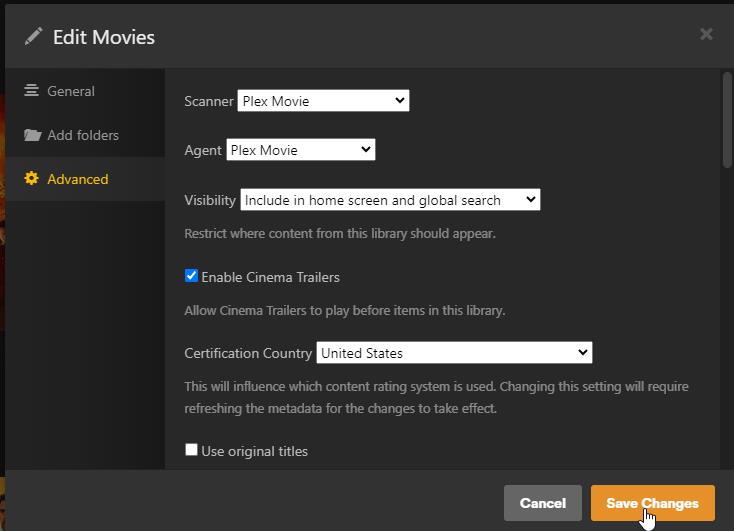
Plex Movie, Plex TV Series, and Plex Music are the modern agents written in same code a server. They have no settings in Settings>Agent All of the settings for these are per library in the advanced tab. So you can now have multiple movie libraries each with different agent settings.
You will have to scrap the Plex data folder on the new machine, before you can execute the watched state transfer again. This procedure is only yielding correct results when done exactly once.
Thank you for this. This will only change existing data, Movies and TV Shows, that is presently on the PMS. Will not effect data that has been deleted.
If I’m correct, what then happens if I download a previously deleted, and watched, Movie that did not have the Plex Movie Agent selected when it was watched? Will it be marked as watched or not watched?