Weeeirrd. Can I grab some logs from v8.0.0, please?
Here you go. Also, here’s a link to a quick video clip of the issue in action along with what it looks like on the server dashboard.
https://www.icloud.com/iclouddrive/0dvYAK2oyZd_4lrhjq6noaEQQ#plex-shield-freeze-issue
shield-logs-050120.txt (1.0 MB)
Any update on this issue? I know I’m not the only one based on posts in other threads I’ve found trying to deal with other issues which are listed below.
Counting them down:
- video/audio freeze - skipping forward or back corrects the issue. That’s this post.
- complete audio sync failure, audio far behind video. This one I’ve so far only seen on one file, but is reproducible at will. File is The Martian 4K with DTHD track. Switching to 1080p version corrects.
- issue with anything higher than 48 kHz audio - I say this since only 96 kHz and 192 kHz seem to have the issue. I can only confirm 96 kHz in Akira though.
Now, if I could use my Apple TV 4K instead to play these and others with DTHD I would, but I can’t since there is also a problem with lip sync that so far is elusive to replicate in any meaningful way. 
I want to say more, but ranting angrily at this point won’t help anything. Any update on this (and other issues/threads) would be great though.
Hey again. Making my rounds now that I installed Kodi. I have no issues at all starting any of these files in Kodi. This makes 3 issues in Plex not seen in Kodi. Yay me.
Can you still replicate these in 8.2?
We’re aware of the 96/192 audio issue, and are investigated, one and two seem to be more likely related to the files themselves, so could we get a sample of those, please?
Hey. For #1, I’m not sure what version I’m now on, but I’ll verify, update if needed, try again, and report. If the problem still persists I’ll grab a snippet of a file I know exhibits the problem.
However having said that, the files showing the start issue as I’ve noted play perfectly fine in Kodi and VLC or on my ATV4K. I’ve gone as far as to re-rip files thinking the same as you probably are.
I cant do this at the moment, but will be able to in the morning. I’ll update.
1 Like
Hello again. I was already on 8.2, but I verified the problem still exists. Here is a link to a sample:
https://www.icloud.com/iclouddrive/0HC804vn5kN0eNJJ-p3Sehj6Q#M.I.1996.bluray.uhd
I’m in the process of re-ripping this since I don’t recall if this is one I tried that on. I’ll let you know if that helps.
Also, i managed to get a test version (9) of the next Shield update, but I haven’t updated yet. Don’t want to muddy things up yet. After testing the re-rip I’ll update and see how that goes.
Alright… the re-rip has the same issue so that file sample should be good. I’m going to update the OS now and see how that goes.
I’m back with good news and bad news. I updated to Shield Experience 9 which is supposed to fix the 96/192 issue and so far I haven’t had one video fail to start playing. That’s the good news.
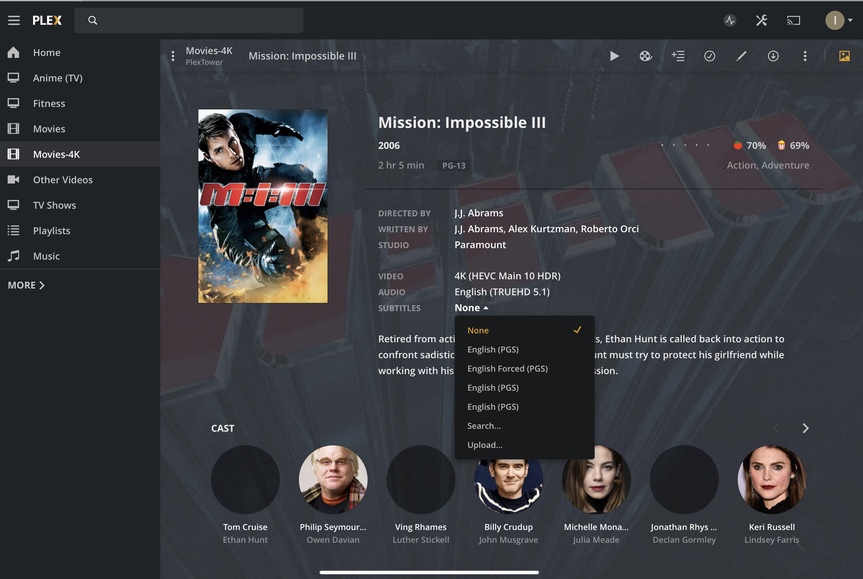
Bad news is now for whatever reason Plex/Plex server is no longer auto-selecting forced subtitles that I know are flagged properly in the MKV container. If I pull up the subtitles list I see the forced one and have to manually select it. That can’t have anything to do with the OS update, can it?
I see server updated a few days ago and I’m on that build (1.19.4.2935). Maybe the issue was introduced at that time? I dunno. If it isn’t one thing it’s another.
Auto selecting is controlled by your account settings, and nothing on that front has changed in regard to that for months, if not years. There were also no changes in 1.19.4 relating to stream selection either, so  We’d need a sample to check against for that too, as I can’t replicate with my own media
Well crap. Too many changes in a short amount of time and I don’t know what else would have caused it. The first file I tried is the one I uploaded a sample of already (MIssion Impossible) and I know for a fact the forced subs were selected already and that was automatic. It’s easy to tell cause they start immediately in the movie.
I have been messing around with Kodi and getting those subtitle settings working right, but I can’t see how that could mess with the server side. Beyond that I’m stumped. I’ve tried re-analyzing a file that has forced subs, but they’re not selected and that did nothing at all.
I guess try the other file fresh and see if you can replicate. I’ve already manually changed a few movies which I shouldn’t have, but know of a couple more that I haven’t changed. The only reason I can find these easily is because I have 4K and 1080p files separate and my 4K library is way less than the regular. I’d be here for days sifting though those.
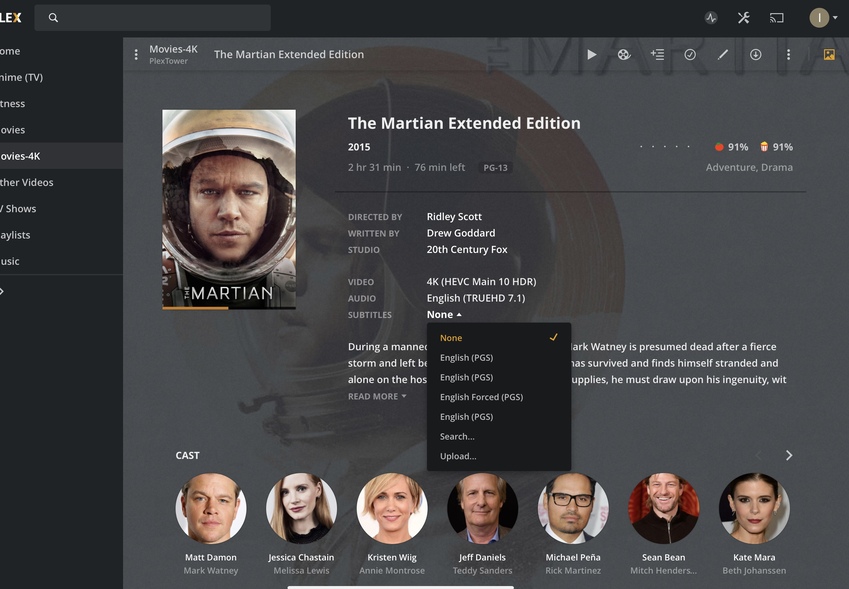
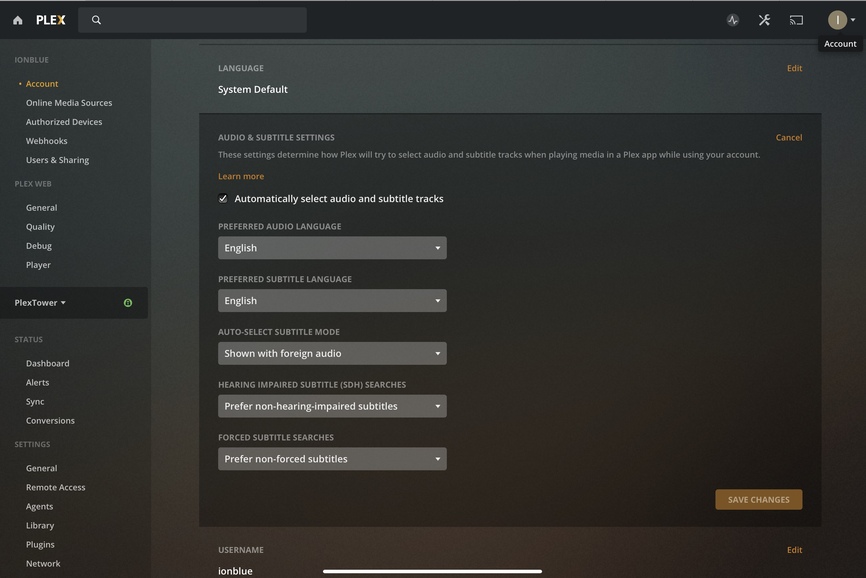
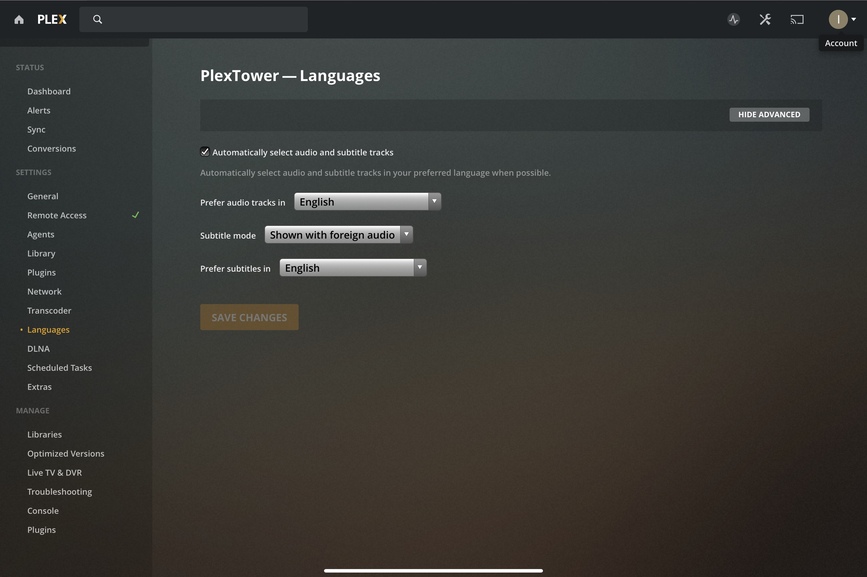
Here are some screenshots showing that the forced subs aren’t being selected along with settings showing that they should be. Beside MI 1 that was already uploaded, The Martian is also showing this and that was uploaded for a sever audio sync problem so you should already have that as well. And in the shots MI 3 also isn’t selected properly.
Now, I could totally see this as an issue on my end when I rip these, but I know that I have to remux these files and set the forced flag so they’re recognized properly. If not, they wouldn’t show up in the menu as forced in the first place. And I know these we’re working because not too long ago I did a MI marathon and I touched nothing for subs. That said, several files had the start problem that I had to skip ahead to fix.
Is it possible that the OS fix for the start problem somehow did this? I don’t see how, but since that was also changed before I saw this happening I can’t think of anything else. Any chance you guys are running on OS 9 that you could test? I dunno. I’m baffled.
I’ll try wit the sample you provided and let you know how I get on 
So, just added it, and it picked up the tracks for me without issue.
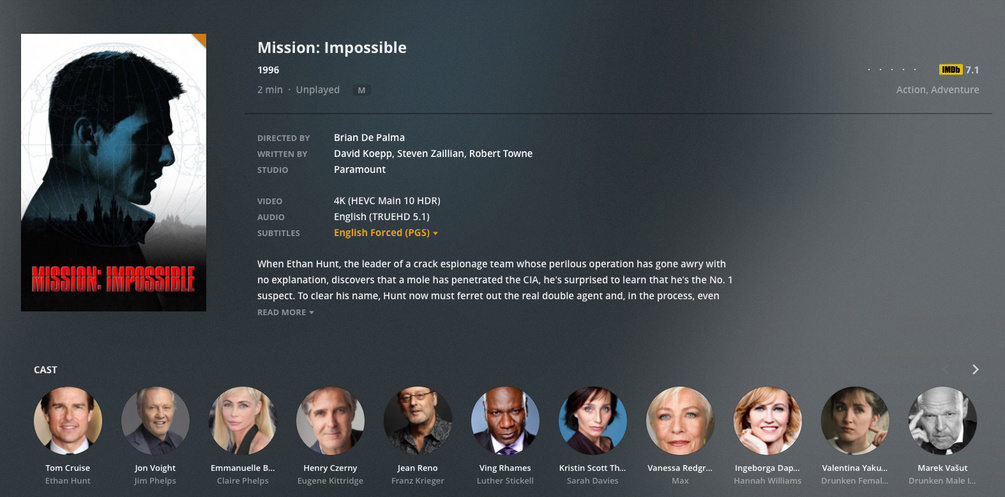
Server settings:
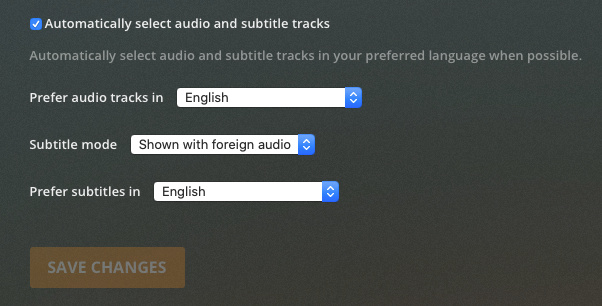
Account settings:

Thanks for checking it. Now that we know the file(s) are likely fine, how can I get the server to pick up the flags again? I tried re-analyzing on individual files and that didn’t help.
Thoughts?
I just went through a chunk of files and some are set right and some not. I still don’t understand how these got changed, but it doesn’t seem to be as big a problem as I thought. So unless you have any suggestions, let’s move on and get back to the real problems. 
This topic was automatically closed 90 days after the last reply. New replies are no longer allowed.
