There seems to be an issue with 5.4.2 (not sure why there are no changelogs for 5.4.2) where searching doesn’t work unless you’ve typed at least 5 or 6 characters.
For example, tried searching “Harry” to find the Harry Potter movies but none were found until I typed “Harry Po”. Same with looking for the Twilight series. Had to type “twili” before any results were found. This is not an issue in the non-preview version of the app.
I have an interesting problem with my Vizio M55-F0.
First I play something. Then, if I turn off the TV while in the Plex app on the TV, the TV shuts off, and then appears to reboot and turn back on. I don’t have any issue with turning off the TV while in any other Vizio app.
This update appears to have killed the Plex app on my Vizio TV (D32f-G1 Ver: 4.60.27-1). All I get now is a blank/dark screen, and I have to power cycle the TV in order to return to the SmartCast home page.
I’m not seeing Dolby Vision being triggered on the app. On my server, I see the DV metadata in the file I’m using. Is this a bug, or do I need to check if my file is ripped correctly?
With the new preview you now had to click “enter” on the profile picture, enter the pin, and then enter again.
Before the new update, you could simply go to a profile picture, type the pin, and it would take you in.
Since the first preview release, you now don’t have to hit enter at the end of typing in your pin to get in the profile; however, you do still have to hit enter on a profile before you’re able to enter a pin.
Could you please add functionality again to allow you to start typing in a pin on a profile picture without first hitting enter.
I have tried the new vizio plex update and it looks good. My main issue was that it would not connect to my local Media Server. It connected to my cloud media server with no issues. I also confirm it was not the TV because all other apps are working. I also roll back to the previous version of Plex on the TV and it works fine and connects to both my local and cloud base servers.
Been using the new Vizio app a lot for the last week or so and have to report it crashes back to Smartcast screen while playing at least 5-10 times a day. No error messages, not logging any errors to server log, server just reports client disconnected unexpectedly… My TV model is OLED55-H1 running latest firmware 5.10.15.5-4, app reports tv chip as Unknown(3). If there is any way I can get more info related to those frequent annoying crashes please let me know.
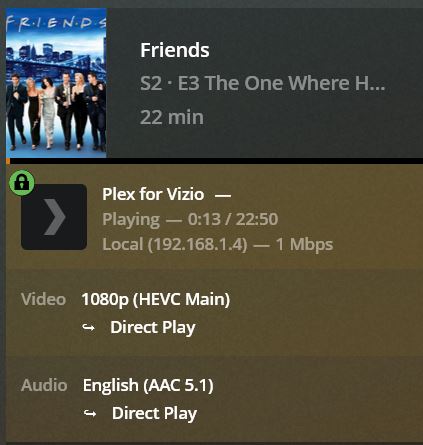
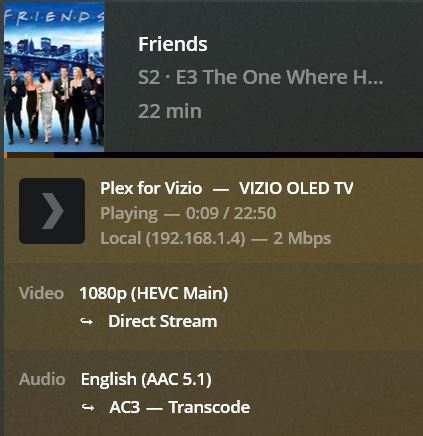
Another thing I noticed… the old Vizio app plays AAC 5.1 audio streams directly with no issues at all while this new one requests server to transcode it to AC3 5.1 reporting 2 channels limitation for AAC streams which is incorrect and not necessary for my tv. If you could add AAC 5.1 as a user selectable stream in Audio settings just like AC3, EAC3, DTS etc. or remove the limitation for this particular tv that would be great. App identifies tv to server as:
I wasn’t able to reproduce this in my initial tests, but it’s still on my radar. I’ve got some more testing to do.
If the media is direct playing, then it might be something to do with the file. If it’s transcoding then you may need to change a setting or disable subtitles (if they’re enabled) to get it to direct play. It’s hard to say without more info. Please start a new thread if you share more info so it doesn’t get lost here.
Filed an issue for this.
Could you change the setting Advanced->Prefer Insecure Connections setting to Always and the Advanced->Allow Insecure Connections also to Always and see if that allows a connection (I’m not suggesting this as a fix, just a test for troubleshooting)?
This is because of the unknown chipset. In this case we use the most restrictive profile for playback since we don’t know what the TV is capable of. I look into identifying that model. It’s possible this is also responsible for the crashes.
Please note that to reproduce this I first have to play something, then after viewing turn off the TV. It then turns back on and ends up on Smartcast. Vizio M55-F0
I have a Vizio E70-F3 TV, and it will sometimes turn back on if I power it off inside the Netflix app. The rest of the time if I’m on the smartcast input it will appear to turn off, but in a dark room you can tell the whole screen has a dim blue backlight on. So every time we turn that TV off we have to switch to an HDMI input before we turn it off.
That makes sense… Please do, thank you…
Another related issue I noticed while testing subtitles is they always get burned-in no matter format(txt or image based) or app subtitles settings - highly CPU-intensive and unnecessary - the vary same files/subtitles(all formats) direct play if I cast to the tv’s built-in Chromecast or from USB stick.
As far as I can tell from my testing this latest model tv direct plays any commonly used container/codec/bit rate/level combo from USB and built-in Cromecast. The Plex Vizio app should do the same.
Thank you again for listening!
I’m having two issues with the current Vizio SmartCast app.
H.264 video streams will trigger transcoding for 10-bit video sources, as well as anything over 1080p.
H.265 video streams will trigger transcoding for video streams tagged at profile Main 10 @ L5.2 or greater regardless of the bitrate. I’m having to manually edit the binaries of the video files to tag them as 5.1 in order for Plex to stream them correctly. Similar to the H.264 settings it would be great to be able to override the H.265 profile levels.
Is there any way to override the profile settings on the server side?
Jan 17, 2021 20:05:14.688 [33012] INFO - [Plex for Vizio] [kulivontot:megmpr9o839vspr6lalfjgfp]   subtitleStream: none
Jan 17, 2021 20:05:14.688 [33012] INFO - [Plex for Vizio] [kulivontot:megmpr9o839vspr6lalfjgfp]   augmentations with profile: Generic
Jan 17, 2021 20:05:14.688 [33012] INFO - [Plex for Vizio] [kulivontot:megmpr9o839vspr6lalfjgfp]     add-transcode-target streaming videoProfile http mkv h264,hevc,vp9 aac,dca
Jan 17, 2021 20:05:14.688 [33012] INFO - [Plex for Vizio] [kulivontot:megmpr9o839vspr6lalfjgfp]     add-limitation videoAudioCodec aac upperBound audio.channels 2
Jan 17, 2021 20:05:14.688 [33012] INFO - [Plex for Vizio] [kulivontot:megmpr9o839vspr6lalfjgfp]     add-limitation streaming videoAudioCodec h264 http match video.orientation 0
Jan 17, 2021 20:05:14.688 [33012] INFO - [Plex for Vizio] [kulivontot:megmpr9o839vspr6lalfjgfp]     add-limitation streaming videoTranscodeTarget h264 http upperBound video.bitDepth 8
Jan 17, 2021 20:05:14.688 [33012] INFO - [Plex for Vizio] [kulivontot:megmpr9o839vspr6lalfjgfp]     add-limitation streaming videoTranscodeTarget h264 http upperBound video.width 1920
Jan 17, 2021 20:05:14.688 [33012] INFO - [Plex for Vizio] [kulivontot:megmpr9o839vspr6lalfjgfp]     add-limitation streaming videoTranscodeTarget h264 http upperBound video.height 1080
Jan 17, 2021 20:05:14.688 [33012] INFO - [Plex for Vizio] [kulivontot:megmpr9o839vspr6lalfjgfp]     add-limitation streaming videoTranscodeTarget hevc http upperBound video.bitDepth 10
Jan 17, 2021 20:05:14.688 [33012] INFO - [Plex for Vizio] [kulivontot:megmpr9o839vspr6lalfjgfp]     add-limitation streaming videoTranscodeTarget hevc http upperBound video.width 3840
Jan 17, 2021 20:05:14.688 [33012] INFO - [Plex for Vizio] [kulivontot:megmpr9o839vspr6lalfjgfp]     add-limitation streaming videoTranscodeTarget hevc http upperBound video.height 2160
Jan 17, 2021 20:05:14.688 [33012] INFO - [Plex for Vizio] [kulivontot:megmpr9o839vspr6lalfjgfp]     add-limitation streaming videoTranscodeTarget hevc http match video.colorTrc bt709|bt470m|bt470bg|smpte170m|smpte240m|bt2020-10|smpte2084
Jan 17, 2021 20:05:14.689 [33012] INFO - [Plex for Vizio] [kulivontot:megmpr9o839vspr6lalfjgfp]     add-limitation streaming videoTranscodeTarget vp9 http upperBound video.bitDepth 8
Jan 17, 2021 20:05:14.689 [33012] INFO - [Plex for Vizio] [kulivontot:megmpr9o839vspr6lalfjgfp]     add-limitation streaming videoTranscodeTarget vp9 http upperBound video.width 3840
Jan 17, 2021 20:05:14.689 [33012] INFO - [Plex for Vizio] [kulivontot:megmpr9o839vspr6lalfjgfp]     add-limitation streaming videoTranscodeTarget vp9 http upperBound video.height 2160
This works, but it doesn’t work when the OSD is shown. I’ve filed an issue to also allow it then, because I don’t think there’s a reason not to.
Some models are not capable of direct playing 10 bit, and some models are not capable of H.264 at 4K.
It would be helpful to know what you have for Settings → About → Chipset and knowing the model of the TV might also help as well. It’s possible we’re not detecting the capabilities for your TV.
We don’t limit the profile levels on the client. I just tested playing a 5.2 video and it worked fine. My best guess is that your particular model doesn’t like the 5.2 and fails, which causes a fallback to transcoding.
To be clear apps for smart TVs doesn’t have much direct control over playback. The SmartCast Plex app basically decides based on what we know about device capabilities what the device can play and either allows direct play, or tells the server to give us something that it can, and then we pass the URL on to the player, which will either play or fail (if we were wrong or the file is broken in some way). The app can’t change anything about the file itself or change how the TVs player responds to different media.
No, but lets see what your chipset and we can see what we can do from there.