I downloaded the project from GIT. Wondering where the cache file code is located. I’m going to try and fix it myself, but don’t know where it’s stored. Seems like it could be an easy fix. It’s set at 100MB and not looking in the right spot for whatever the new amount should be.
What are you trying to ‘fix’ ?
I have played around with large cache settings, and there is absolutely no reason to change it - it will not give any better performance.
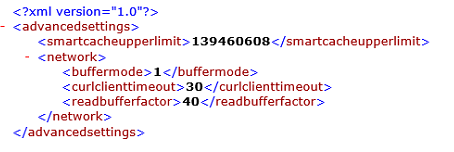
These are the settings I use currently for cache - it buffers quicker than before, especially handy when running 4k x265 films;
put this in advancedsettings.xml
@nielsvdp said:
What are you trying to ‘fix’ ?I have played around with large cache settings, and there is absolutely no reason to change it - it will not give any better performance.
These are the settings I use currently for cache - it buffers quicker than before, especially handy when running 4k x265 films;put this in advancedsettings.xml

excellent. I put it in the %appdata%\openpht\userdata folder and manually created the advancedsettings.xml file
@tjcinnamon said:
@nielsvdp said:
What are you trying to ‘fix’ ?I have played around with large cache settings, and there is absolutely no reason to change it - it will not give any better performance.
These are the settings I use currently for cache - it buffers quicker than before, especially handy when running 4k x265 films;put this in advancedsettings.xml
excellent. I put it in the %appdata%\openpht\userdata folder and manually created the advancedsettings.xml file
yes, that is the correct path - good luck
@nielsvdp said:
@tjcinnamon said:
@nielsvdp said:
What are you trying to ‘fix’ ?I have played around with large cache settings, and there is absolutely no reason to change it - it will not give any better performance.
These are the settings I use currently for cache - it buffers quicker than before, especially handy when running 4k x265 films;put this in advancedsettings.xml
excellent. I put it in the %appdata%\openpht\userdata folder and manually created the advancedsettings.xml file
yes, that is the correct path - good luck
Thanks for your help those settings are a life saver. My VPS upload is slow relative to our respective locations. This helps immensely.
I have a follow up question if I set to limit to above 400MB smaller videos (like 1.5 to 2GB) won’t play:
http://forums.plex.tv/discussion/273240/smart-cache-upper-limit-too-high/p1?new=1
@tjcinnamon said:
@nielsvdp said:
@tjcinnamon said:
@nielsvdp said:
What are you trying to ‘fix’ ?I have played around with large cache settings, and there is absolutely no reason to change it - it will not give any better performance.
These are the settings I use currently for cache - it buffers quicker than before, especially handy when running 4k x265 films;put this in advancedsettings.xml
excellent. I put it in the %appdata%\openpht\userdata folder and manually created the advancedsettings.xml file
yes, that is the correct path - good luck
Thanks for your help those settings are a life saver. My VPS upload is slow relative to our respective locations. This helps immensely.I have a follow up question if I set to limit to above 400MB smaller videos (like 1.5 to 2GB) won’t play:
http://forums.plex.tv/discussion/273240/smart-cache-upper-limit-too-high/p1?new=1
No idea - I have the memory cache set at about 130 megs which I cannot raise due to only having 1GB of internal memory.
I really use those settings so that the buffer fills MUCH more quicker than by default - only very handy for files that use a really high bitrate (40+ mbps)
@nielsvdp said:
@tjcinnamon said:
@nielsvdp said:
@tjcinnamon said:
@nielsvdp said:
What are you trying to ‘fix’ ?I have played around with large cache settings, and there is absolutely no reason to change it - it will not give any better performance.
These are the settings I use currently for cache - it buffers quicker than before, especially handy when running 4k x265 films;put this in advancedsettings.xml
excellent. I put it in the %appdata%\openpht\userdata folder and manually created the advancedsettings.xml file
yes, that is the correct path - good luck
Thanks for your help those settings are a life saver. My VPS upload is slow relative to our respective locations. This helps immensely.I have a follow up question if I set to limit to above 400MB smaller videos (like 1.5 to 2GB) won’t play:
http://forums.plex.tv/discussion/273240/smart-cache-upper-limit-too-high/p1?new=1
No idea - I have the memory cache set at about 130 megs which I cannot raise due to only having 1GB of internal memory.
I really use those settings so that the buffer fills MUCH more quicker than by default - only very handy for files that use a really high bitrate (40+ mbps)
Is there any documentation on SmartCacheUpperLimit anywhere?
Easily googled; http://kodi.wiki/view/HOW-TO:Modify_the_video_cache
@nielsvdp said:
Easily googled; http://kodi.wiki/view/HOW-TO:Modify_the_video_cache
I don’t believe (but I’m not sure) OpenPHT is forked from Krypton (v17) where the cache XML attributes changed names in that documentation. Also, the ones you posted above that did work were not in Kodi 16 and below. There is no mention of SmartUpperCacheLimit. The prior Kodi XML for AdvancedSettings is
network>
buffermode>1</buffermode
cachemembuffersize>5971520</cachemembuffersize
readbufferfactor>2</readbufferfactor
/network>
These above attributes did not work. It stayed at 100MB
However, the XML attributes you posted did work… for the most part. if the cache is set “too high” (I’m not sure what constitutes too high, I have 16GB of RAM), it won’t play the video.
Thanks for checking though. Any idea where you got that SmartUpperCacheLimit from? I posted in the Kodi section and reddit as well: Location of file to adhere to cache Reddit - Dive into anything
Your suggestion actually resolved the problem for more than just me too (so double thanks). Now I’m looking to have a large cache without breaking sub 2GB videos
Do you know what version of Kodi OpenPHT is forked from?
